Get help

Utilities & toolsVocal Remover, free online

Take the voice out of a song and make a karaoke track

Open a song and the singer steps back from the microphone. The band keeps playing, and the stage is yours. It all happens on your PC and nothing is uploaded. Singing in your key and saving the vocals alone are in Pro.

  • Free, runs in your browser
  • No account needed
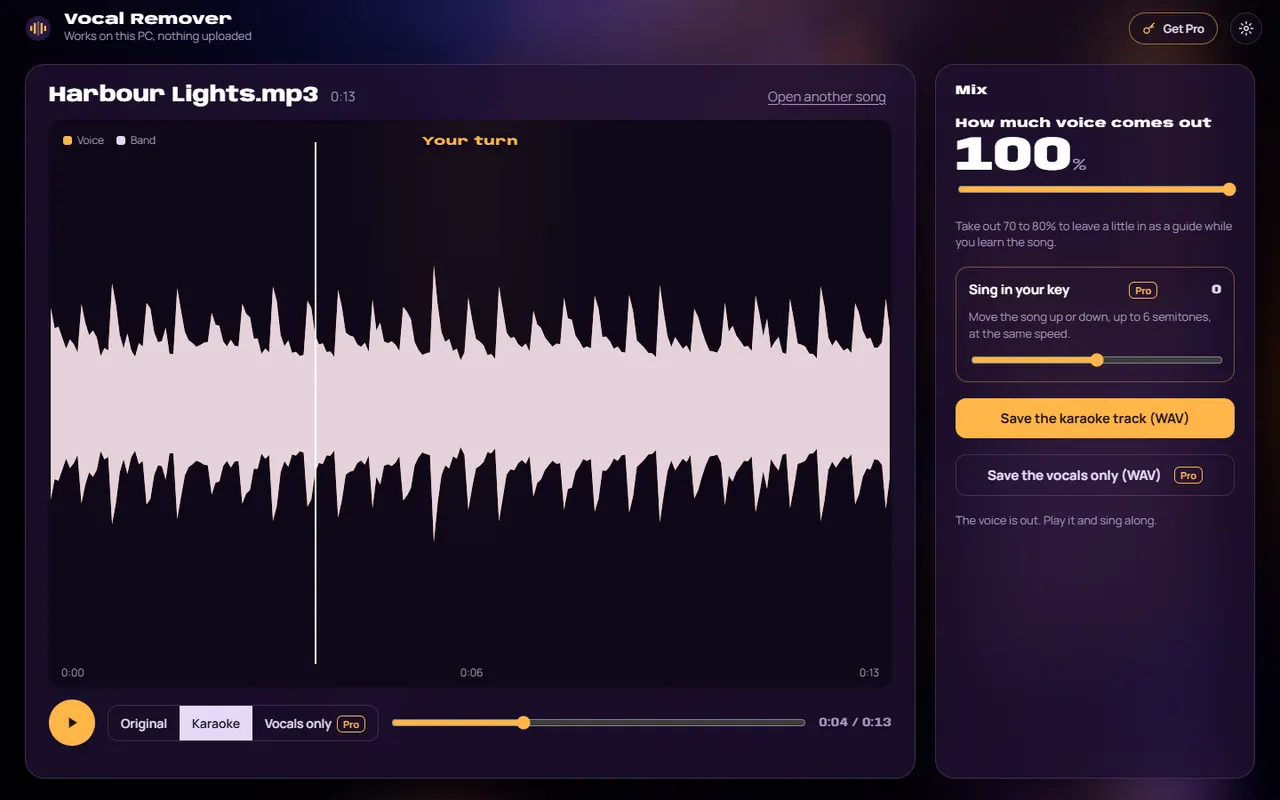
Vocal Remover with a song open: the song drawn as a strip with the band in lilac and the voice in amber wiped away, the label reading Your turn, a Play button, Original, Karaoke and Vocals only, and a Mix panel on the right.

Who it's for

For anyone who wants to sing a song at home, practise it, or make a backing track: karaoke nights, singers learning a song, teachers, bands, and video makers who need the music without the voice. Your songs never leave your PC.

Features

What it does

Vocal Remover with a song open: the song drawn as a strip with the band in lilac and the voice in amber wiped away, the label reading Your turn, a Play button, Original, Karaoke and Vocals only, and a Mix panel on the right.

See the voice, then watch it go

The song is drawn as a strip: the band in lilac and the voice in amber. When the voice comes out, the amber is wiped away like a karaoke lyric, and the label turns to Your turn.

  • Choose how much voice comes out

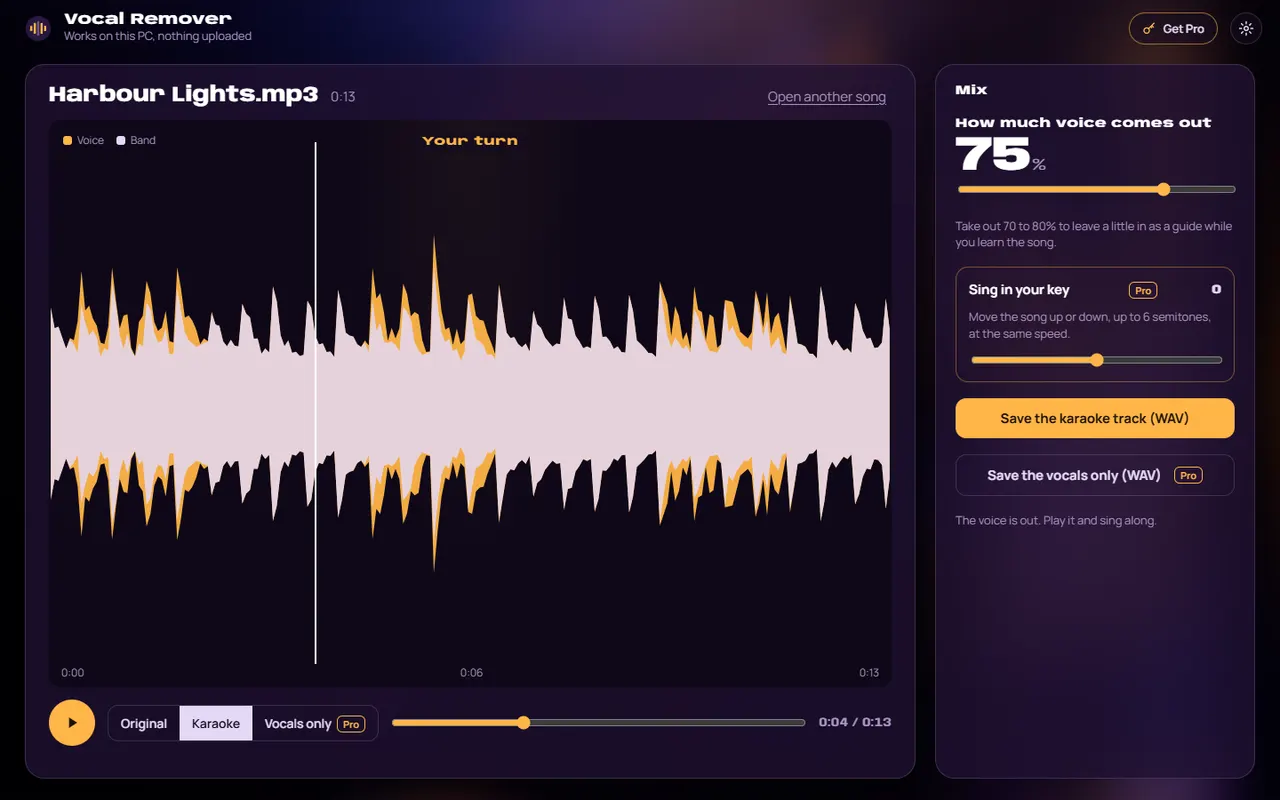
    All of it, none of it, or something in between. Take out 70 to 80 percent to leave a little in as a guide while you learn the song.

  • Listen three ways

    Original, Karaoke or Vocals only, and switch without losing your place. Save the karaoke track as a WAV file.

The amount slider at 75 percent: a quarter of the amber voice layer stays in the strip, as a guide while you learn the song.

Your songs stay on your PC

The voice is found by an engine that runs inside the app. Nothing is uploaded, and it works offline once the voice finder (39 MB) has downloaded the first time.

  • Any song you have

    MP3, M4A, WAV, FLAC and OGG files up to 20 minutes, as far as your browser can play them. Drop a file on the window or choose one.

How it works

Three steps, no setup

  1. Open a song

    Drop a file on the window, or choose one from your PC.

  2. Take the voice out

    A few seconds later the voice is wiped from the strip. Choose how much comes out.

  3. Sing, and save the track

    Play it and sing along. Save the karaoke track as a WAV file to take with you.

Pricing

Free to use, Pro when you need more

Get it free from the Microsoft Store. Pro is a one-time purchase on this website.

Free

$0

  • Open MP3, M4A, WAV, FLAC and OGG songs up to 20 minutes
  • Take the voice out and choose how much
  • Listen to the original, the karaoke track and the voice alone
  • Save the karaoke track as a WAV file
  • Works offline; nothing is uploaded
Get it from Microsoft

Pro: everything in Free, plus

$4.99 one-time

  • Sing in your key: up or down 6 semitones, at the same speed
  • Save the vocals on their own as a WAV file
  • Every future update to the Pro tools
  • One payment, up to 3 PCs
Buy Pro

Buy Pro here and paste the key into the app's Settings. It works on up to 3 PCs, with a 14-day refund, no questions asked.

What's new

Version 1.0.0

  • First release: open a song and the singer steps back from the microphone. The band keeps playing, and the stage is yours. MP3, M4A, WAV, FLAC and OGG work on most PCs.
  • Choose how much of the voice comes out, listen to the original, the karaoke track and the voice on its own, and save the karaoke track as a WAV file. Your songs are separated on your PC and never leave it.
  • Pro lets you sing in your key (up or down 6 semitones, at the same speed) and save the vocals on their own.

FAQ

Questions

Something not answered here? Ask us and you'll get a reply.

Ask a question
Is my music uploaded?

No. The song is opened and separated on your PC by programs that run inside the app. It is never sent anywhere. The only download is the voice finder itself, 39 MB, once.

How well does it work?

Best on studio recordings. The voice finder is a 2019 model (Spleeter by Deezer Research), so some voice can remain as a faint ghost, especially reverb and backing vocals, and the band can sound slightly watery where the voice was. A live recording with a singing crowd keeps some of the crowd.

Does it take out every sound of the voice?

It finds the voice below about 11 kHz. Above that everything stays in the karaoke track, so breaths and "s" sounds can still be faintly heard.

Which files can I open?

MP3, M4A, WAV, FLAC and OGG, as far as your PC can play them, from 2 seconds to 20 minutes. A file the app cannot read is said plainly.

Can I save the karaoke track?

Yes, as a WAV file (16-bit, 44.1 kHz stereo). WAV plays on every phone, PC and music app. There is no MP3 export for now.

Does it work offline?

Yes. The first time you open a song the app downloads its voice finder once (39 MB) and keeps it on your PC; after that it works with no connection.

Get Vocal Remover

Open a song and the singer steps back from the microphone. The band keeps playing, and the stage is yours. It all happens on your PC and nothing is uploaded. Singing in your key and saving the vocals alone are in Pro.

Use only music you have the right to use.

© 2026 CAO Labs