Get help

For veteransVA Claim Tracker, free online

VA rating calculator and claim tracker

Work out your combined rating with real VA math, see your monthly payment, and keep every condition, piece of evidence and deadline of your claim in one place. Free, no account, nothing uploaded.

  • Free, runs in your browser
  • No account needed
  • Works offline
  • Your data stays on your device
VA Claim Tracker working out a combined rating: 50% lower back, 30% PTSD and 10% on each knee make 72%, which rounds to 70%, with the monthly payment for a veteran with a spouse and two children.

Features

What it does

VA Claim Tracker working out a combined rating: 50% lower back, 30% PTSD and 10% on each knee make 72%, which rounds to 70%, with the monthly payment for a veteran with a spouse and two children.

VA math, shown step by step

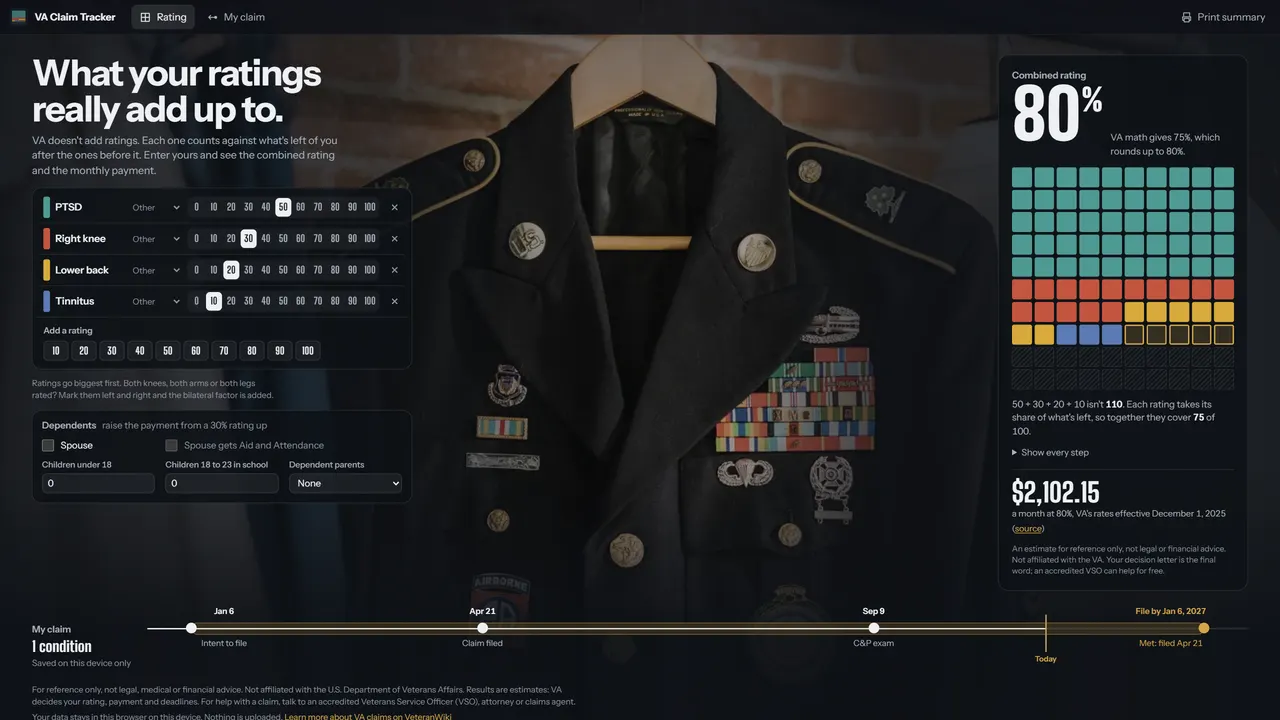
VA doesn't add ratings: each one takes its share of what's left, so 50% and 30% make 65%, which rounds to 70%. The calculator follows the rating schedule's combined ratings table (38 CFR 4.25) and shows every step.

  • Bilateral factor included

    Rated on both arms or both legs? Mark which side each rating is on and the 10% bilateral factor is added the way 38 CFR 4.26 describes.

  • Your monthly payment

    Add a spouse, children, children in school or dependent parents and see the payment at VA's rates effective December 1, 2025, with a link to VA's table.

The My claim tab: deadlines to file the claim and to ask for a decision review, key dates, and a tinnitus claim with its evidence checklist.

Track every condition

Each condition gets a checklist of the evidence most claims need: a diagnosis, the in-service event, a nexus letter, service records and buddy statements. Add your own items and notes, and the date of your C&P exam.

  • Deadlines you can't afford to miss

    Enter the date you sent your intent to file and the date of your decision letter, and see how many days are left to file the claim and to ask for a decision review.

  • Private, offline, yours

    Everything stays in your browser on this device: no account, no upload, no tracking. It works offline after the first visit. Export a file to back it up, or print a one-page summary for your VSO or doctor.

How it works

Three steps, no setup

  1. Add your ratings

    From your decision letter, or the ones you expect.

  2. Add your conditions

    Tick off evidence as you gather it.

  3. Watch the deadlines

    Days left to file and to ask for a review.

What's new

Version 1.1.1

  • Settings has a new "Report a problem" form: tell us what went wrong, and leave your email if you want an answer.
  • You can turn on crash reports in Settings to help us fix problems faster. They are off unless you turn them on, and file paths, email addresses and your user name are removed before anything is sent.

Version 1.1.0

  • New look: a dress uniform on a hanger behind a dark navy screen, one look for everyone (the app no longer follows your light or dark setting; Windows High Contrast still works).
  • Your combined rating is now drawn as a whole person of 100 squares. Each condition fills its share in its own colour, and the rounding to the nearest 10 shows in brass.
  • Rate each condition with a row of buttons from 0 to 100. A brass "bilateral factor" tag shows when both arms or both legs count.
  • A claim timeline runs along the bottom: your intent to file, filing, C&P exam and decision dates, today, and the one-year windows to file and to ask for a review.
  • The printed summary now includes the grid, in greys for any printer. Your ratings, payment figures and saved data are unchanged.

Version 1.0.0

  • Work out your VA combined rating the way the rating schedule does, with the bilateral factor, and see every step.
  • See your monthly payment at VA's rates effective December 1, 2025, with your spouse, children and parents.
  • Track each condition of your claim: an evidence checklist, status, C&P exam date and notes, plus the days left to file after an intent to file and to ask for a decision review.
  • Export a backup, import it on another device, or print a one-page summary. Everything stays on your device and works offline.

FAQ

Questions

Something not answered here? Ask us and you'll get a reply.

Ask a question
How does the VA calculate a combined rating?

VA treats you as 100% able and lets each rating take its share of what's left, largest first. 50% leaves 50; 30% of that 50 is 15, so 50% and 30% combine to 65%. The final value is rounded to the nearest 10, with 5 rounding up, so 65% becomes 70%.

What is the bilateral factor?

When both arms or both legs have a rating of 10% or more, VA combines those ratings first and adds 10% of the result before combining it with everything else. For example, 10% on each knee combine to 19, plus 1.9, which makes 21.

How much will I get paid?

The calculator uses VA's current compensation table, effective December 1, 2025. At 10% and 20% everyone gets the same amount; from 30% up it also depends on your spouse, children and dependent parents. VA decides your actual payment.

How long do I have after an intent to file?

One year from the date VA receives your intent to file. File within that year and your benefits can start from the intent-to-file date. The tracker counts the days for you.

How long do I have to appeal a decision?

Generally one year from the date on your decision letter to ask for a Higher-Level Review, file a Supplemental Claim or appeal to the Board, if you want to keep your original effective date.

Is my information uploaded anywhere?

No. It's saved in your browser on your device and never sent to us. There is no account. Use Export to keep a backup file, because clearing your browser's data deletes it.

Is this from the VA?

No. VA Claim Tracker is not affiliated with the U.S. Department of Veterans Affairs. It's for reference only and isn't legal, medical or financial advice. For help with a claim, talk to an accredited Veterans Service Officer (VSO), attorney or claims agent.


Get VA Claim Tracker

Work out your combined rating with real VA math, see your monthly payment, and keep every condition, piece of evidence and deadline of your claim in one place. Free, no account, nothing uploaded.

For reference only, not legal, medical or financial advice. Not affiliated with the U.S. Department of Veterans Affairs. Results are estimates: VA decides your rating, payment and deadlines. For help with a claim, talk to an accredited Veterans Service Officer (VSO), attorney or claims agent.
© 2026 CAO Labs