Get help

ProductivityUnicode Converter - Krutidev, Bijoy, Preeti, free online

Kruti Dev to Unicode converter, and back again

Paste text typed in Kruti Dev, DevLys, Bijoy or Preeti and get real Unicode Hindi, Bengali or Nepali, or turn Unicode back into Kruti Dev for a typing test. It converts on your PC and sends nothing anywhere. Free, with Word files and whole folders in Pro.

  • Free, runs in your browser
  • No account needed
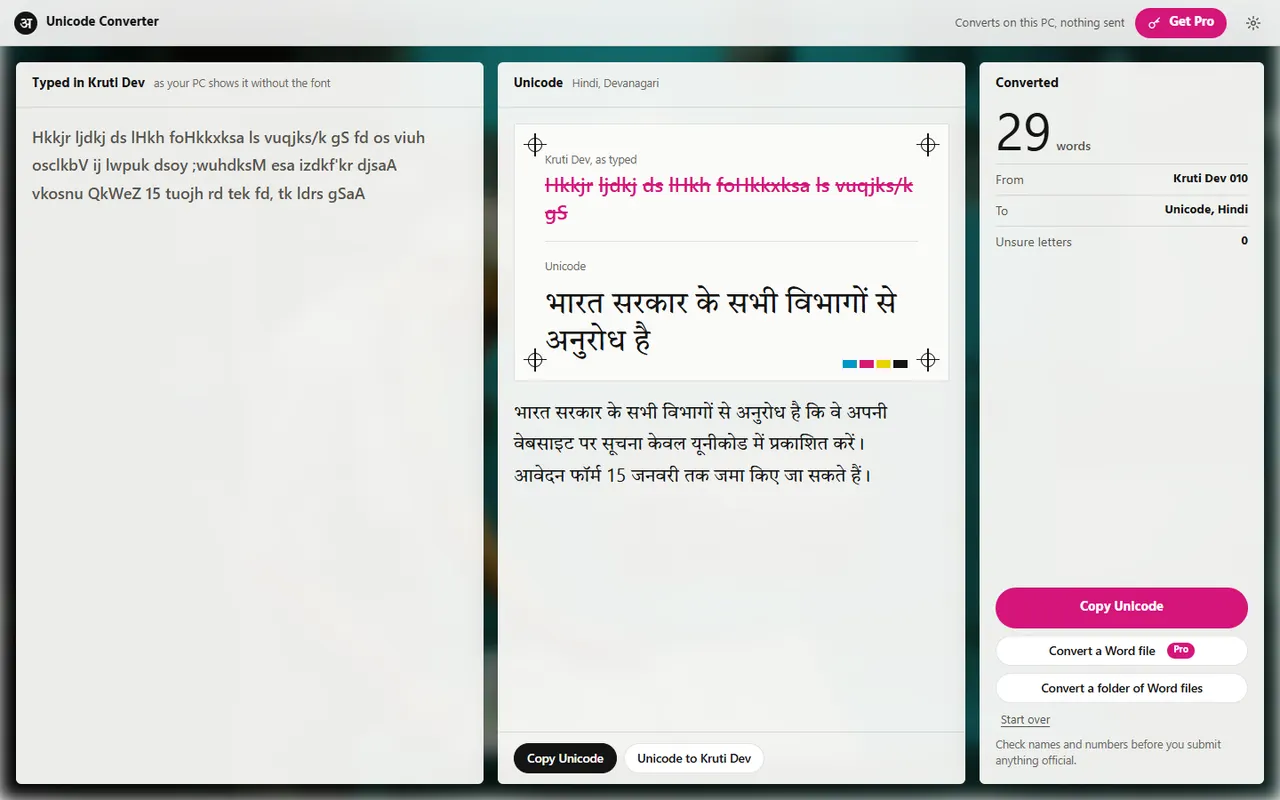
Unicode Converter showing a government notice typed in Kruti Dev on the left, the proof sheet with the garbled line struck through above the clean Hindi line, and the converted Unicode text below it.

Who it's for

For government and office staff, clerks, typists, journalists, teachers and students in India, Nepal and Bangladesh who still have text in Kruti Dev, DevLys, Bijoy or Preeti, and for anyone practising for a Hindi typing test.

Features

What it does

Unicode Converter showing a government notice typed in Kruti Dev on the left, the proof sheet with the garbled line struck through above the clean Hindi line, and the converted Unicode text below it.

Kruti Dev, DevLys, Bijoy and Preeti

Pick the font the text was typed in. Pre-base vowel signs, reph, half letters and conjuncts are put in the right order for Unicode.

  • And back again

    Typing tests in India still use Kruti Dev. Turn Unicode text back into Kruti Dev keys with one click.

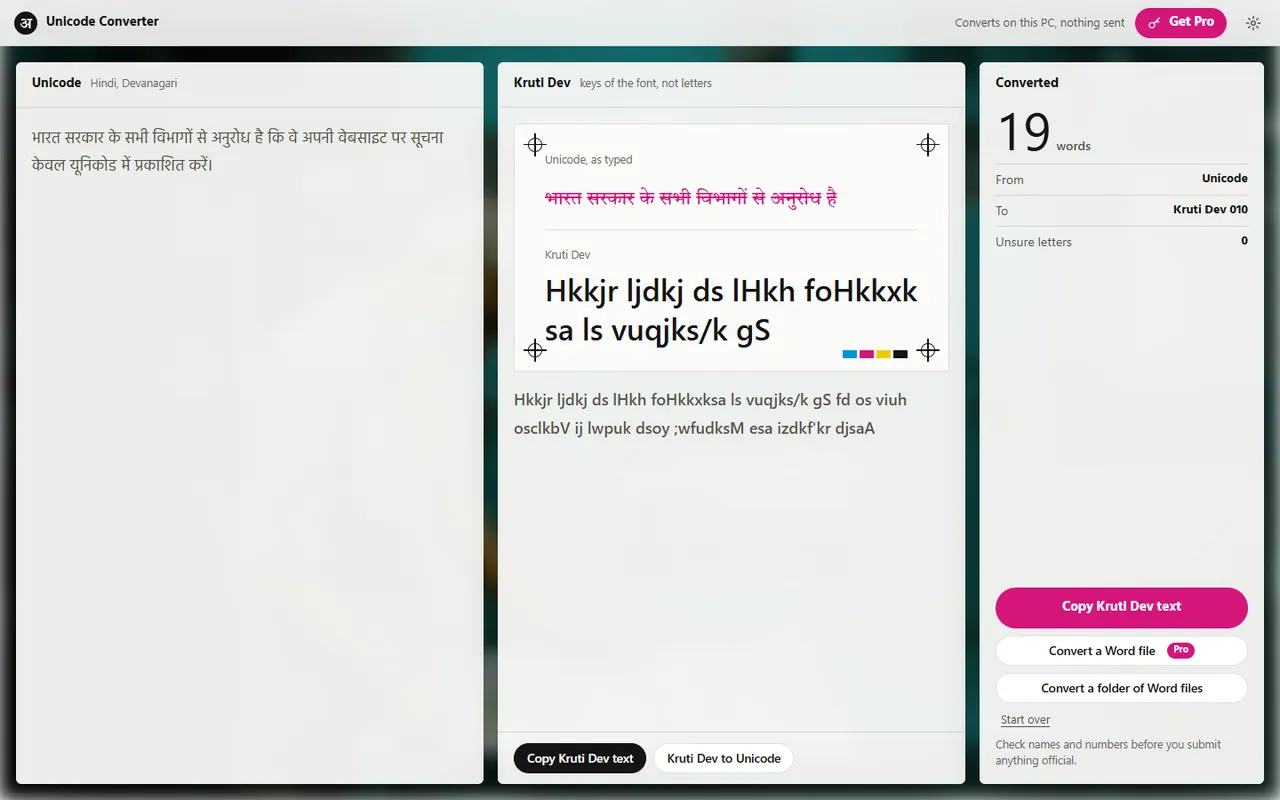
The same app turning Hindi Unicode text back into Kruti Dev keys for a typing test, with a Copy Kruti Dev text button.

Unsure letters are highlighted

A key the font table has no letter for is not guessed. It stays as it is and is highlighted so you can check it.

  • Nothing leaves your PC

    The tables are inside the app. Your notices, names and numbers are never sent to a server.

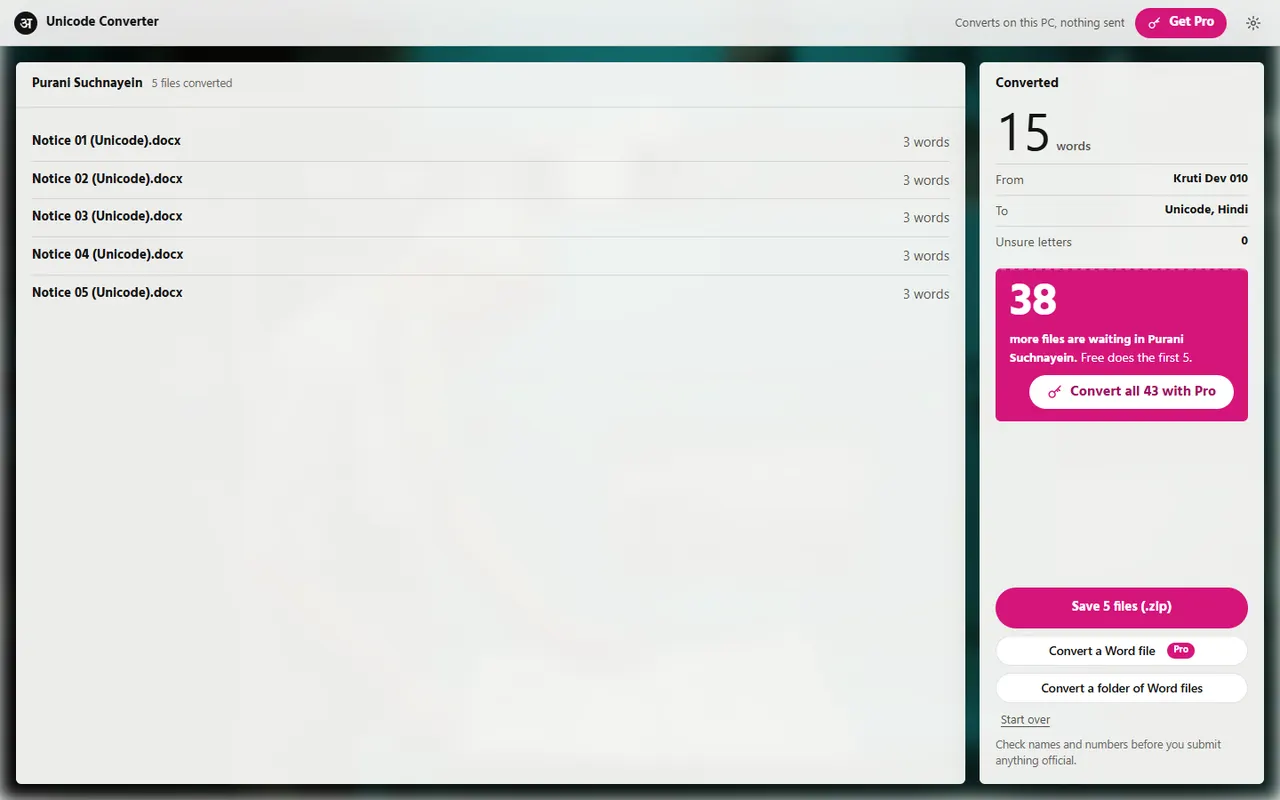
A folder of 43 Word files, Purani Suchnayein, with the first 5 converted and a magenta block saying 38 more files are waiting.

Works offline

After the first load the app is kept on your PC. No internet needed to convert.

  • Word and Excel files, whole folders

    Pro converts .docx files with tables and formatting kept, .xlsx cell by cell, and a whole folder in one go. Free converts the first 5 files of a folder.

How it works

Three steps, no setup

  1. Paste or open

    Pick the font, paste your text, or choose a Word file or a folder.

  2. Watch it reset

    The clean line is set letter by letter under the garbled one on the proof sheet.

  3. Copy or save

    Copy the Unicode into Word, WhatsApp or a form, or save the converted files.

Pricing

Free to use, Pro when you need more

Get it free from the Microsoft Store. Pro is a one-time purchase on this website.

Free

$0

  • Paste or type any amount of text
  • Every font, both directions
  • Copy the result
  • Unsure letters highlighted for review
  • The first 5 Word files of a folder
  • Works offline; nothing is uploaded
Get it from Microsoft

Pro: everything in Free, plus

$4.99 one-time

  • Word (.docx) files converted, tables and formatting kept
  • A whole folder of Word files in one go
  • Excel (.xlsx) files, cell by cell
  • One payment, up to 3 PCs
Buy Pro

Buy Pro here and paste the key into the app's Settings. It works on up to 3 PCs, with a 14-day refund, no questions asked.

What's new

Version 1.0.0

  • First release: paste text typed in Kruti Dev, DevLys, Bijoy or Preeti and get Unicode Hindi, Bengali or Nepali that works in WhatsApp, Google, Word and government forms. The clean line is set letter by letter under the garbled one.
  • Turn Unicode back into Kruti Dev, DevLys, Bijoy or Preeti, for typing tests.
  • Letters the font table does not cover are highlighted as unsure instead of being guessed.
  • Nothing you paste leaves your PC, and it works offline. Free converts any amount of text, and the first 5 Word files of a folder.
  • Pro converts Word (.docx) files with tables and formatting kept, a whole folder of Word files in one go, and Excel (.xlsx) files cell by cell.
  • Chanakya is not supported yet.

FAQ

Questions

Something not answered here? Ask us and you'll get a reply.

Ask a question
Is my text uploaded?

No. The conversion tables run inside the app on your PC. Your text and your files are never sent anywhere.

Which fonts are supported?

Kruti Dev 010, DevLys 010 (Hindi), Preeti (Nepali) and Bijoy (Bengali), in both directions. Chanakya is not supported yet.

Why are some letters highlighted?

They are keys the font table does not cover, for example a rare conjunct glyph. The app leaves them as they are instead of guessing. Check them by eye.

Does it include the fonts?

No. The legacy font files are not part of the app. You do not need them to convert; to read Unicode-to-legacy output you install the legacy font yourself.

What does the free version do with Word files?

It converts the first 5 Word files of a folder, complete. The rest are counted with the folder name. Pro converts every file.

Is the result exactly right?

It is a rule-based table converter. Check names and numbers before you submit anything official.

Get Unicode Converter - Krutidev, Bijoy, Preeti

Paste text typed in Kruti Dev, DevLys, Bijoy or Preeti and get real Unicode Hindi, Bengali or Nepali, or turn Unicode back into Kruti Dev for a typing test. It converts on your PC and sends nothing anywhere. Free, with Word files and whole folders in Pro.

Check names and numbers before you submit anything official.

© 2026 CAO Labs