Get help

BusinessPer Diem Calculator, free online

Per diem calculator: GSA rates for your trip, day by day

Type a city or ZIP code and your travel dates and see what the trip pays in lodging and meals at GSA's per diem rates: each night at its own month's rate, the first and last days at 75%, meals provided taken off. Several stops and the expense report as CSV or PDF with Pro.

  • Free, runs in your browser
  • No account needed
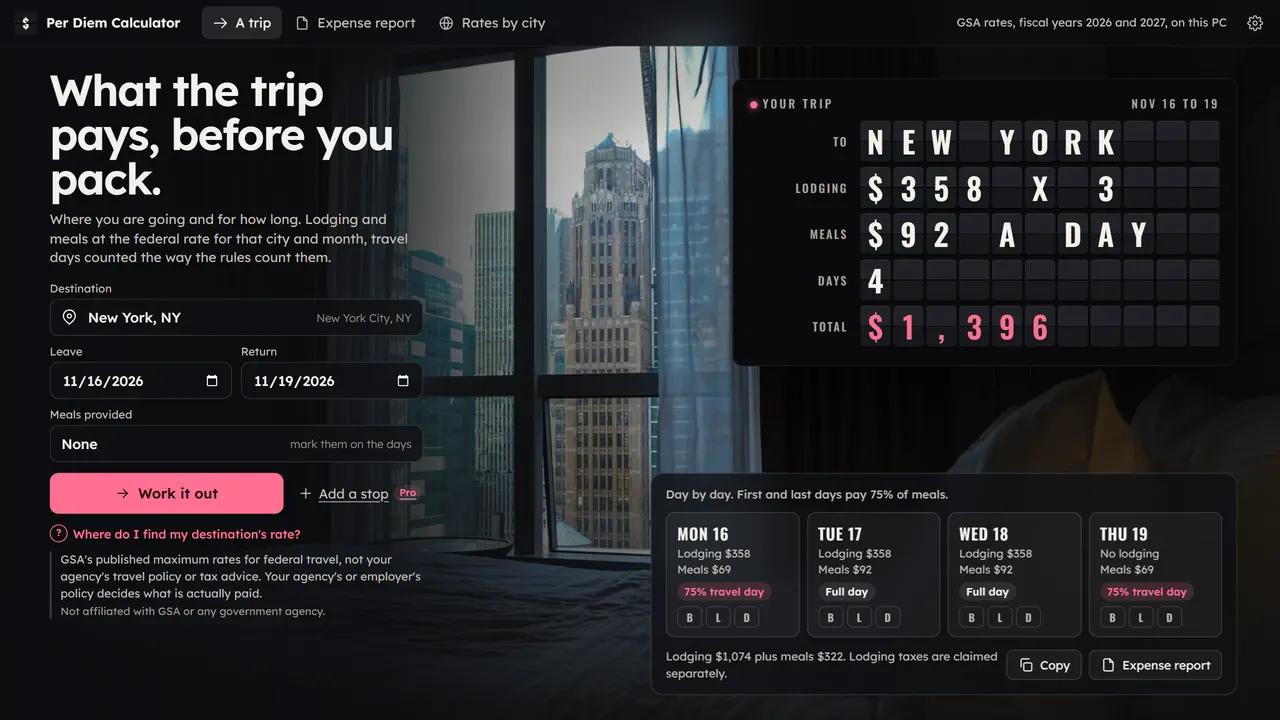
Per Diem Calculator over a dark hotel room with the city in the window: a trip to New York, November 16 to 19, worked out on a split-flap board reading New York, $358 times 3 for lodging, $92 a day for meals, 4 days and $1,396 in total, with a card for each day, the first and last marked 75% travel day.

Features

What it does

Per Diem Calculator over a dark hotel room with the city in the window: a trip to New York, November 16 to 19, worked out on a split-flap board reading New York, $358 times 3 for lodging, $92 a day for meals, 4 days and $1,396 in total, with a card for each day, the first and last marked 75% travel day.

The trip on a split-flap board

Destination, lodging, meals, days and total flip into place like an old station board, so the number you came for is the one in rose.

  • Day by day, the way the rules count it

    A card a day: lodging for every night but the last, meals at 75% on the day you leave and the day you return, 100% in between.

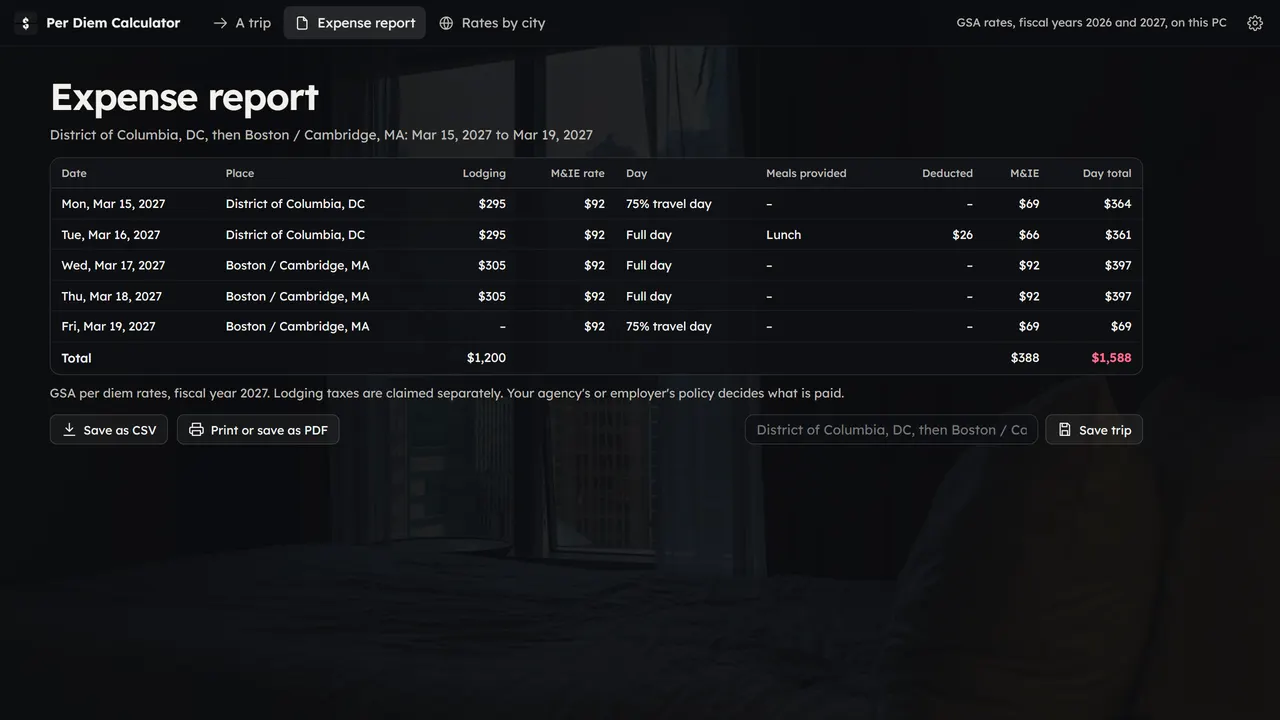
The expense report for a trip to Washington, DC, then Boston: one row a day with the place, lodging, the meals rate, travel day or full day, a lunch provided and its $26 deduction, and the totals, with Save as CSV and Print or save as PDF.

Each night at its own month

Busy cities change rates by season. Each night is priced at the rate for its month, across fiscal years too, from GSA's own files.

  • Meals provided, taken off

    Mark a conference lunch or a hotel breakfast paid by the agency on its day; the meals amount drops by GSA's breakdown, never below the incidentals.

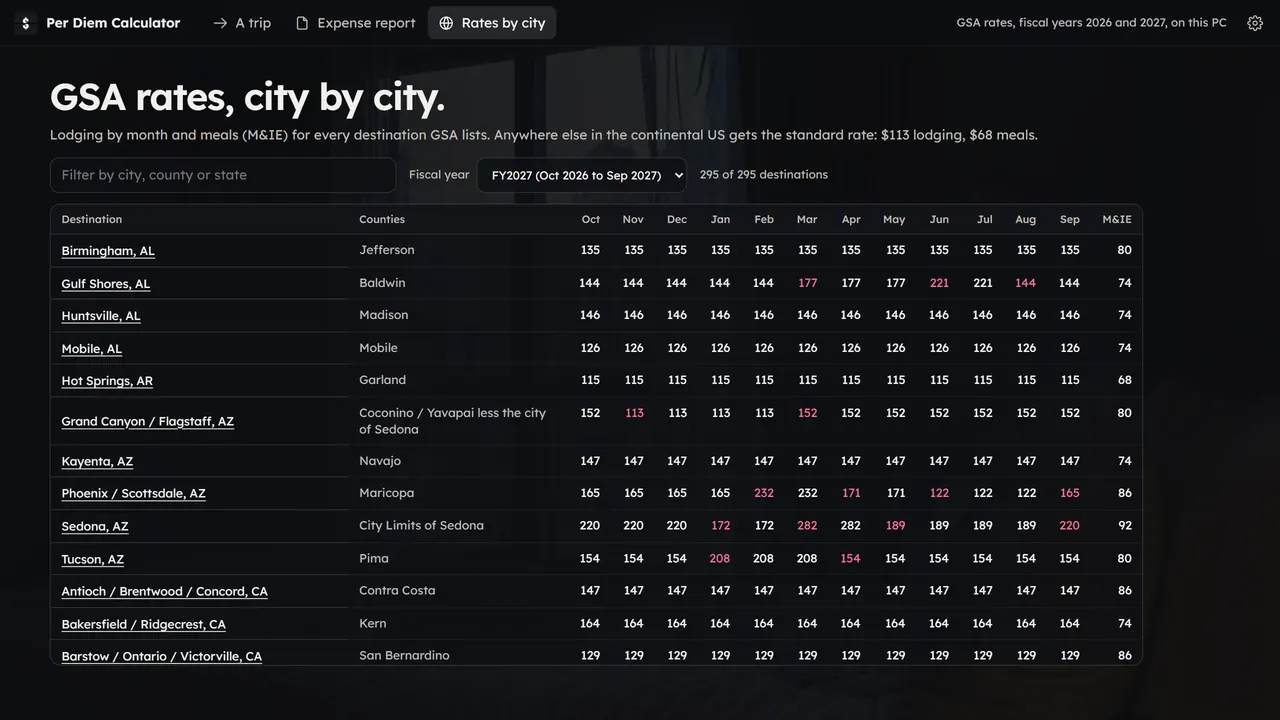
Rates by city: every GSA destination with its lodging rate for each month of the fiscal year and its meals rate, the months where the rate changes in rose.

Rates by city

Every destination GSA lists, lodging month by month and the meals rate, for fiscal years 2026 and 2027. Anywhere else gets the standard rate.

  • Pro: several stops and the expense report

    Trips with up to eight stops, each night at the rate of where you sleep; save trips, and the day table as CSV or printed to PDF.

How it works

Three steps, no setup

  1. Type the destination

    A city, a county or a ZIP code.

  2. Pick the dates

    The day you leave and the day you return.

  3. Read the board

    Lodging, meals and the total, day by day.

Pricing

Free to use, Pro when you need more

Get it free from the Microsoft Store. Pro is a one-time purchase on this website.

Free

$0

  • Any trip in the continental US, offline
  • Lodging by month, meals at 75% on travel days
  • Meals provided taken off by GSA's breakdown
  • Rates by city; copy the trip as text
Get it from Microsoft

Pro: everything in Free, plus

$9.99 one-time

  • Trips with several stops
  • Save trips on your PC
  • The expense report as CSV or PDF
  • One payment, up to 3 PCs
Buy Pro

Buy Pro here and paste the key into the app's Settings. It works on up to 3 PCs, with a 14-day refund, no questions asked.

What's new

Version 1.0.0

  • First release: type a city or ZIP code and your travel dates, and see what the trip pays in lodging and meals at GSA's per diem rates, day by day. The rates are on your PC, so it works with the Wi-Fi off.
  • The first and last days of travel pay 75% of meals, the way the federal travel rules count them, and each night is priced at the rate for its own month.
  • Mark a breakfast, lunch or dinner that was provided on any day and the meals amount drops by GSA's own breakdown.
  • Rates by city: every GSA destination with its lodging rate month by month, for fiscal years 2026 and 2027.
  • Pro: trips with several stops, saved trips, and the expense report as CSV or printed to PDF.

FAQ

Questions

Something not answered here? Ask us and you'll get a reply.

Ask a question
Where do I find my destination's rate?

Your travel orders name the duty location: type that city, its county or its ZIP code; the ZIP is the surest. A city not on GSA's list gets the standard rate for the continental US, unless it is inside a listed county. Rates can change by month in busy cities; the app picks the month of each night.

Why do the first and last days pay 75%?

The Federal Travel Regulation (41 CFR 301-11.20) pays 75% of the meals and incidentals rate on the day you leave and the day you return, and 100% on the days in between. A same-day trip of more than 12 hours is one day at 75%.

How are meals provided taken off?

At the amount GSA's M&IE breakdown gives that meal for the city's rate, from the 75% amount on a travel day, and never below the incidentals (41 CFR 301-11.21). Meals on a plane or a hotel's free breakfast don't count.

Does it cover Alaska, Hawaii or travel abroad?

No. It covers the 48 contiguous states and DC, from GSA's rates. Alaska, Hawaii, US territories and foreign travel have rates set by the Defense and State Departments.

Where does the data come from?

From GSA's public per diem files: the rates file, the ZIP code file and the M&IE breakdown for each fiscal year, at gsa.gov/perdiem. The app shows which fiscal years it has.

Is what I enter sent anywhere?

No. The rates are downloaded from our website once and looked up in your browser. Destinations, dates and saved trips stay on your PC.

Get Per Diem Calculator

Type a city or ZIP code and your travel dates and see what the trip pays in lodging and meals at GSA's per diem rates: each night at its own month's rate, the first and last days at 75%, meals provided taken off. Several stops and the expense report as CSV or PDF with Pro.

GSA's published maximum rates for federal travel, not your agency's travel policy or tax advice. Your agency's or employer's policy decides what is actually paid. Rates from GSA's public per diem files (gsa.gov/perdiem). Not affiliated with GSA or any government agency.

© 2026 CAO Labs