Get help

Photo & videoPassport Photo, free online

Make a passport photo at home

Stand against a plain wall and take a picture. The app crops, levels and sizes it to your passport rules and measures it before you print or upload. It runs on your PC, so your photo never leaves it. We crop and measure. We never retouch.

  • Free, runs in your browser
  • No account needed
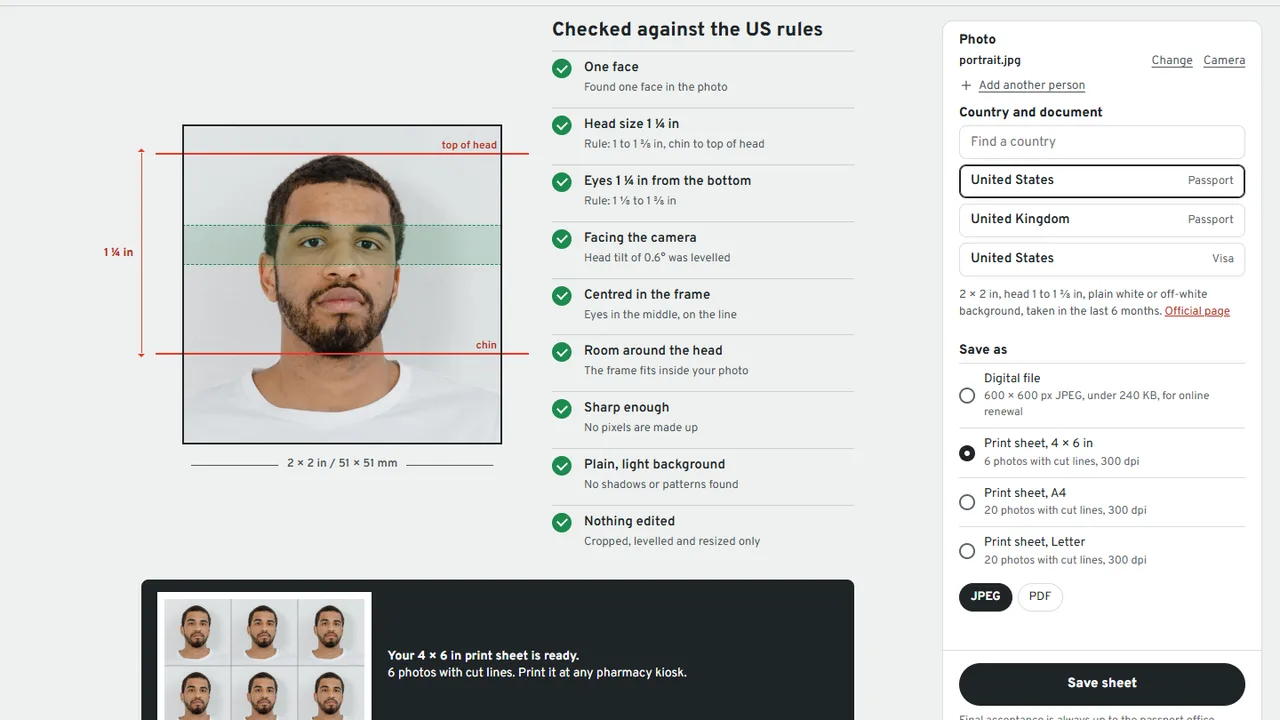
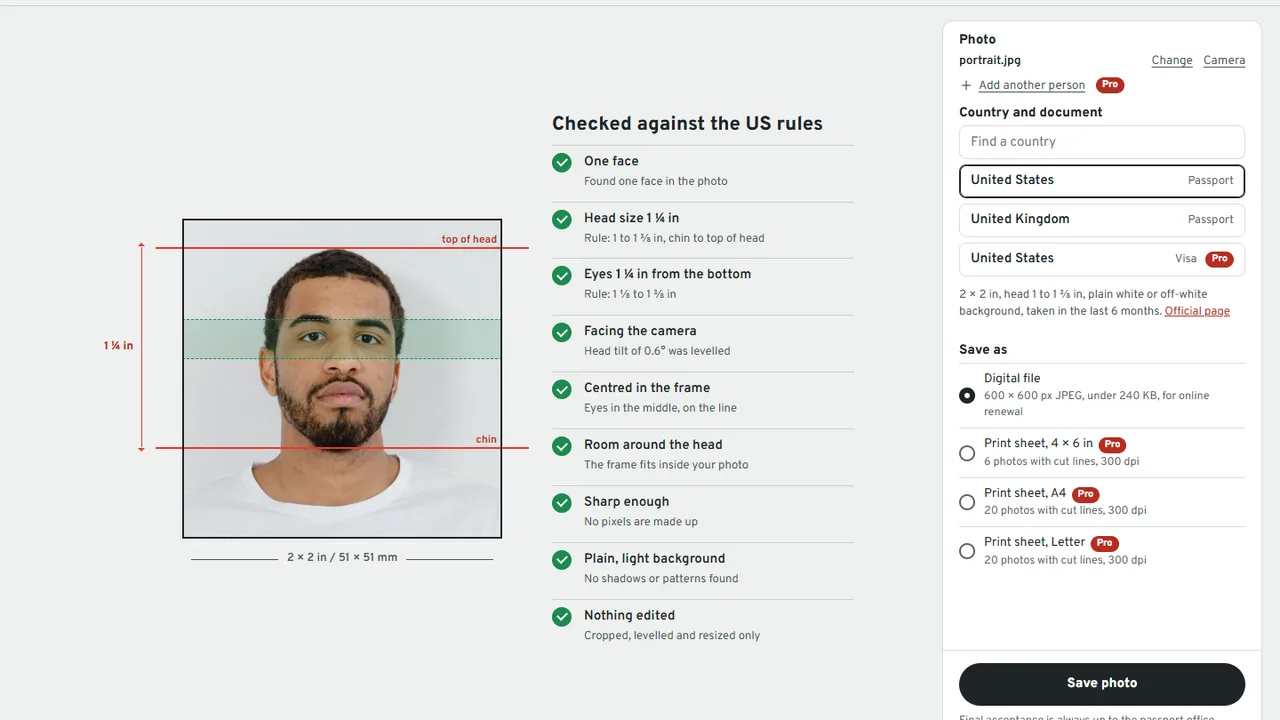
Passport Photo with a portrait framed for the US passport: red lines at the top of the head and the chin with the head size measured between them, a green band for the eye height, and the 2 by 2 inch frame, beside the list of checks, all ticked.

Features

What it does

Passport Photo with a portrait framed for the US passport: red lines at the top of the head and the chin with the head size measured between them, a green band for the eye height, and the 2 by 2 inch frame, beside the list of checks, all ticked.

We crop and measure. We never retouch.

The app only crops, levels the head and resizes. It never retouches a face, swaps a background or applies a filter, which passport offices require.

  • Measured on your PC

    A small face finder runs inside the app, in the background, so your photo is never uploaded. It keeps working with no connection.

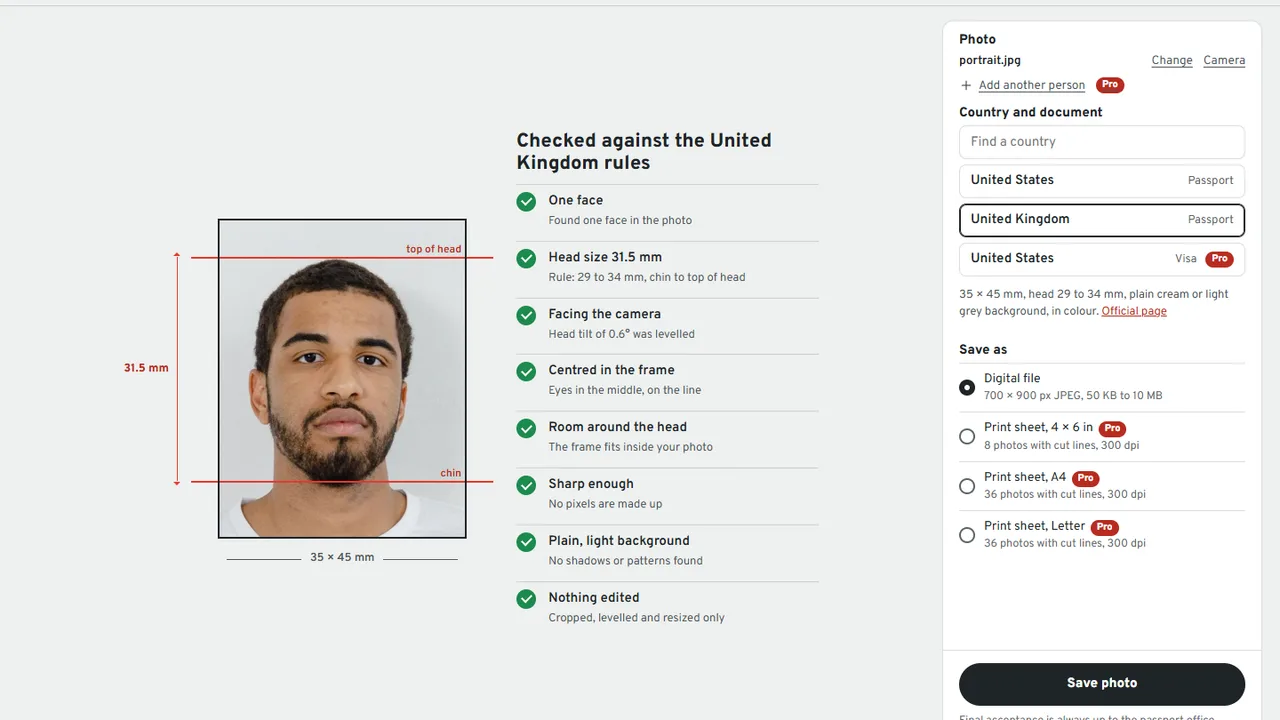
The same portrait reframed for the UK passport at 35 by 45 millimetres with a head of 31.5 millimetres, and the list of countries and documents on the right with the digital file size.

Checked against the rules

Head size, eye height, a level head facing the camera, a plain light background and one face only, each with its measurement and the rule it is held to.

  • The official size

    The digital file comes out at the office’s own pixel size and file size: 600 × 600 px under 240 KB for the US, 700 × 900 px for the UK.

A 4 by 6 inch print sheet of six identical passport photos with cut lines, ready to make, under the checks, with the three sheet sizes and the JPEG or PDF choice on the right.

Camera or file

Open a JPG, PNG, WebP or BMP, drop it on the window, paste it, or take the picture with your camera.

  • Pro: print sheets

    A 4 × 6 in, A4 or Letter sheet at 300 dpi with cut lines, saved as JPEG or PDF, with several people on one sheet and the US visa size.

How it works

Three steps, no setup

  1. Open a photo

    Or take one with the camera.

  2. Watch it measured

    The lines slide onto your head.

  3. Save the file

    Digital file, or a print sheet with Pro.

Pricing

Free to use, Pro when you need more

Get it free from the Microsoft Store. Pro is a one-time purchase on this website.

Free

$0

  • Open a photo or take one with the camera
  • United States and United Kingdom passports
  • Every check, with the measurements
  • Save the digital file at the official pixel size
  • See the print sheet before you buy it
Get it from Microsoft

Pro: everything in Free, plus

$9.99 one-time

  • Print sheets with cut lines: 4 × 6 in, A4 and Letter
  • Save sheets as JPEG or PDF at 300 dpi
  • Several people on one sheet
  • The US visa size, and more as official sources are added
  • One payment, up to 3 PCs
Buy Pro

Buy Pro here and paste the key into the app's Settings. It works on up to 3 PCs, with a 14-day refund, no questions asked.

What's new

Version 1.0.0

  • First release: make a passport photo from your own wall. Open a photo or take one with the camera; the app finds your face, levels it, crops and sizes it to your country's rules, and measures it. It runs on your PC and your photo is never uploaded.
  • We crop and measure. We never retouch: no filters, no background swaps, no edits to your face, which is what passport offices require.
  • Checks for head size, eye height, a level head facing the camera, a plain light background, and one face only. Final acceptance is always up to the passport office.
  • Save the digital file at the official pixel size for the United States and United Kingdom passports.
  • Pro lays your photo out on a 4 × 6 in, A4 or Letter print sheet with cut lines (JPEG or PDF, 300 dpi), puts several people on one sheet and adds the US visa size.

FAQ

Questions

Something not answered here? Ask us and you'll get a reply.

Ask a question
Is my photo uploaded?

No. The face is found and the photo is cropped on your PC, in the app. It is not sent to us or anyone else, and nothing is kept after you close it.

Does it retouch my photo or change the background?

No, never. The app only crops, levels the head and resizes. Your face and your background stay exactly as you took them. The US State Department and the UK passport office both refuse photos that were altered by software.

Why is there no Canada?

Canada does not accept a photo that was cropped or edited by software, so a cropping tool is the wrong tool for it. It needs a photo taken by a photographer.

Which countries can I choose?

The United States and United Kingdom passports are free, and the United States visa is in Pro. A country is added only when its size and rules can be read from its government’s own page; each one links to that page in the app.

Will my photo be accepted?

The checks are measurements against the published rules, not a verdict. The head and the eye line are estimated from the face, so they are good to a few percent. Final acceptance is always up to the passport office.

What makes a good photo?

A plain, light wall, even light on your face with no shadows, the camera at eye height about 1.5 m (5 ft) away, you looking straight at it with a neutral face. Take it again from further back if the app says there is not enough room around your head.

What does Pro add?

Print sheets with cut lines for a 4 × 6 in, A4 or Letter page at 300 dpi, saved as JPEG or PDF, with several people on one sheet, and the US visa size. Without Pro the sheet is shown as a preview.
Get Passport Photo

Stand against a plain wall and take a picture. The app crops, levels and sizes it to your passport rules and measures it before you print or upload. It runs on your PC, so your photo never leaves it. We crop and measure. We never retouch.

Faces are found with YuNet (OpenCV Zoo, MIT) on onnxruntime-web (MIT). Final acceptance is always up to the passport office.

© 2026 CAO Labs