Get help

BusinessOIG Exclusion Search, free online

OIG exclusion search: is anyone on the list?

Check a new hire, a doctor or a vendor against the OIG List of Excluded Individuals and Entities before they touch a Medicare or Medicaid claim. The list is on your PC, so names never leave it. Screen a whole staff list, every month, with Pro.

  • Free, runs in your browser
  • No account needed
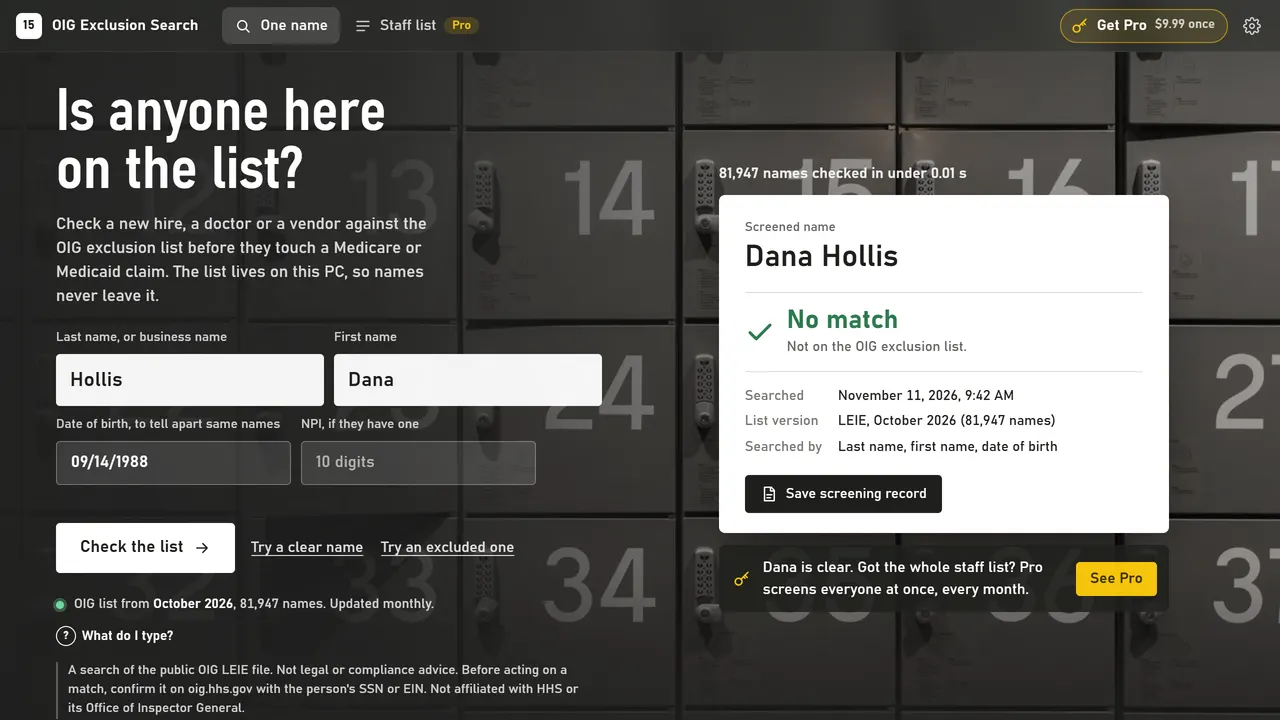
OIG Exclusion Search with a clear name: a white result card reading No match, Not on the OIG exclusion list, with the time of the search and the list version, over a wall of staff lockers, and a button to save the screening record.

Features

What it does

OIG Exclusion Search with a clear name: a white result card reading No match, Not on the OIG exclusion list, with the time of the search and the list version, over a wall of staff lockers, and a button to save the screening record.

The whole list, on your PC

The OIG exclusion list is part of the app, so a name is searched on your PC in a blink and never sent anywhere. It keeps working with no connection.

  • A record for the auditor

    A clear result gives a dated screening record as a PDF: what you searched, when, and the version of the list it was searched against.

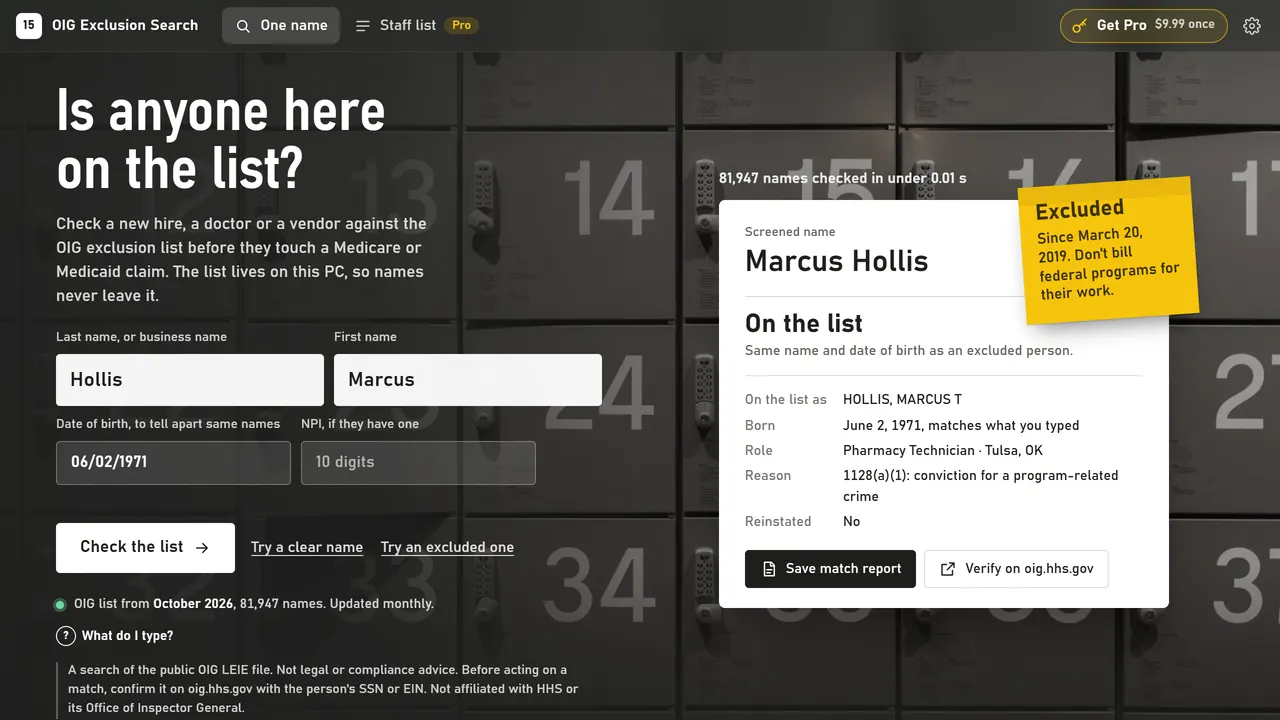
An invented person who is on the list: a yellow sticky note reading Excluded is pinned to the result card, which shows the name as listed, the date of birth that matches, the reason and a button to verify on oig.hhs.gov.

Same name, different person

Add a date of birth or an NPI to tell two people with the same name apart. A match shows the name as listed, the reason and the date.

  • Never "confirmed"

    The public list has no SSN or EIN, so a match is a name to verify. Each one links to the OIG online search to confirm it.

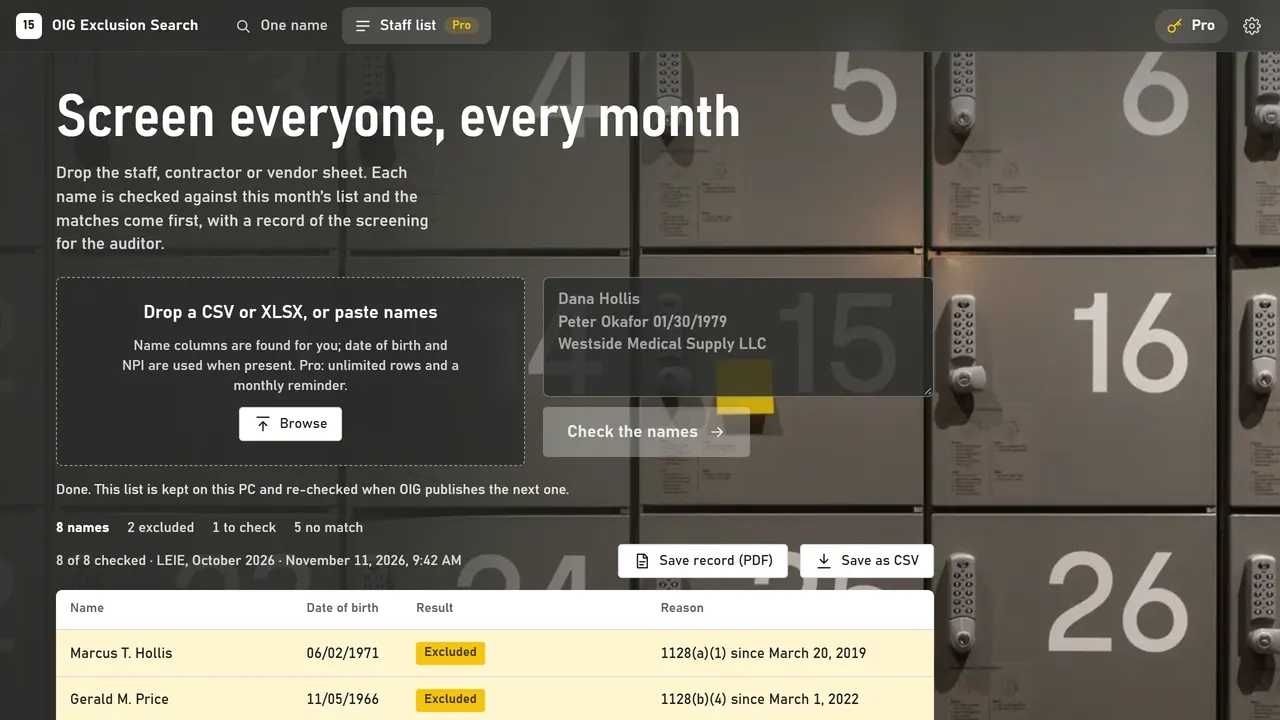
A staff list of 8 names screened at once: the two excluded people are listed first on yellow rows, then the name that needs a date of birth, then the names with no match.

Pro: screen the whole staff

Drop the staff, contractor or vendor sheet (CSV or Excel). Excluded people come first, with a dated PDF and CSV record of the run.

  • Pro: a monthly re-check

    Your list is kept on your PC and screened again when OIG publishes the next list.

How it works

Three steps, no setup

  1. Type a name

    Last and first, or a business.

  2. A scan runs

    Every name on the list, checked.

  3. Keep the record

    A dated PDF for the audit.

Pricing

Free to use, Pro when you need more

Get it free from the Microsoft Store. Pro is a one-time purchase on this website.

Free

$0

  • Check one name, as often as you like
  • A dated screening record (PDF) when the result is clear
  • Date of birth or NPI to tell same names apart
  • The first 5 names of a staff list
Get it from Microsoft

Pro: everything in Free, plus

$14.99 one-time

  • Screen a whole staff, contractor or vendor list (CSV or Excel)
  • Excluded names first
  • A PDF and a CSV record for the auditor
  • A monthly re-check of your saved list
  • One payment, up to 3 PCs
Buy Pro

Buy Pro here and paste the key into the app's Settings. It works on up to 3 PCs, with a 14-day refund, no questions asked.

What's new

Version 1.1.0

  • Pro now also checks the SAM.gov exclusions list (federal contract and grant debarments), in single checks and staff lists. Each match says which list it came from, the agency and when the exclusion ends.

Version 1.0.0

  • First release: check a name against the OIG List of Excluded Individuals and Entities. The list is stored in the app, so names never leave your PC and it works with no connection.
  • Add a date of birth or NPI to tell two people with the same name apart. A match shows the name as listed, the reason and the date, and links to the OIG's online search to confirm it.
  • A clear result gives a dated screening record as a PDF.
  • Pro screens a whole staff, contractor or vendor list (CSV, Excel or pasted), excluded names first, saves a PDF and CSV record for the auditor, and re-checks your saved list when the next monthly list arrives.

FAQ

Questions

Something not answered here? Ask us and you'll get a reply.

Ask a question
What is the OIG exclusion list?

The List of Excluded Individuals/Entities (LEIE), kept by the Office of Inspector General of the US Department of Health and Human Services. People and businesses on it may not take part in Medicare, Medicaid or other federal health care programs, and a provider that bills for their work can be fined.

Who has to check it?

Any organization that bills a federal health care program: before hiring or contracting, and then regularly. OIG recommends checking every month. This app does the checking; it is not legal or compliance advice.

Where does the data come from?

From the OIG's public LEIE database file, which it publishes every month at oig.hhs.gov/exclusions. It is a public record. We ship a compact copy inside the app and say which month it is from. Updates arrive through the Microsoft Store and the website; the month is shown on the first screen.

Does a match mean the person is excluded?

No. A match means the name (and date of birth or NPI, if you gave one) is on the list. The public file has no SSN or EIN, so confirm it on the OIG's online search before you act. The app links to it from every match.

Are the names I type sent anywhere?

No. The list is searched on your PC. A list you screen as Pro is kept on your PC only, for the monthly re-check, and you can forget it any time.

Why did a person with my name show as a possible match?

Because the list holds someone with the same name and you gave nothing to tell you apart. Add a date of birth or an NPI; if they differ from the listed person, the result is clear.

Get OIG Exclusion Search

Check a new hire, a doctor or a vendor against the OIG List of Excluded Individuals and Entities before they touch a Medicare or Medicaid claim. The list is on your PC, so names never leave it. Screen a whole staff list, every month, with Pro.

A search of the public OIG LEIE file. Not legal or compliance advice. Before acting on a match, confirm it on oig.hhs.gov with the person's SSN or EIN. Data from the HHS Office of Inspector General. Not affiliated with HHS or its Office of Inspector General.

© 2026 CAO Labs