Get help

BusinessOFAC Search, free online

OFAC sanctions list search for any name

Check any name against the U.S. Treasury SDN and Consolidated sanctions lists in seconds, free. See the match score, the aliases and the sanctions program, and keep a dated screening record. Screen a whole customer list with Pro.

  • Free, runs in your browser
  • No account needed
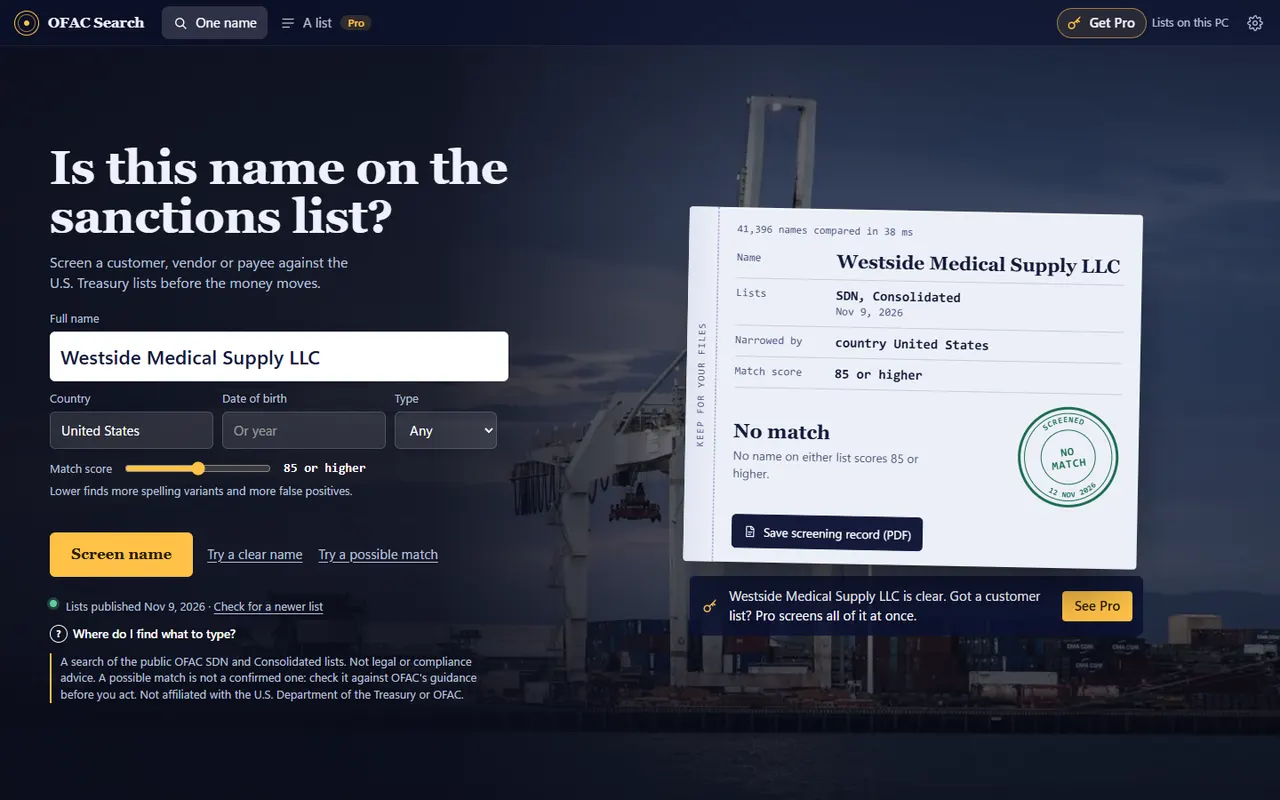
OFAC Search with a name that has no match: a payment slip stamped NO MATCH in green ink, dated, over a harbour crane at dusk, with the date Treasury published the lists.

Features

What it does

OFAC Search with a name that has no match: a payment slip stamped NO MATCH in green ink, dated, over a harbour crane at dusk, with the date Treasury published the lists.

A slip, stamped

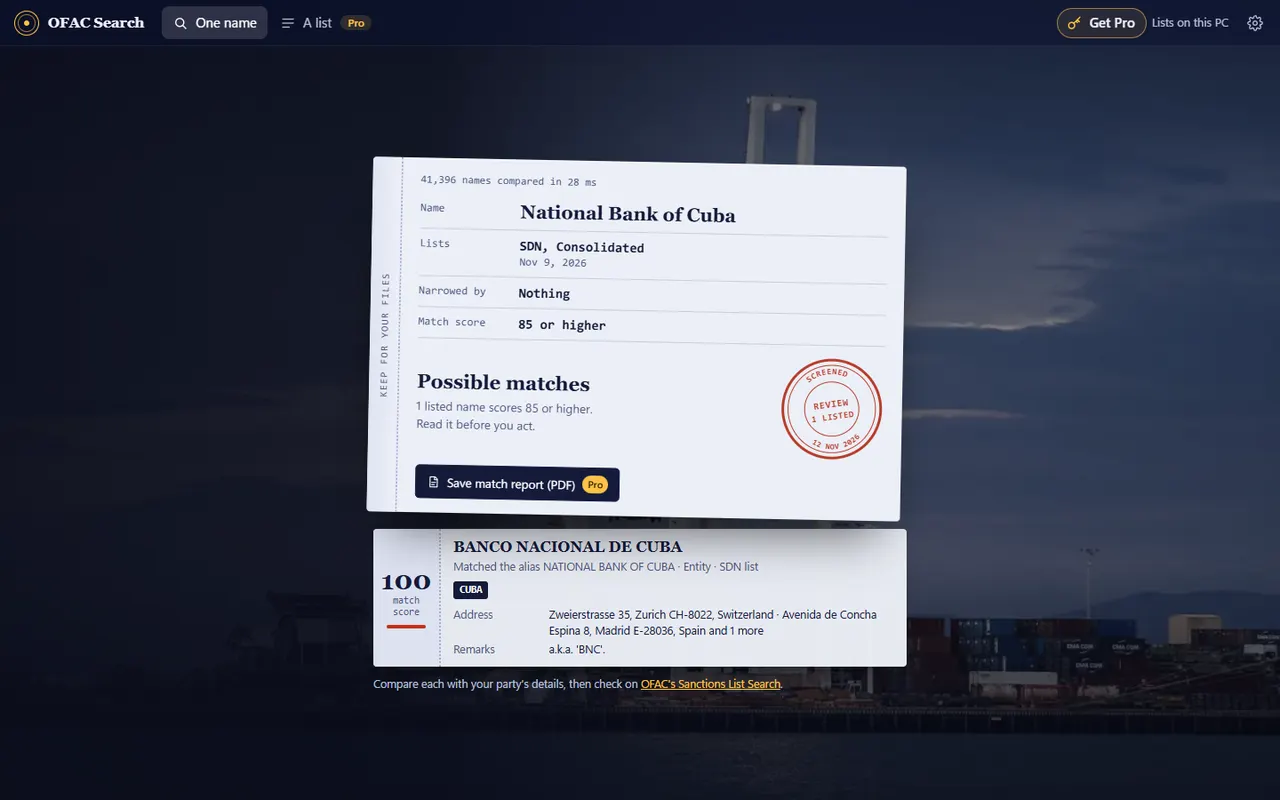
The name is fed through a payment slip and stamped: NO MATCH in green, or REVIEW in red with the possible matches stacked under it.

  • See why it matched

    Every possible match shows its match score, which listed name or alias matched, the sanctions program, and the aliases, addresses and dates of birth in the listing.

A possible match: the slip stamped REVIEW in red and the listing under it with its match score of 100, the sanctions program CUBA, the alias that matched and the addresses.

A score you can see

Fuzzy matching on names and aliases, like OFAC's own search. The match score starts at 85 and you can move it to find more spelling variants or fewer false positives.

  • Narrow it down

    Add a country, a date of birth or a type (individual, entity, vessel, aircraft) to cut false positives when you have them.

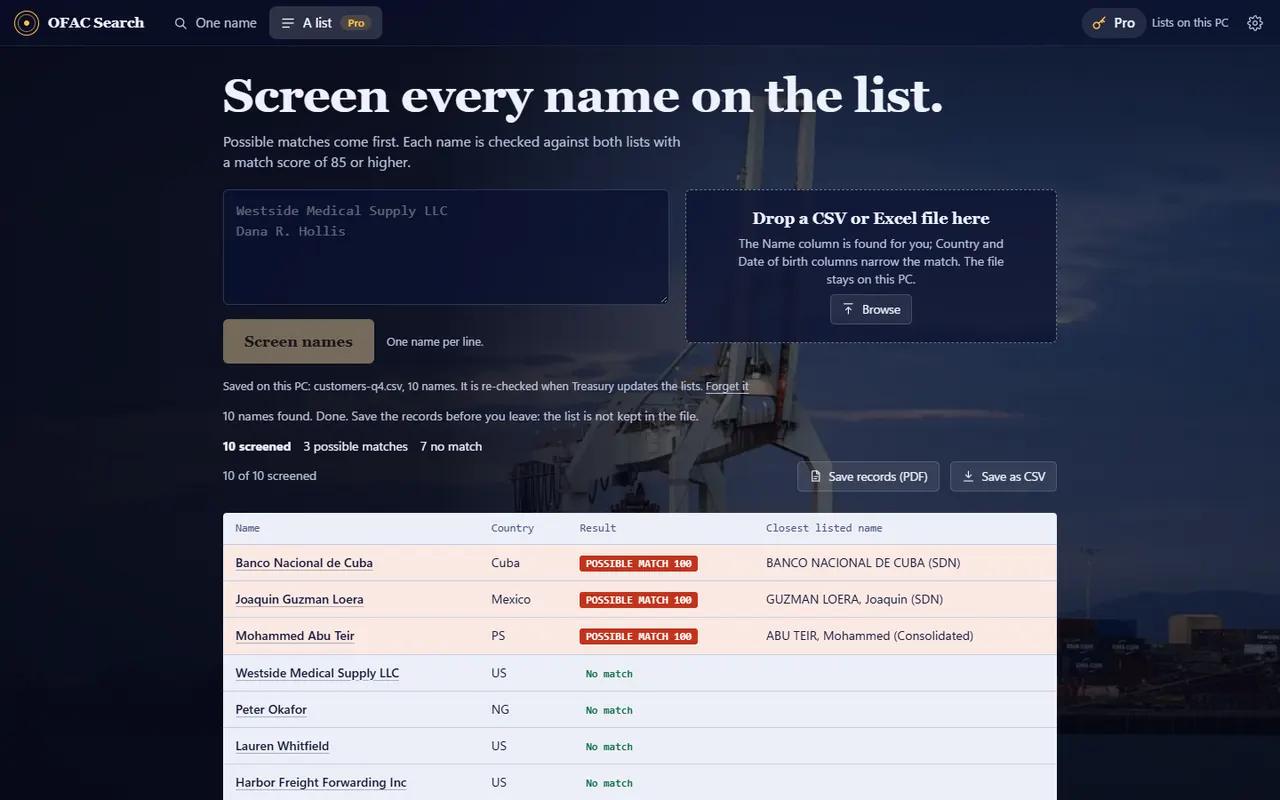
A customer list of 10 names screened at once: the three possible matches first, then the names with no match, and buttons to save the records as a PDF or a CSV.

Proof you checked

A name with no match gets a dated screening record. Save it as a PDF for your files.

  • Pro: screen the whole list

    Check a CSV or Excel list of customers and vendors, possible matches first, and re-check your saved list when Treasury updates the SDN list.

How it works

Three steps, no setup

  1. Type the name

    The full legal name, with country and date of birth if you have them.

  2. Read the slip

    Stamped, with the possible matches under it.

  3. Keep the record

    A dated PDF for your files.

Pricing

Free to use, Pro when you need more

Get it free from the Microsoft Store. Pro is a one-time purchase on this website.

Free

$0

  • Check one name against the SDN and Consolidated lists, as often as you like
  • Match score, aliases, sanctions program, addresses and dates of birth
  • A dated PDF screening record for a name with no match
  • Screen the first 5 names of a pasted list or a dropped file
Get it from Microsoft

Pro: everything in Free, plus

$9.99 one-time

  • Screen a whole CSV or Excel list, possible matches first
  • Your saved list is re-checked when Treasury updates the SDN list
  • A dated screening record for every name, as one PDF or a CSV
  • One payment, up to 3 PCs
Buy Pro

Buy Pro here and paste the key into the app's Settings. It works on up to 3 PCs, with a 14-day refund, no questions asked.

What's new

Version 1.0.0

  • First release: check any name against the U.S. Treasury's SDN and Consolidated sanctions lists. Each possible match shows its match score, the listed name or alias that matched, the sanctions program, aliases and addresses.
  • Narrow the search with a country, a date of birth or a type, and move the match score to find more spelling variants or fewer false positives.
  • A name with no match gets a dated screening record you can save as a PDF for your files.
  • The lists are kept on your PC after the first load, so the app works offline, and each answer shows the date Treasury published the lists. They are refreshed from our site every day.
  • Pro screens a whole CSV or Excel list at once with possible matches first, re-checks your saved list when Treasury updates the SDN list, and saves a dated record for every name.

FAQ

Questions

Something not answered here? Ask us and you'll get a reply.

Ask a question
Where do I find what to type?

Use the full legal name as it is on the ID or invoice. Add the country and date of birth if you have them: they cut false positives.

Where do the lists come from?

From the U.S. Department of the Treasury's Office of Foreign Assets Control (OFAC): the Specially Designated Nationals (SDN) list and the Consolidated (non-SDN) list, the public files it publishes. The app keeps the last copy on your PC, checks for a newer one when you open it, and shows the date Treasury published the lists.

What does the match score mean?

How close the name you typed is to a listed name or alias, from 0 to 100, found by comparing the words of each name. 100 is the same name. It starts at 85, as in OFAC’s own search; lower it to find more spelling variants and more false positives. A score is a measure of similarity, never a determination.

Does a possible match mean the person or company is sanctioned?

No. It means a listed name is close to the one you typed. Many names are shared. Compare the listing with your party's details, then check it on OFAC's Sanctions List Search and read OFAC's guidance before you act. This is not legal or compliance advice.

Is the name I type sent anywhere?

No. The lists are matched on your PC. Our server only hands over Treasury's published files, the same files to everyone, and knows nothing about the names you screen.

Is my customer list uploaded?

No. A file you drop is read in your browser and stays there. Pro keeps your last list in this browser on your PC, so it can be re-checked when Treasury updates; you can forget it any time.

Does it work offline?

Yes, after the first load. The app and the last copy of the lists are kept on your PC; it says so when it is using that copy.

Get OFAC Search

Check any name against the U.S. Treasury SDN and Consolidated sanctions lists in seconds, free. See the match score, the aliases and the sanctions program, and keep a dated screening record. Screen a whole customer list with Pro.

A search of the public OFAC SDN and Consolidated lists. Not legal or compliance advice. A possible match is not a confirmed one: check it against OFAC's guidance before you act. List data from the U.S. Department of the Treasury, OFAC. Not affiliated with the U.S. Department of the Treasury or OFAC.

© 2026 CAO Labs