Get help

For billing and credentialingNPI Lookup, free online

NPI lookup

Look up any healthcare provider by NPI number, or by name and state, and see the CMS registry record as the badge they'd wear: taxonomy, licence, practice address and status. Check a whole roster at once with Pro.

  • Free, runs in your browser
  • No account needed
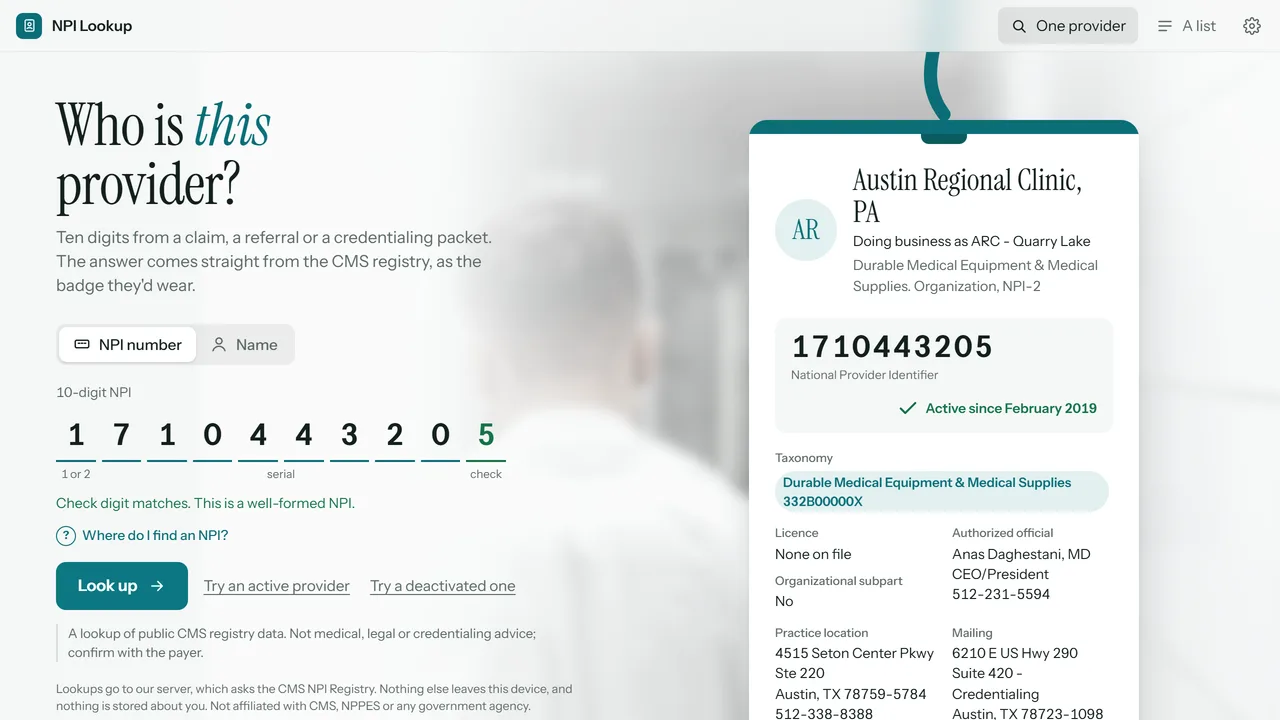
NPI Lookup with 1710443205 looked up: an ID badge on a teal lanyard reads Austin Regional Clinic, PA, active since February 2019, with its taxonomy, authorized official, practice location and mailing address.

Features

What it does

NPI Lookup with 1710443205 looked up: an ID badge on a teal lanyard reads Austin Regional Clinic, PA, active since February 2019, with its taxonomy, authorized official, practice location and mailing address.

The record, as a badge

Name, credential, taxonomy with its code, licence, practice location, mailing address and phone, read from the CMS NPI Registry and laid out like the ID badge the provider wears. Copy it as text or save it as CSV.

  • Search by name and state too

    Only have a name from a referral letter? Type "Smith, Austin", pick a state, and choose from the people and organizations that match.

Ten digit slots with 1234567893 typed in; the last digit is green and the line under it says the check digit matches.

Typos caught before you search

The tenth digit of every NPI is a check digit. NPI Lookup checks it as you type, so a mistyped number shows up red with the digit it should have been.

  • Deactivated NPIs get a red stamp

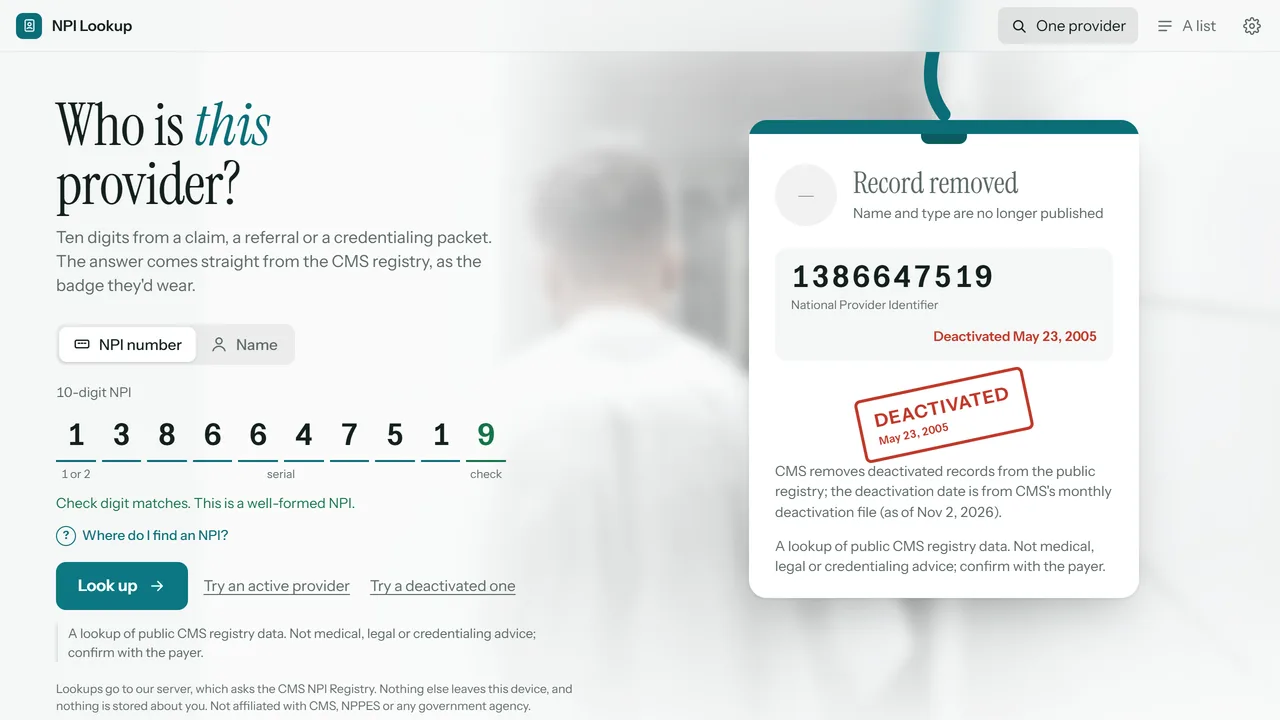
    CMS removes deactivated records from its public registry, so most lookups just come back empty. NPI Lookup checks CMS's monthly deactivation file and shows the date.

A deactivated NPI, 1386647519: the badge is stamped Deactivated, May 23, 2005, and explains that CMS removes deactivated records.

Pro: check the whole roster

Drop the credentialing sheet or a claims export as CSV or Excel, up to 5,000 NPIs a run. Invalid, deactivated and missing NPIs come first.

  • Pro: export with your columns kept

    The export keeps every column of your sheet and adds the registry's: status, deactivation date, name, type, primary taxonomy and code, licence and state.

How it works

Three steps, no setup

  1. Type the ten digits

    From box 24J or 33a of a claim, or a referral.

  2. Look up

    The answer comes from the CMS registry.

  3. Read the badge

    Then confirm with the payer before you rely on it.

Pricing

Free to use, Pro when you need more

Get it free from the Microsoft Store. Pro is a one-time purchase on this website.

Free

$0

  • Unlimited lookups by NPI or by name and state
  • The full registry record as a badge
  • Check digit checked as you type
  • Deactivated NPIs shown with their date
  • Copy or save a record as CSV
  • Paste up to 10 NPIs at a time
Get it from Microsoft

Pro: everything in Free, plus

$9.99 one-time

  • CSV or Excel rosters, up to 5,000 NPIs a run
  • Attention first: invalid, deactivated, missing
  • Export with your columns kept and the registry columns added
  • One payment, up to 3 PCs
Buy Pro

Buy Pro here and paste the key into the app's Settings. It works on up to 3 PCs, with a 14-day refund, no questions asked.

What's new

Version 1.0.0

  • First release: look up any healthcare provider by NPI number, or by name and state, and see the CMS registry record as an ID badge: taxonomy, licence, practice address and status.
  • The tenth digit checks itself as you type, so a mistyped NPI shows up before you search.
  • Deactivated NPIs get a red stamp with the date CMS deactivated them.
  • Check a list of NPIs at once and see the ones needing attention first. Pro checks whole CSV or Excel rosters and exports the results.

FAQ

Questions

Something not answered here? Ask us and you'll get a reply.

Ask a question
What is an NPI number?

A National Provider Identifier: the ten-digit number every US healthcare provider and organization that bills insurance gets from CMS. It never changes when a provider moves or changes jobs. Individual providers have a type 1 NPI, organizations a type 2.

Where do I find an NPI?

On a claim, in box 24J of the CMS-1500 (the provider who treated) and box 33a (the practice that bills). It's also on referral letters, prescriptions and prior-authorization forms next to the provider's name, and every provider can look up their own record on the NPPES site; the number is public.

How do I verify an NPI?

Type it into NPI Lookup. First the check digit tells you whether the number is well-formed; then the CMS registry tells you who it belongs to, their taxonomy and licence, and whether it's active. For credentialing, confirm with the payer or the primary source too.

What does deactivated mean?

CMS deactivates an NPI when a provider dies, retires, or the organization closes, or for fraud. Deactivated NPIs disappear from the public registry, so NPI Lookup checks CMS's monthly deactivation file and shows the date. An NPI deactivated since the latest monthly file shows as not in the registry until the next one.

Is this HIPAA data?

No. The NPI Registry is a public list of provider business records that CMS publishes under the NPI rule. There is no patient information anywhere in NPI Lookup, and a list of NPIs is a list of public identifiers.

Do you store my roster?

No. Your file is read in your browser and never uploaded. Each NPI is looked up one by one through our server, which asks the CMS registry and keeps nothing about what was looked up. The results are gone when you close the tab, so export first.


Get NPI Lookup

Look up any healthcare provider by NPI number, or by name and state, and see the CMS registry record as the badge they'd wear: taxonomy, licence, practice address and status. Check a whole roster at once with Pro.

A lookup of public CMS registry data. Not medical, legal or credentialing advice; confirm with the payer or the primary source before you rely on it. Not affiliated with CMS, NPPES or any government agency.

© 2026 CAO Labs