Get help

Utilities & toolsMAC Address Lookup, free online

MAC address lookup: who made that device?

Paste a MAC address from your router's device list and see the maker from the IEEE registry, what kind of company it is, and whether the address is a phone's private one that no tool can trace. Look up a whole network at once with Pro.

  • Free, runs in your browser
  • No account needed
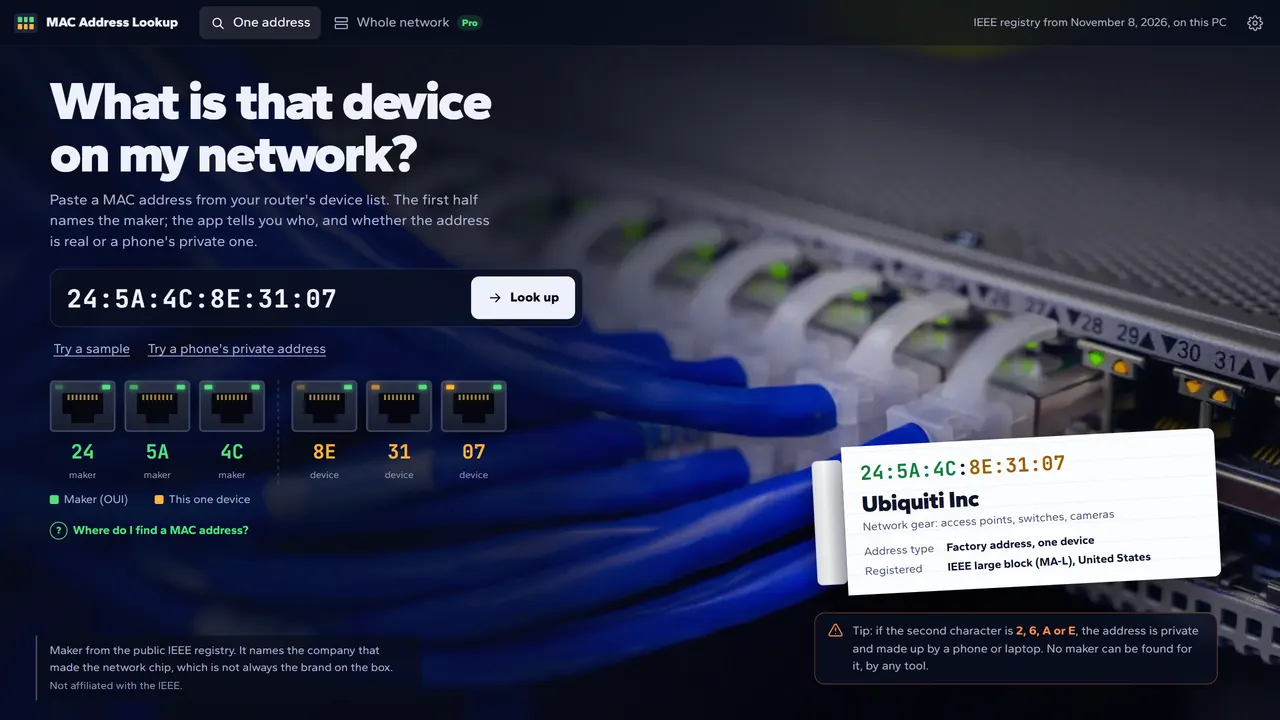
MAC Address Lookup with the address 24:5A:4C:8E:31:07: six drawn network ports, the first three lit green with 24, 5A and 4C for the maker and the last three amber for the device, over a photo of blue cables plugged into a switch. A white cable label reads Ubiquiti Inc, network gear, a factory address in an IEEE large block registered in the United States.

Features

What it does

MAC Address Lookup with the address 24:5A:4C:8E:31:07: six drawn network ports, the first three lit green with 24, 5A and 4C for the maker and the last three amber for the device, over a photo of blue cables plugged into a switch. A white cable label reads Ubiquiti Inc, network gear, a factory address in an IEEE large block registered in the United States.

The address as six ports

The first three bytes light up green for the maker, the last three amber for the one device, so you see which half the registry answers for.

  • The maker, on a cable label

    The company that registered the block with the IEEE, what it makes when it's a name you'd meet at home or in the office, the block size and the country.

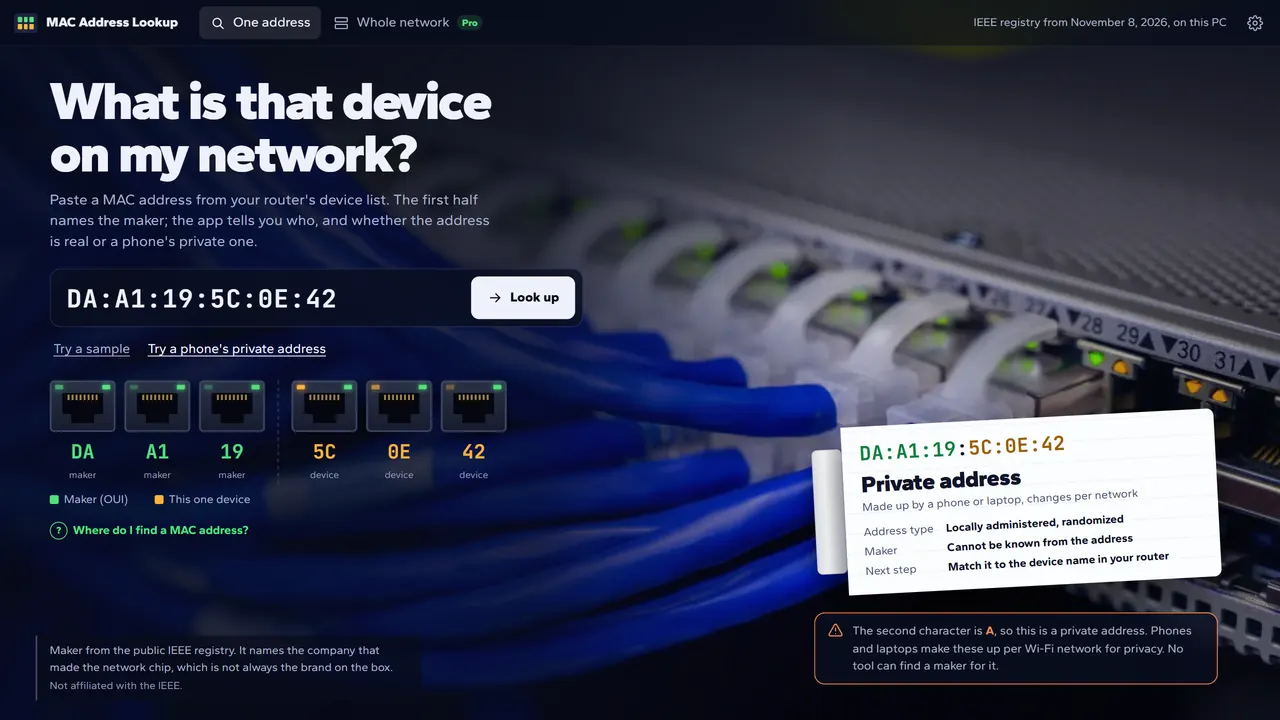
A phone's private address, DA:A1:19:5C:0E:42: the label says it was made up by a phone or laptop, that no maker can be known from it, and to match it to the device name in the router; a tip explains that the second character A marks it as private.

Private addresses, said plainly

Phones and laptops make up a new address for each Wi-Fi network. When the second character is 2, 6, A or E, the app says so, and tells you to match it by name in your router instead.

  • Any way it is written

    Colons, dashes, Cisco dots or none, and the first half alone is enough. Broadcast and multicast addresses are named as such, not as devices.

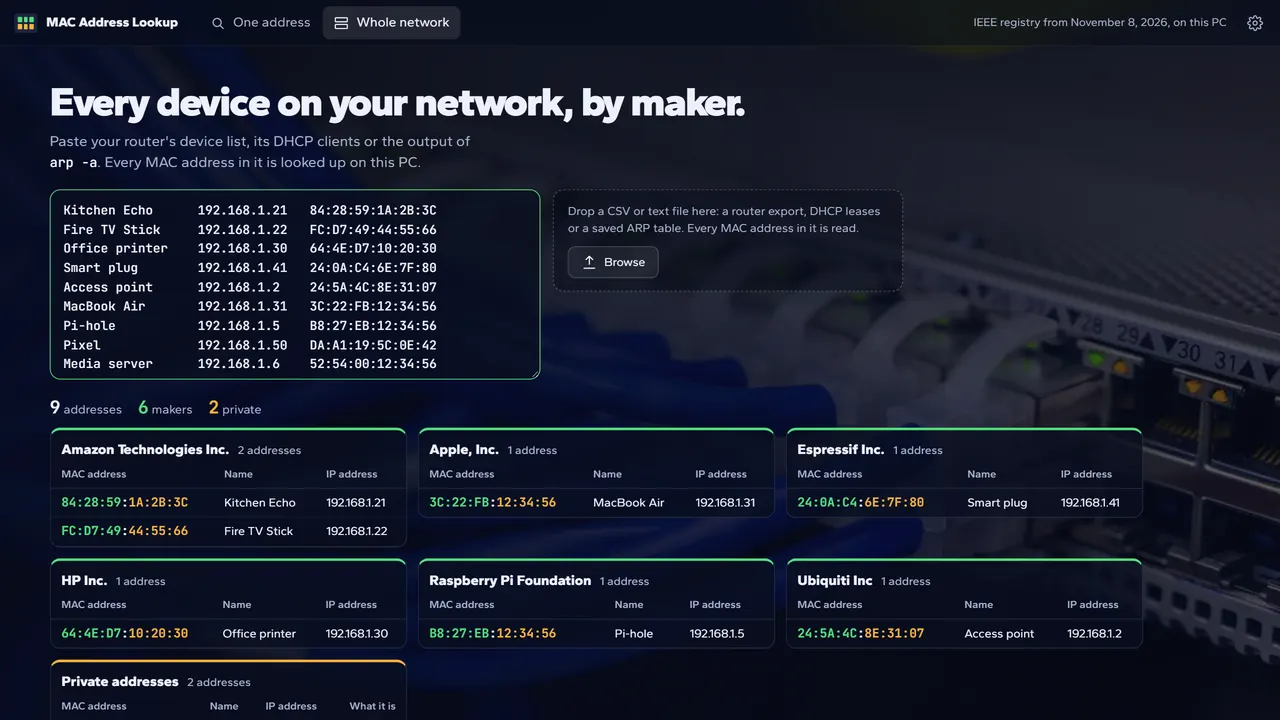
A home router's device list pasted in and looked up: nine addresses from six makers, grouped as Amazon, Apple, Espressif, HP, Raspberry Pi and Ubiquiti, with the private ones apart.

Pro: the whole network

Paste or drop your router's device list, DHCP leases or an ARP table. Every device is grouped by maker, private and unknown addresses flagged; save the result as CSV.

  • The registry, on your PC

    The IEEE's public MA-L, MA-M, MA-S and IAB listings are in the app, so it works with the Wi-Fi off and no address you look up leaves your PC.

How it works

Three steps, no setup

  1. Copy the address

    From the router, ipconfig or the label.

  2. Watch the ports

    Maker half green, device half amber.

  3. Read the label

    Who made it, or why nobody can tell.

Pricing

Free to use, Pro when you need more

Get it free from the Microsoft Store. Pro is a one-time purchase on this website.

Free

$0

  • Unlimited lookups, offline
  • The maker, the block and its country
  • Private, virtual, broadcast and multicast addresses named
  • Look up the first 5 addresses of a network list
Get it from Microsoft

Pro: everything in Free, plus

$9.99 one-time

  • Network lists up to 5,000 addresses a run
  • Drop a router export, DHCP leases or an ARP table
  • Grouped by maker; save as CSV
  • One payment, up to 3 PCs
Buy Pro

Buy Pro here and paste the key into the app's Settings. It works on up to 3 PCs, with a 14-day refund, no questions asked.

What's new

Version 1.0.0

  • First release: paste a MAC address from your router and see who made the device. The whole IEEE registry is on your PC, so it works with the Wi-Fi off.
  • Colons, dashes, dots or none: any way the address is written works, and the first half alone is enough to find the maker.
  • Says plainly when an address is a phone's or laptop's private one, which has no maker to find, and when it is a broadcast or multicast address rather than a device.
  • A whole network: paste a router's device list or an ARP table and see every device grouped by maker. Pro looks up the whole list, reads a dropped file and saves the results as CSV.

FAQ

Questions

Something not answered here? Ask us and you'll get a reply.

Ask a question
Where do I find a MAC address?

In your router's app or admin page, under connected devices or DHCP clients. On Windows, run getmac, or ipconfig /all and read the line "Physical Address". On a printer, camera or smart plug, on the sticker on the device or its box. On a phone, in Settings under Wi-Fi and the network's details; phones use a different private address for each Wi-Fi network unless you turn that off.

Why does it name a different company than the brand on my device?

The IEEE registry names whoever registered the block of addresses, which is often the maker of the network chip or module inside, not the brand on the box. A smart plug sold under one name often shows Espressif or Tuya, for example.

Why does it say "private address"?

When the second character of the address is 2, 6, A or E, the address was set locally, not by a factory. Phones, tablets and Windows laptops make these up for privacy, usually a new one per Wi-Fi network. Nobody can find a maker for such an address; match it to the device's name in your router's list instead.

Where does the data come from?

From the IEEE Registration Authority's public listings of MAC address blocks (MA-L, MA-M, MA-S and IAB) at standards-oui.ieee.org. The app shows the date of the copy it has.

Is what I look up sent anywhere?

No. The registry is downloaded from our website once and searched in your browser. A list you paste or drop is read in your browser and never uploaded.
Get MAC Address Lookup

Paste a MAC address from your router's device list and see the maker from the IEEE registry, what kind of company it is, and whether the address is a phone's private one that no tool can trace. Look up a whole network at once with Pro.

Maker from the public IEEE registry. It names the company that made the network chip, which is not always the brand on the box. Registry from the IEEE Registration Authority (standards-oui.ieee.org). Not affiliated with the IEEE.

© 2026 CAO Labs