Get help

BusinessLien Waiver Generator for Windows

California lien waiver generator for Windows

Fill in California's four statutory lien waiver forms word for word, print them in triplicate or save a PDF, and keep every job's waivers and 20-day notice deadlines on your PC.

  • Free in the Microsoft Store
  • No account needed
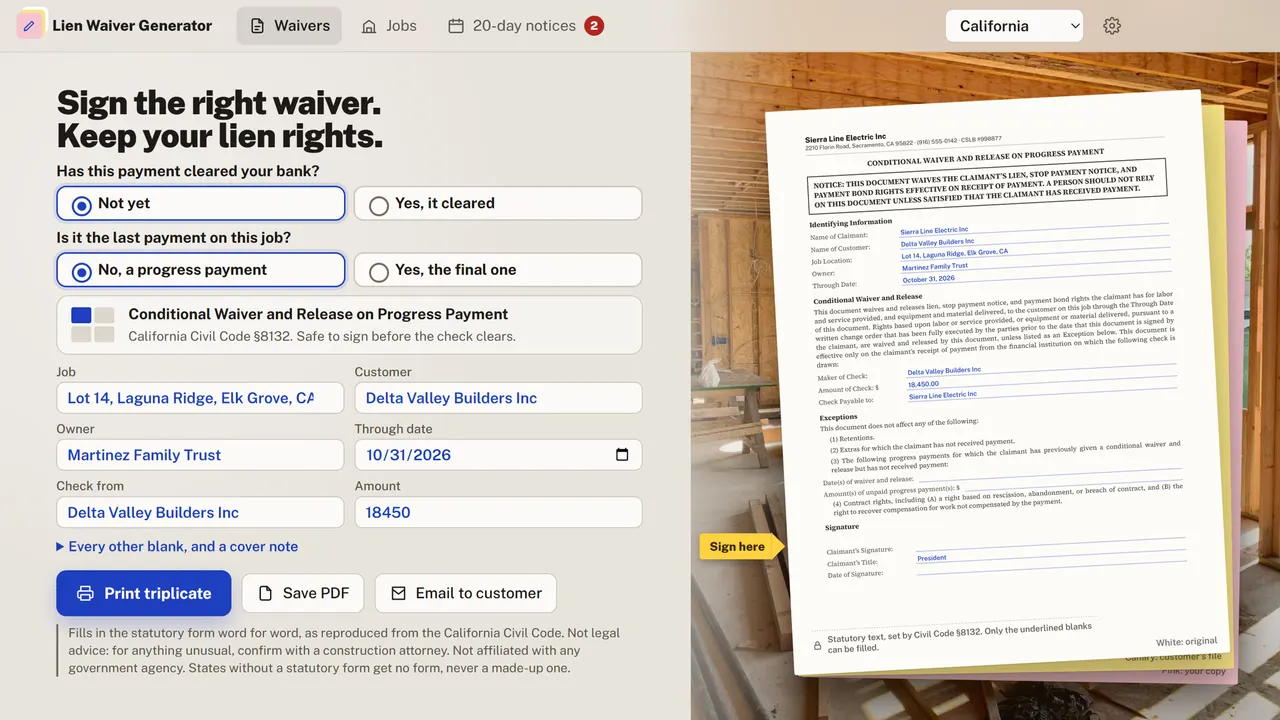
Lien Waiver Generator: two questions on the left pick the Conditional Waiver and Release on Progress Payment; the filled-in form lies on a construction slab in white, canary and pink copies.

Features

What it does

Lien Waiver Generator: two questions on the left pick the Conditional Waiver and Release on Progress Payment; the filled-in form lies on a construction slab in white, canary and pink copies.

Two questions pick the right form

Has the payment cleared your bank? Is it the last payment on the job? The answers pick one of California Civil Code §8132, §8134, §8136 or §8138.

  • The statute, word for word

    The form text is reproduced exactly from the California Civil Code and locked. Only the blanks the statute leaves can be filled, with a faint blue underline.

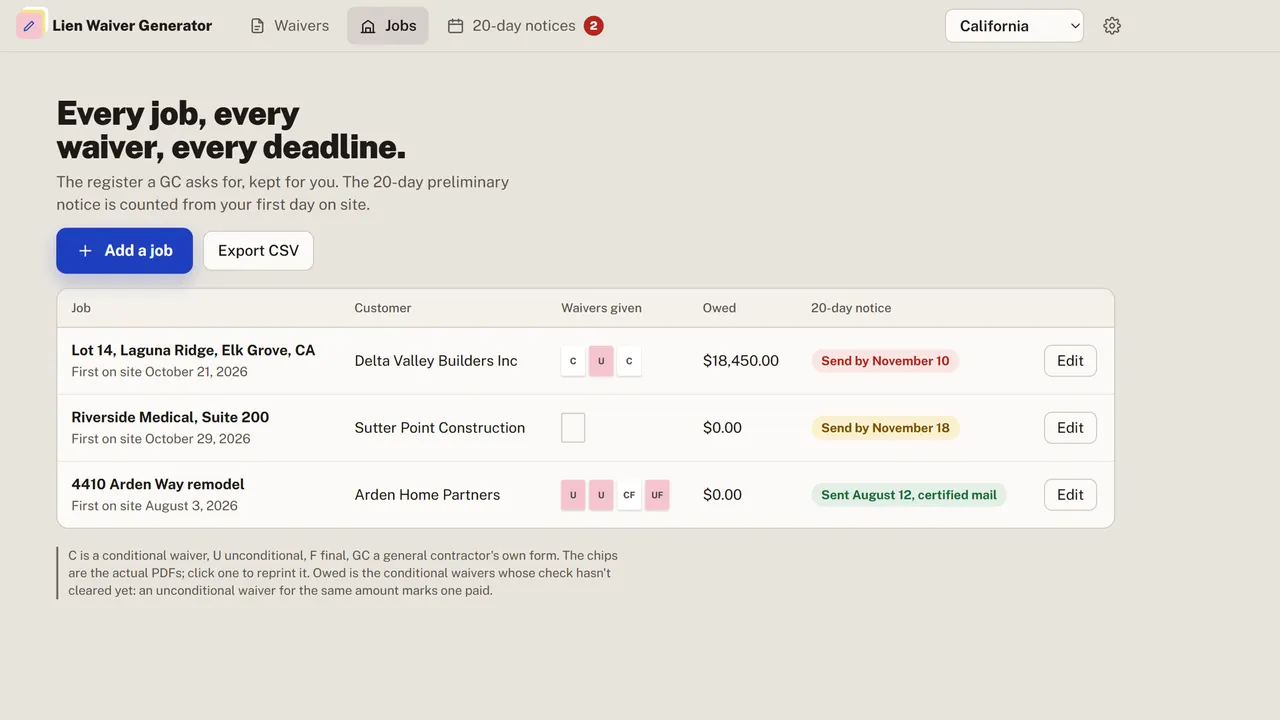
The job register: three jobs with their waivers as paper chips, the amount still owed and the 20-day preliminary notice deadline for each.

Triplicate, PDF or email

Print three copies, save a PDF, or open your mail app with a note and the PDF ready to attach. Your letterhead goes above the form, never inside it.

  • A warning before you give up your rights

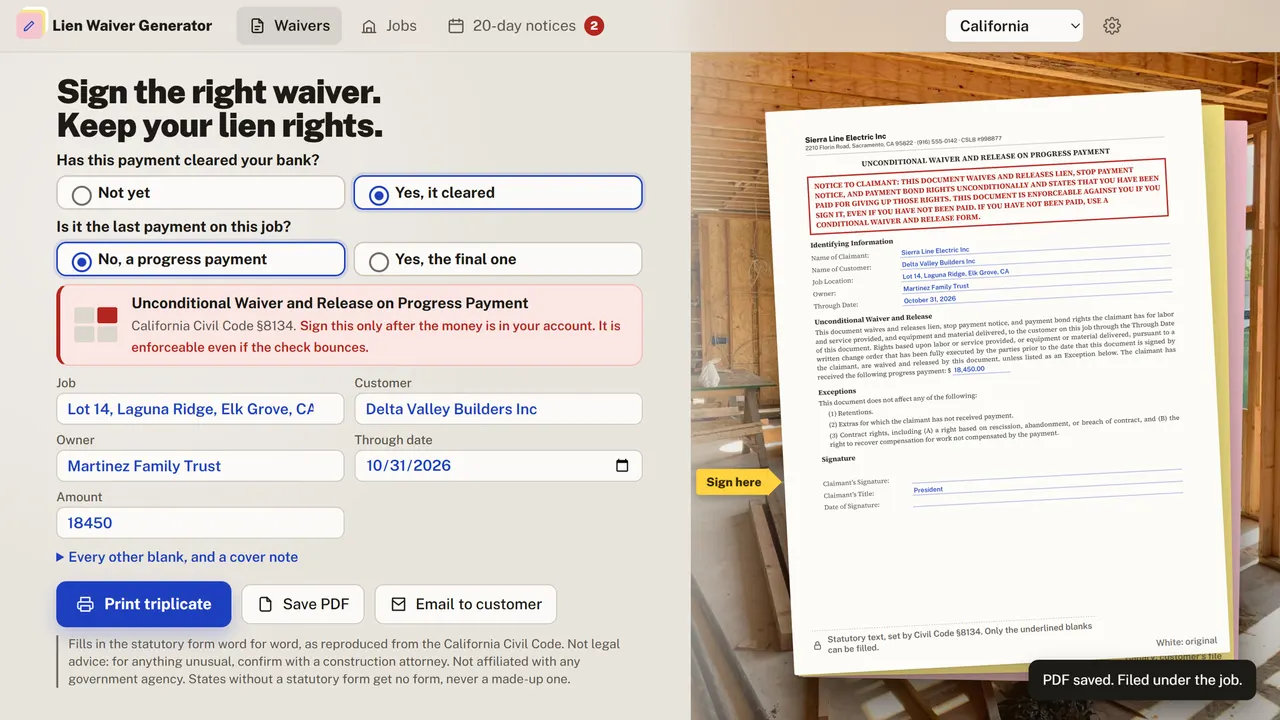
    The unconditional forms are enforceable even if the check bounces. The app says so in red before you print one.

The Unconditional Waiver and Release on Progress Payment, with its Notice to Claimant boxed in red and a caution to sign only after the money has cleared.

Every job, every waiver

Each waiver you print or save is filed under its job. Click a paper chip to open the PDF and reprint it; see what is still owed on conditional waivers.

  • 20-day notice deadlines

    With Pro, the 20-day preliminary notice deadline is counted from your first day on site and turns red when it is days away.

How it works

Three steps, no setup

  1. Answer two questions

    Cleared or not, progress or final.

  2. Fill in the blanks

    Job, customer, owner, through date, check and amount.

  3. Print, save or email

    Three copies, a PDF, or a draft email; filed under the job.

Pricing

Free to use, Pro when you need more

Get it free from the Microsoft Store. Pro is a one-time purchase on this website.

Free

$0

  • All four of California's statutory waiver forms
  • Print in triplicate, save a PDF, email to the customer
  • Your letterhead and a saved signature
  • A register of up to two jobs with their waivers
Get it from Microsoft

Pro: everything in Free, plus

$14.99 one-time

  • Any number of jobs in the register
  • 20-day preliminary notice deadlines for every job
  • File a general contractor's own waiver PDF under the job
  • Export the register as a spreadsheet (CSV)
Buy Pro

Buy Pro here and paste the key into the app's Settings. It works on up to 3 PCs, with a 14-day refund, no questions asked.

What's new

Version 1.3.0

  • After you've used the app a few times, one quiet line under a result offers to open the Microsoft Store's rating box. It asks once, at most twice, never interrupts your work, and you can simply carry on.
  • Settings has a new "Report a problem" form: tell us what went wrong, and leave your email if you want an answer.
  • You can turn on crash reports in Settings to help us fix problems faster. They are off unless you turn them on, and file paths, email addresses and your user name are removed before anything is sent.

Version 1.2.0

  • "Get Pro" at the top of the window shows what Pro adds and its price, and takes your license key right there, without opening Settings. During a sale, it shows the sale price.

Version 1.0.0

  • First release: California's four statutory lien waiver forms, filled in word for word, printed in triplicate or saved as a PDF.
  • Every waiver is filed under its job, with what is still owed and the 20-day notice deadline.

FAQ

Questions

Something not answered here? Ask us and you'll get a reply.

Ask a question
Which waiver do I sign?

If the check has not cleared yet, a conditional waiver (§8132 for a progress payment, §8136 for the final one). Only once the money is in your account, an unconditional waiver (§8134 or §8138). The unconditional forms are enforceable even if the check bounces.

Is the wording exactly the statute?

Yes. The text of each form is reproduced from California Civil Code §§8132, 8134, 8136 and 8138 as published on leginfo.legislature.ca.gov and cannot be edited. California enforces a waiver only if it follows the statutory form, so the app fills in the blanks and nothing else.

Can I edit the wording or use a general contractor’s own form?

No. If a GC sends its own waiver, the app can't edit it; have a construction attorney review it if its wording differs from the statutory form. With Pro you can file the GC's PDF under the job so your register stays complete.

Does it do other states?

Not yet. This version fills in California's forms only. A state without a statutory form gets no form, never a made-up one.

Does it print the 20-day preliminary notice?

No. California lists what the preliminary notice must contain (Civil Code §§8102 and 8202) but gives no single fill-in form, so the app keeps the deadline for each job and leaves the notice itself to you.

Where is my data kept?

On your PC, in the app’s own data folder: your jobs, the PDFs of the waivers you made, your letterhead and signature. There is no account and no server.

What does Pro cost?

$14.99, once. Buy it on this website and paste the license key into Settings. It works on up to 3 PCs, and there is a 14-day refund, no questions asked.
Get Lien Waiver Generator

Fill in California's four statutory lien waiver forms word for word, print them in triplicate or save a PDF, and keep every job's waivers and 20-day notice deadlines on your PC.

Fills in the statutory forms word for word, as reproduced from the California Civil Code. Not legal advice: for anything unusual, confirm with a construction attorney. Not affiliated with any government agency.

© 2026 CAO Labs