Get help

For importers and sellersHTS Code Lookup, free online

HTS code lookup for US imports

Describe what you import or type a code, and see where it sits in the Harmonized Tariff Schedule, section by section down to the 10-digit line, with the duty for its origin and value: the general rate, Section 301 on products of China and the fees. Check a whole product list with Pro.

  • Free, runs in your browser
  • No account needed
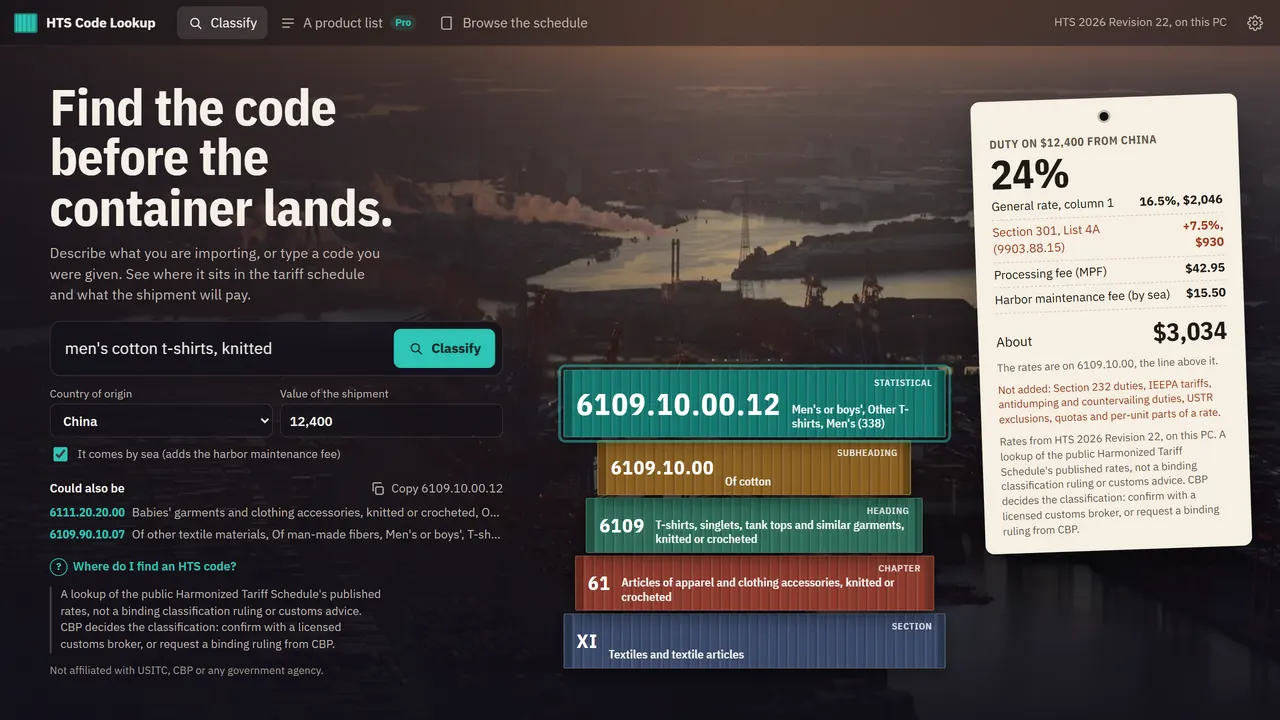
HTS Code Lookup classifying men's cotton T-shirts, knitted: over a container port at sunrise, five painted containers are stacked with section XI, chapter 61, heading 6109, subheading 6109.10.00 and the statistical line 6109.10.00.12 on top, and a paper duty tag beside them reads 24% for a shipment from China: the 16.5% general rate, Section 301 List 4A at 7.5%, the processing and harbor fees, and the total.

Features

What it does

HTS Code Lookup classifying men's cotton T-shirts, knitted: over a container port at sunrise, five painted containers are stacked with section XI, chapter 61, heading 6109, subheading 6109.10.00 and the statistical line 6109.10.00.12 on top, and a paper duty tag beside them reads 24% for a shipment from China: the 16.5% general rate, Section 301 List 4A at 7.5%, the processing and harbor fees, and the total.

The code, built like a container stack

Section, chapter, heading, subheading and the 10-digit statistical line, each a container on the pile with its own words from the schedule.

  • A duty tag for your shipment

    Pick the origin and type the value: the general or column 2 rate, Section 301 on products of China with its List, the processing fee and the harbor fee, added up.

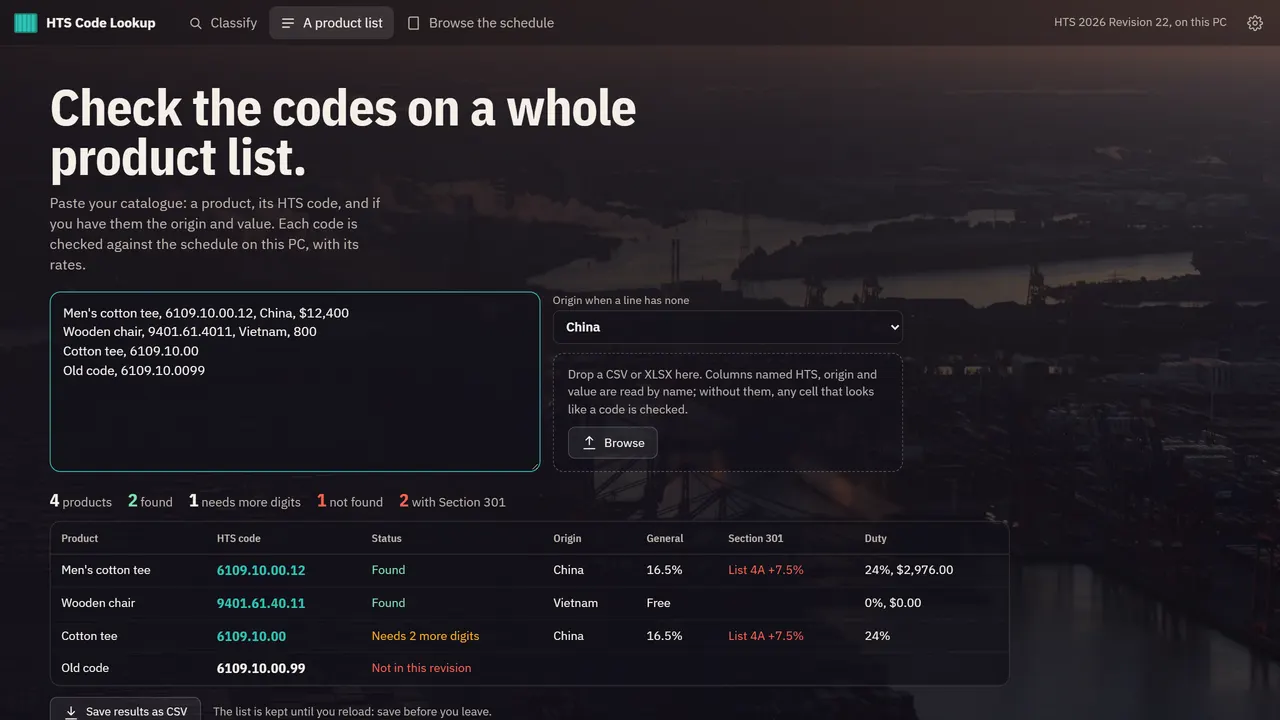
A product list checked at once: each product with its HTS code, found or needing more digits or not in this revision, its origin, general rate, Section 301 and the duty on its value.

Could also be

Classification is a choice between neighbours, so the nearby codes are listed with the words that set them apart.

  • The whole schedule, on your PC

    Every line of the USITC's current revision is in the app, so searching works with the Wi-Fi off and nothing you type leaves your PC.

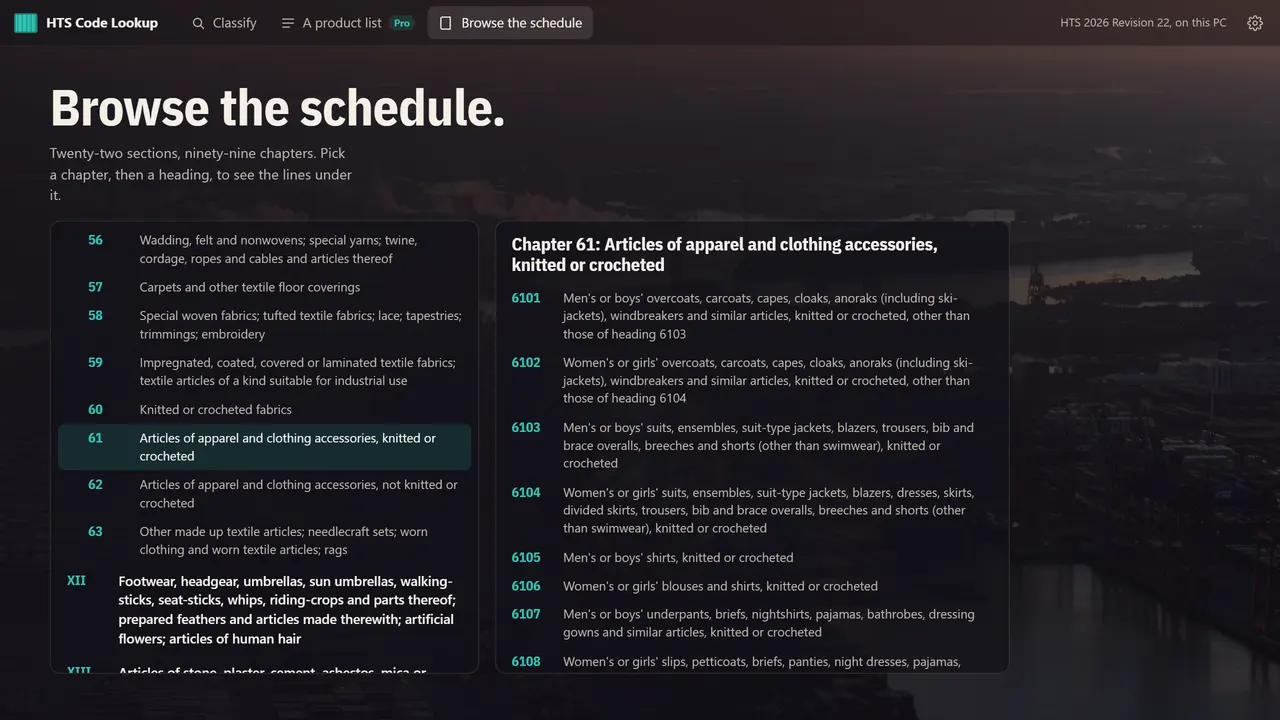
Browsing the schedule: the 22 sections with their chapters on the left, and chapter 61's headings on the right.

Pro: a product list

Paste or drop your catalogue. Each code is checked against the current revision, with its rates for the origin and the duty on its value; save the result as CSV.

  • Says what it leaves out

    Section 232, IEEPA tariffs, antidumping and countervailing duties and USTR exclusions are named on the tag as not added, never guessed.

How it works

Three steps, no setup

  1. Describe the product

    Or type the code you were given.

  2. Read the stack

    Every level of the code, top to bottom.

  3. Check the tag

    The rate and the duty for your origin and value.

Pricing

Free to use, Pro when you need more

Get it free from the Microsoft Store. Pro is a one-time purchase on this website.

Free

$0

  • Unlimited searches by words or by code
  • The stack, from section to the 10-digit line
  • The duty tag: general rate, Section 301, MPF and HMF
  • Browse all 22 sections and 99 chapters
  • Check the first 5 lines of a product list
Get it from Microsoft

Pro: everything in Free, plus

$14.99 one-time

  • Product lists up to 5,000 lines a run
  • CSV or XLSX catalogues, columns found by name
  • Rates per origin and duty per line; save as CSV
  • One payment, up to 3 PCs
Buy Pro

Buy Pro here and paste the key into the app's Settings. It works on up to 3 PCs, with a 14-day refund, no questions asked.

What's new

Version 1.1.0

  • Pro adds a rates and landed-cost panel to the duty tag: the schedule's general, special-program and column 2 rates side by side, and a landed-cost estimate (goods, duty, processing fee, harbor fee and the freight you type), clearly marked as an estimate.
  • Settings has a new "Report a problem" form: tell us what went wrong, and leave your email if you want an answer.
  • You can turn on crash reports in Settings to help us fix problems faster. They are off unless you turn them on, and file paths, email addresses and your user name are removed before anything is sent.

Version 1.0.0

  • First release: describe what you import or type a code, and see where it sits in the Harmonized Tariff Schedule, section by section down to the 10-digit line. The whole schedule is on your PC, so it works with the Wi-Fi off.
  • A duty tag for the origin and value you give: the general rate (or column 2), Section 301 on products of China, the processing fee and the harbor fee. What it doesn't add is said on the tag.
  • "Could also be" shows the neighbouring codes, because classification is a choice between them.
  • A product list: paste or drop a catalogue and see each line's code checked, with its rates. Pro checks the whole list, reads CSV or XLSX and saves the results as CSV.

FAQ

Questions

Something not answered here? Ask us and you'll get a reply.

Ask a question
Where do I find the HTS code for my product?

On the commercial invoice or packing list from your supplier; on CBP Form 7501, the entry summary your customs broker files (column 27); from your broker, who can tell you the code used on your last entry of the same product; or in CBP's past binding rulings, searchable in CROSS at rulings.cbp.gov.

Where do the rates come from?

From the Harmonized Tariff Schedule of the United States that the U.S. International Trade Commission publishes at hts.usitc.gov. The app shows which revision it has. Section 301 comes from the China Tariffs list the USITC publishes with the schedule, and the fees from CBP.

Does it include the newest tariffs?

It includes the general and column 2 rates and Section 301 on products of China. It does not add Section 232 duties, IEEPA tariffs, antidumping or countervailing duties, or USTR exclusions; these change often and depend on facts the code alone does not show, so the tag names them as not added. Your customs broker can tell you which apply.

What is the difference between an HTS code and an HS code?

The first six digits are the international Harmonized System, the same in every country. The United States adds two digits for the rate of duty and two more for statistics, making the 10-digit HTS number you report on an entry.

Is this a binding classification?

No. It is a lookup of the published schedule. CBP decides the classification; for certainty, ask a licensed customs broker or request a binding ruling from CBP.

Is what I type sent anywhere?

No. The schedule is downloaded from our website once and searched in your browser. A product list you paste or drop is read in your browser and never uploaded.

Get HTS Code Lookup

Describe what you import or type a code, and see where it sits in the Harmonized Tariff Schedule, section by section down to the 10-digit line, with the duty for its origin and value: the general rate, Section 301 on products of China and the fees. Check a whole product list with Pro.

A lookup of the public Harmonized Tariff Schedule's published rates, not a binding classification ruling or customs advice. CBP decides the classification: confirm with a licensed customs broker, or request a binding ruling from CBP. Schedule from the U.S. International Trade Commission (hts.usitc.gov). Not affiliated with USITC, CBP or any government agency.

© 2026 CAO Labs