Get help

ProductivityGrammar Checker - Offline, free online

Offline grammar and spell checker for English

Paste your text or open a Word file and see every mistake marked like an editor would mark it, with the reason. It checks on your PC, works offline and sends nothing anywhere. English only. Free, with Word files of any length in Pro.

  • Free, runs in your browser
  • No account needed
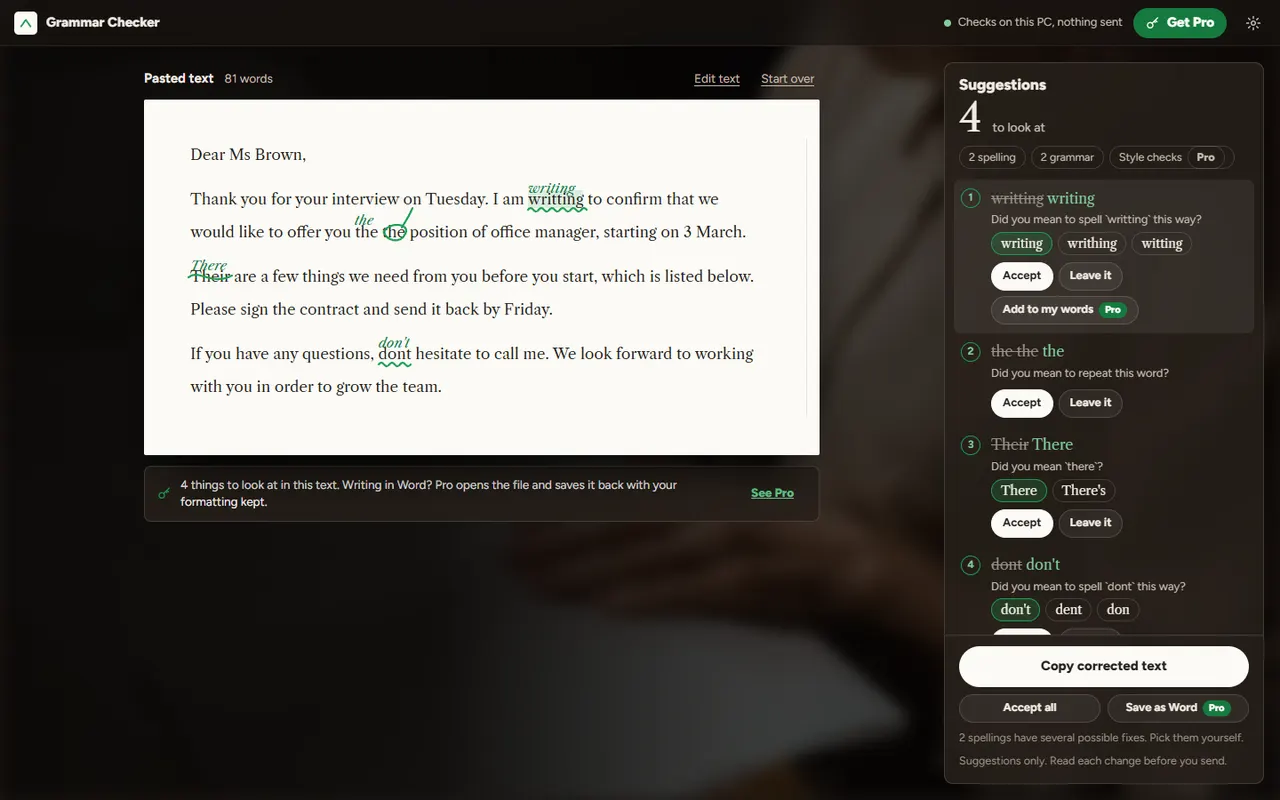
Grammar Checker showing a letter on a white page with green proofreading marks: a wavy line under a misspelling, a loop through a repeated word, a strike-through with the fix written above, and a panel listing each suggestion.

Who it's for

For people who write letters, contracts, reports and emails in English and want a second pair of eyes that stays on their own PC: office staff, HR, small-business owners, students, lawyers’ assistants and anyone who cannot paste a draft into a website. English only.

Features

What it does

Grammar Checker showing a letter on a white page with green proofreading marks: a wavy line under a misspelling, a loop through a repeated word, a strike-through with the fix written above, and a panel listing each suggestion.

Marked like an editor would

A wavy line under a misspelling, a loop through a repeated word, a caret where a word is missing, a strike-through with the fix written above. The marks are drawn on your own text, one by one.

  • Every suggestion says why

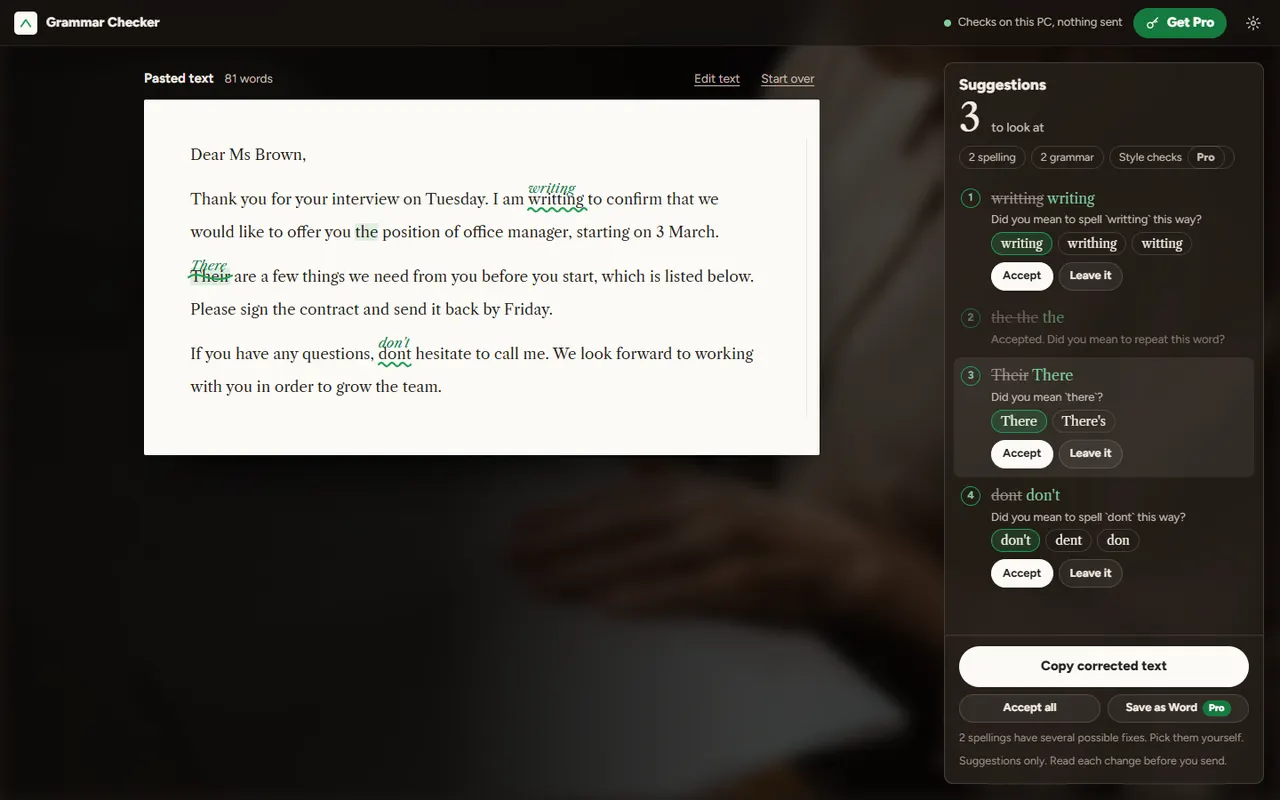
    Each one comes with its reason in plain words and the other possible fixes. You decide: Accept it or Leave it, then copy the corrected text.

One suggestion selected in the panel: the flagged word struck through and the fix beside it, the reason in a sentence, the other possible fixes, and Accept and Leave it buttons.

Nothing leaves your PC

The checker runs inside the app. Your contract, HR letter or draft is never sent to a server, so it is fine for text you cannot paste into a website.

  • Works offline

    After the first load the app and its checker are kept on your PC. No internet needed to check.

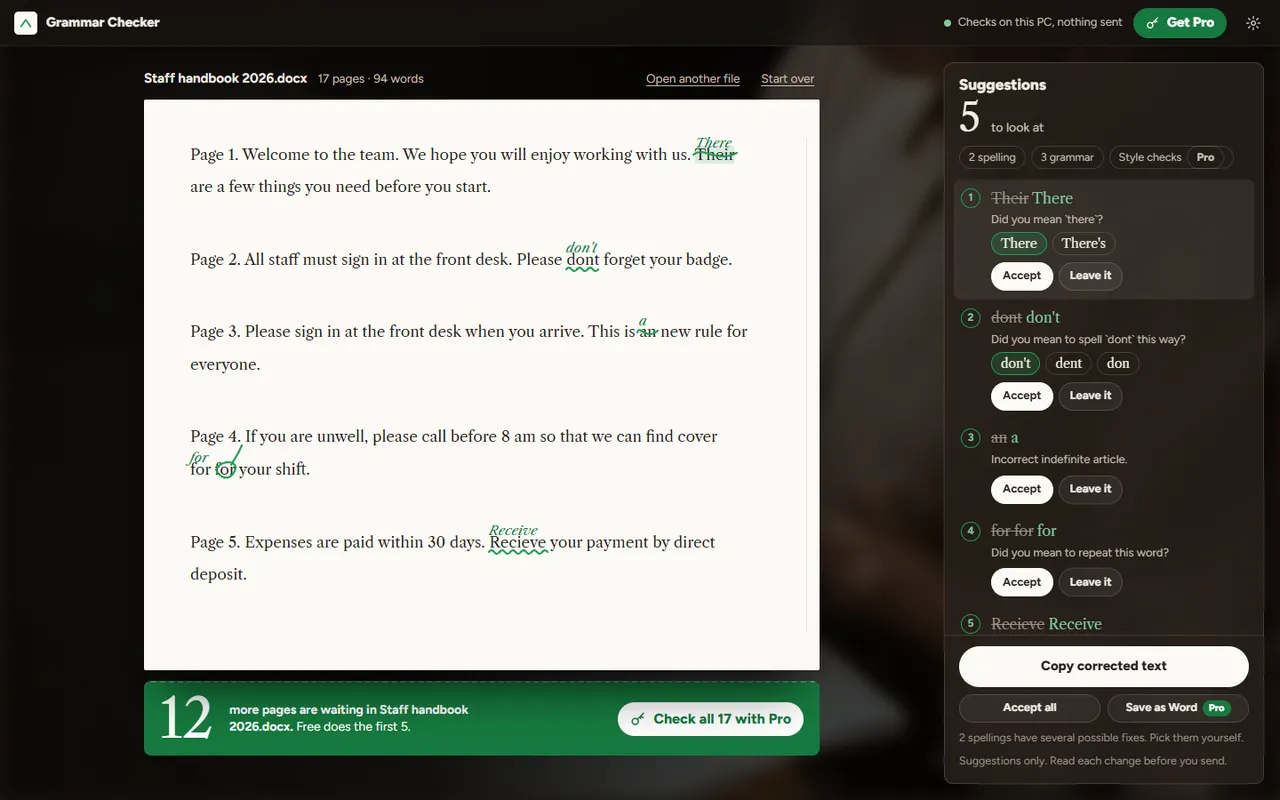
A Word file, Staff handbook 2026.docx, opened with its first 5 pages checked and marked, and a green block saying 12 more pages are waiting.

Word files too

Open a Word (.docx) file and check it. Free checks the first 5 pages. Pro checks any length and saves it back as .docx with your formatting kept.

  • English only, said plainly

    It checks English and nothing else. Choose American, British, Canadian or Australian spelling. It suggests changes; it does not promise your text is free of errors.

How it works

Three steps, no setup

  1. Paste or open

    Paste your text, or open a Word file, or drop it on the window.

  2. Watch it marked

    The marks are drawn on the page in reading order while the count climbs.

  3. Accept or leave

    Read each reason, accept the fix or leave it, then copy the text or save the Word file.

Pricing

Free to use, Pro when you need more

Get it free from the Microsoft Store. Pro is a one-time purchase on this website.

Free

$0

  • Paste or type any amount of text
  • Every suggestion with its reason
  • Accept, Leave it, copy the corrected text
  • The first 5 pages of a Word (.docx) file
  • American, British, Canadian or Australian spelling
  • Works offline; nothing is uploaded
Get it from Microsoft

Pro: everything in Free, plus

$9.99 one-time

  • Word files of any length
  • Saved back as .docx with your formatting kept
  • Your own word list: names, products and terms it leaves alone
  • Style checks: long sentences, passive voice, repeated openings
  • One payment, up to 3 PCs
Buy Pro

Buy Pro here and paste the key into the app's Settings. It works on up to 3 PCs, with a 14-day refund, no questions asked.

What's new

Version 1.0.0

  • First release: paste or type any amount of English, or open a Word (.docx) file, and see what is wrong marked like an editor would mark it: a wavy line under a misspelling, a loop through a repeated word, a caret where a word is missing, a strike-through with the fix written above.
  • Every suggestion says why. Accept it or leave it, then copy the corrected text. Nothing you write leaves your PC, and it works offline.
  • Free checks the first 5 pages of a Word file.
  • Pro checks Word files of any length and saves them back as .docx with your formatting kept, keeps your own word list of names and terms to leave alone, and adds style checks for long sentences, passive voice and repeated openings.
  • English only. Pick American, British, Canadian or Australian spelling in Settings.

FAQ

Questions

Something not answered here? Ask us and you'll get a reply.

Ask a question
Is my text uploaded?

No. The checker is a program that runs inside the app on your PC. Your text and your Word files are never sent anywhere.

Does it work offline?

Yes, after the first load. The app and its checker (about 20 MB) are kept on your PC.

Which languages does it check?

English only. It does not check other languages, and text in another language is marked as misspelled. You can choose American, British, Canadian or Australian spelling in Settings.

How good is it?

It is a rule-based checker, not an AI that rewrites your work. It catches common spelling, grammar, punctuation and wording mistakes and says why. It can miss things and sometimes suggests a wrong word, which is why it only suggests and shows the other fixes. Read each change before you send.

What does the free version do with a Word file?

It checks the first 5 pages in full. Word does not store a page count in the file, so a file not saved by Word is counted at about 450 words a page. Pro checks every page.

Does saving as Word keep my formatting?

Yes, in Pro. Each accepted fix is written into the text it replaces, so fonts, bold, tables, images, headers and styles stay as they were. Only the changed words are touched.

What is the word list?

A Pro list of names, products and terms that should never be marked as misspelled. It stays on your PC.
Get Grammar Checker - Offline

Paste your text or open a Word file and see every mistake marked like an editor would mark it, with the reason. It checks on your PC, works offline and sends nothing anywhere. English only. Free, with Word files of any length in Pro.

English only. It suggests changes and does not promise your text is error-free: read each change before you send.

© 2026 CAO Labs