Get help

BusinessE-Invoice Viewer, free online

XRechnung, ZUGFeRD and Factur-X viewer

Open the e-invoice your supplier sent, an XML file or a ZUGFeRD PDF, and read it as a normal invoice. See what the file claims to be, whether the amounts add up, save it as a PDF or print it. Free, and nothing is uploaded. Open a whole folder with Pro.

  • Free, runs in your browser
  • No account needed
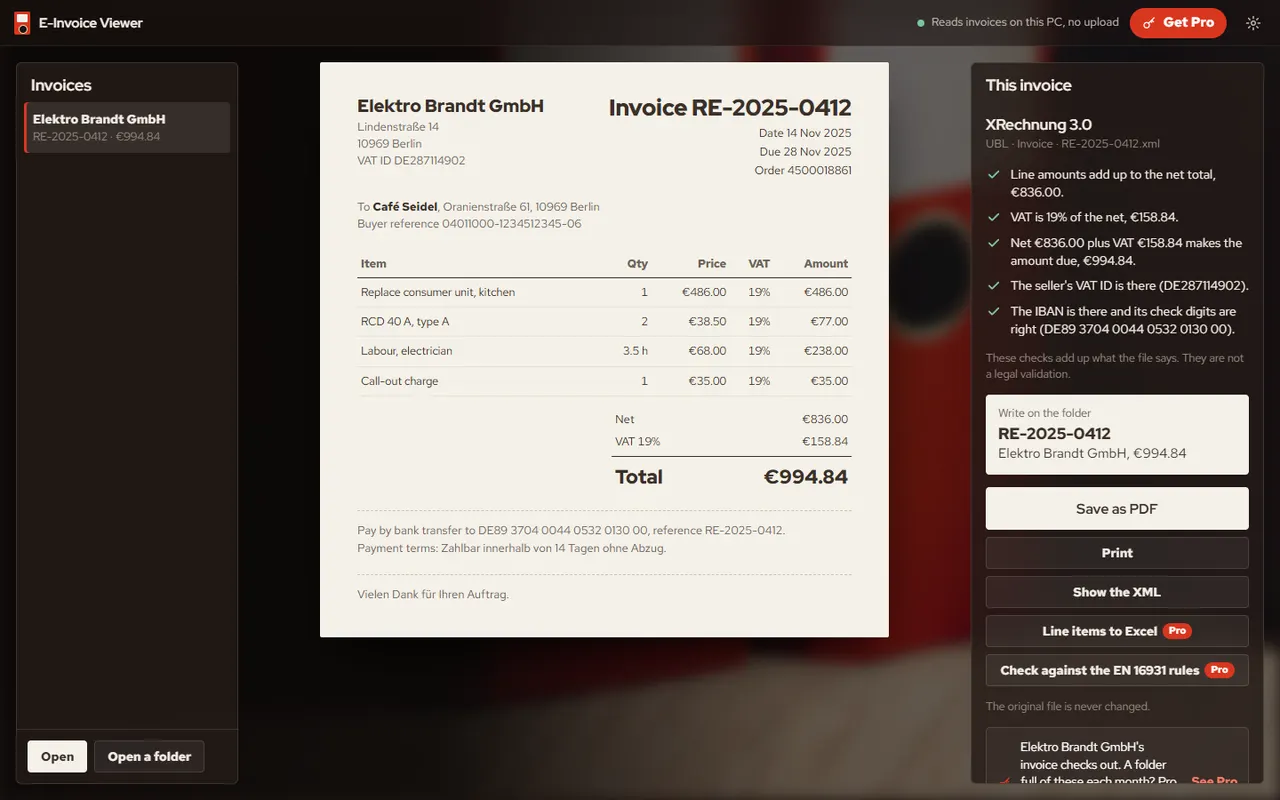
E-Invoice Viewer showing an XRechnung 3.0 invoice as a paper invoice over a desk with red binders: the seller, the lines, the VAT and the total, and a panel that says the amounts add up.

Who it's for

For bookkeepers, small businesses, assistants and anyone in Germany, France or the rest of the EU who received an e-invoice (E-Rechnung, facture électronique) and cannot open the XML or does not trust the PDF. In English, German and French.

Features

What it does

E-Invoice Viewer showing an XRechnung 3.0 invoice as a paper invoice over a desk with red binders: the seller, the lines, the VAT and the total, and a panel that says the amounts add up.

Any e-invoice, as a normal invoice

XRechnung and Peppol in UBL, XRechnung and ZUGFeRD and Factur-X in CII. The XML is turned into the paper invoice you expected: seller, buyer, lines, VAT, totals and how to pay.

  • Inside a PDF too

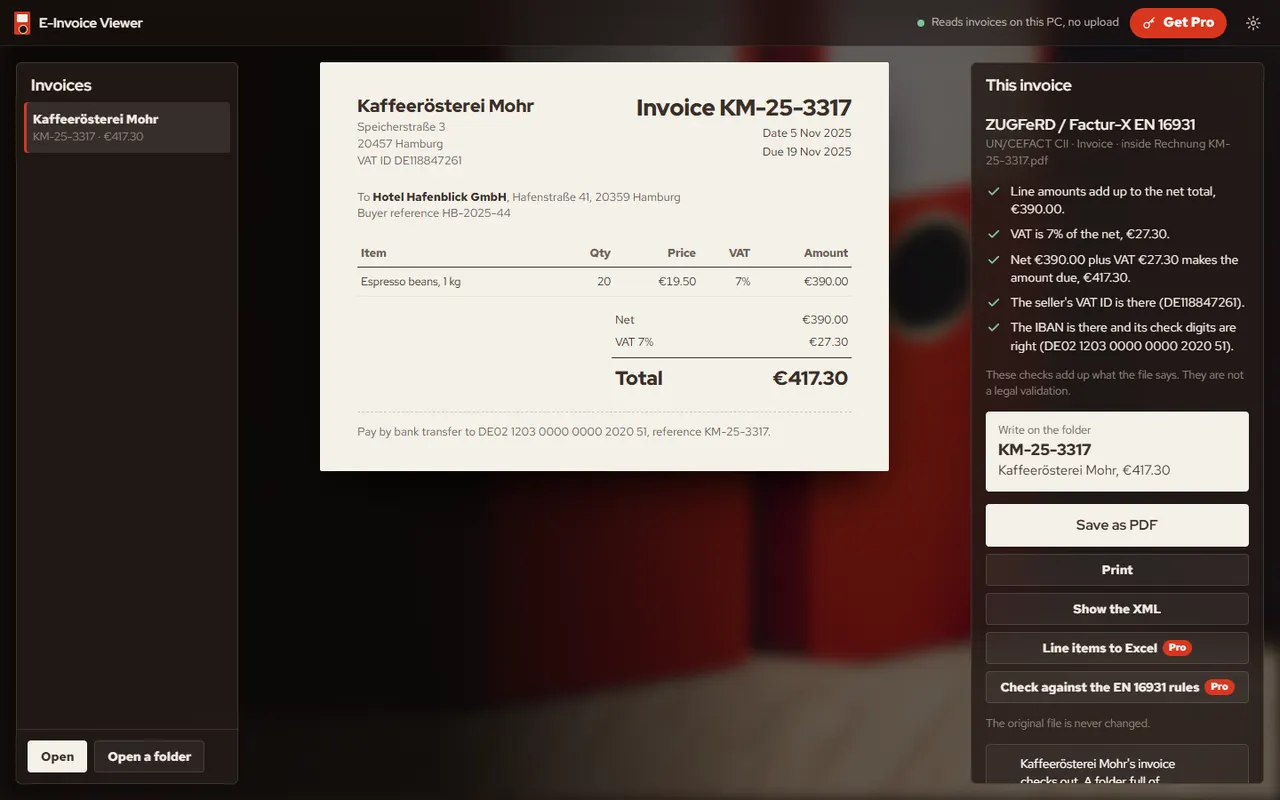
    ZUGFeRD and Factur-X PDFs carry the invoice inside. Open the PDF and the invoice is lifted out of it, with the format and profile it claims named ("XRechnung 3.0", "Factur-X BASIC").

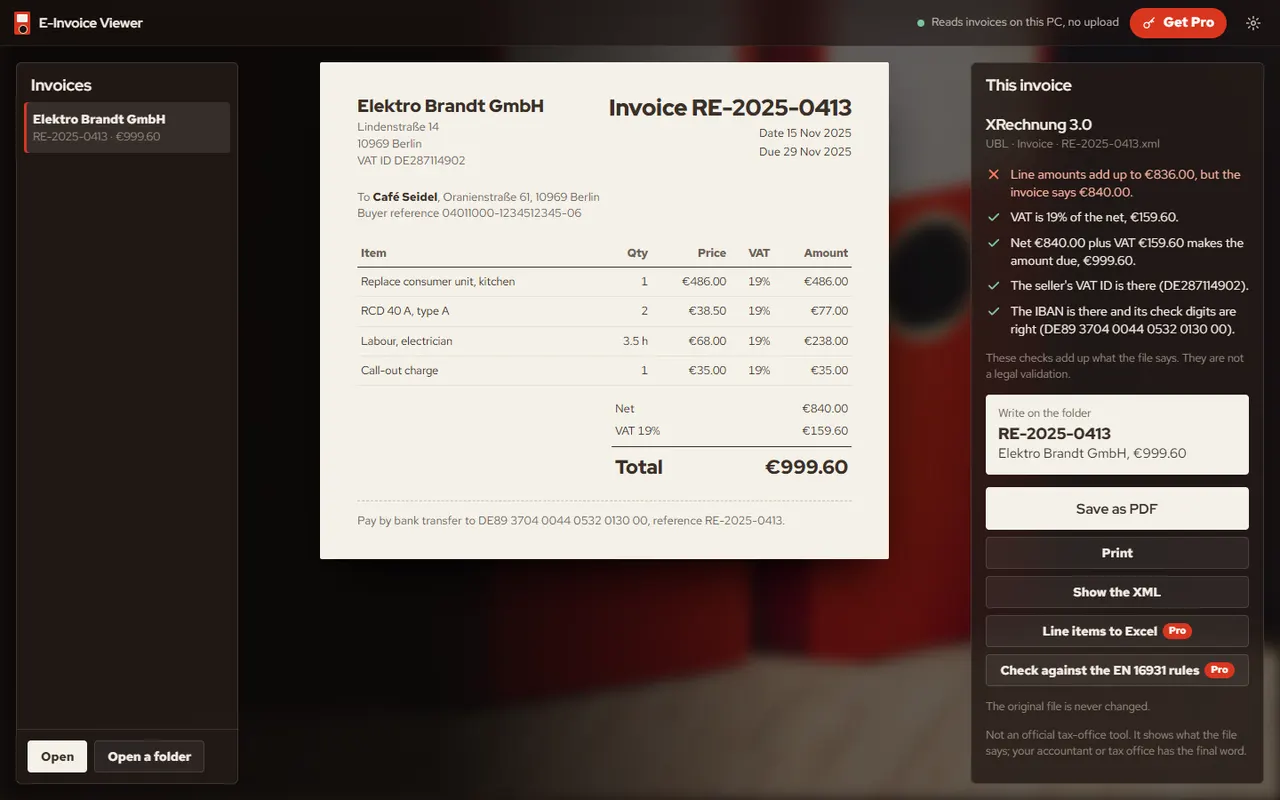
An invoice whose line amounts add up to €836.00 while the file says €840.00: the check says so in plain words, in red, above the checks that pass.

Does it add up?

Line amounts against the net total, VAT per rate, the amount due, the seller’s VAT ID and the IBAN’s check digits. A wrong figure is shown plainly: "Line amounts add up to €836.00, but the invoice says €840.00."

  • Never a verdict

    It shows what the file says. It never calls a file legally valid or invalid: your accountant or tax office has the final word.

A ZUGFeRD PDF opened: the invoice that was hiding inside it is read out and shown, with its format and profile named, ready to save as a PDF or print.

Save, print, look behind it

Save the invoice as a PDF, print it, or show the XML it came from. The original file is never changed.

  • Pro: a whole folder

    Open a whole folder, save every invoice as its own PDF, put every line item of every invoice into one Excel sheet and check each file against the core EN 16931 business rules.

How it works

Three steps, no setup

  1. Open the file

    The .xml or the PDF your supplier sent, or drop it on the window.

  2. Read the invoice

    The tags fall away and the values settle into a paper invoice.

  3. Check and keep it

    See what adds up, then save it as a PDF or print it.

Pricing

Free to use, Pro when you need more

Get it free from the Microsoft Store. Pro is a one-time purchase on this website.

Free

$0

  • Open one invoice at a time: XRechnung, ZUGFeRD, Factur-X, Peppol, UBL and CII
  • The invoice as a paper invoice, with its format and profile named
  • Checks: line amounts, VAT, amount due, seller VAT ID, IBAN check digits
  • Save as PDF, print, show the XML
  • The first 5 invoices of a folder
  • English, German and French
Get it from Microsoft

Pro: everything in Free, plus

$9.99 one-time

  • Open a whole folder, not just 5 invoices
  • Save every invoice as its own PDF, into a folder or one zip file
  • Every line item of every invoice in one Excel sheet
  • A full check of each file against the core EN 16931 business rules
  • One payment, up to 3 PCs
Buy Pro

Buy Pro here and paste the key into the app's Settings. It works on up to 3 PCs, with a 14-day refund, no questions asked.

What's new

Version 1.0.0

  • First release: open an XRechnung, ZUGFeRD, Factur-X or Peppol invoice (an .xml file, or a PDF that carries one) and read it as a normal invoice. Nothing is uploaded.
  • It says what the file claims to be ("XRechnung 3.0", "Factur-X BASIC", "Peppol BIS Billing 3.0") and checks that the line amounts, the VAT and the amount due add up, that the seller's VAT ID is there and that the IBAN's check digits are right. A wrong figure is shown plainly.
  • Save an invoice as a PDF, print it, or look at the XML behind it.
  • Open a folder: the first 5 invoices open, and the rest are counted so you know what is waiting.
  • In English, German and French, chosen from your Windows language and switchable in Settings.
  • Pro opens a whole folder, saves every invoice as its own PDF, puts every line item of every invoice into one Excel sheet and checks each file against the core EN 16931 business rules.

FAQ

Questions

Something not answered here? Ask us and you'll get a reply.

Ask a question
Where do I find the file?

It is the .xml attached to the e-mail from your supplier, or a PDF named like the invoice. ZUGFeRD and Factur-X PDFs carry the invoice inside; an ordinary PDF is only a picture of an invoice and has nothing to read.

Which formats does it read?

UBL 2.1 invoices and credit notes (XRechnung UBL, Peppol BIS Billing 3.0) and UN/CEFACT Cross Industry Invoice (XRechnung CII, ZUGFeRD 2.x, Factur-X). It names the format and profile the file says it is, from the specification identifier inside it.

Is my invoice uploaded?

No. The file is read by your browser or the installed app, on your PC. Nothing about the invoice is sent anywhere.

Does it tell me whether the invoice is valid?

No. It adds up what the file says and shows what is missing or wrong, in plain words. It is not an official validator and is not a statement that a file is legally valid or invalid. Your accountant or tax office has the final word.

What do the checks cover?

That the line amounts add up to the net total, that the VAT at each rate matches the net amount, that the net plus VAT is the amount due, that the seller’s VAT ID is there, and that the IBAN has correct check digits. Pro adds the core EN 16931 business rules: mandatory fields, the BR-CO arithmetic and, for XRechnung, the contact and buyer-reference rules.

Does it work offline?

Yes, after the first load. The app and its PDF reader are kept on your PC.

Which languages?

English, German and French, chosen from your Windows language. You can change it in Settings.
Get E-Invoice Viewer

Open the e-invoice your supplier sent, an XML file or a ZUGFeRD PDF, and read it as a normal invoice. See what the file claims to be, whether the amounts add up, save it as a PDF or print it. Free, and nothing is uploaded. Open a whole folder with Pro.

Not an official tax-office tool. It shows what the file says; your accountant or tax office has the final word.

© 2026 CAO Labs