Get help

BusinessChange Order for Windows

Construction change order app for Windows

Price a change order, see what it does to the contract sum and the finish date, and get it signed before you build it: on your PC, by email or on paper.

  • Free in the Microsoft Store
  • No account needed
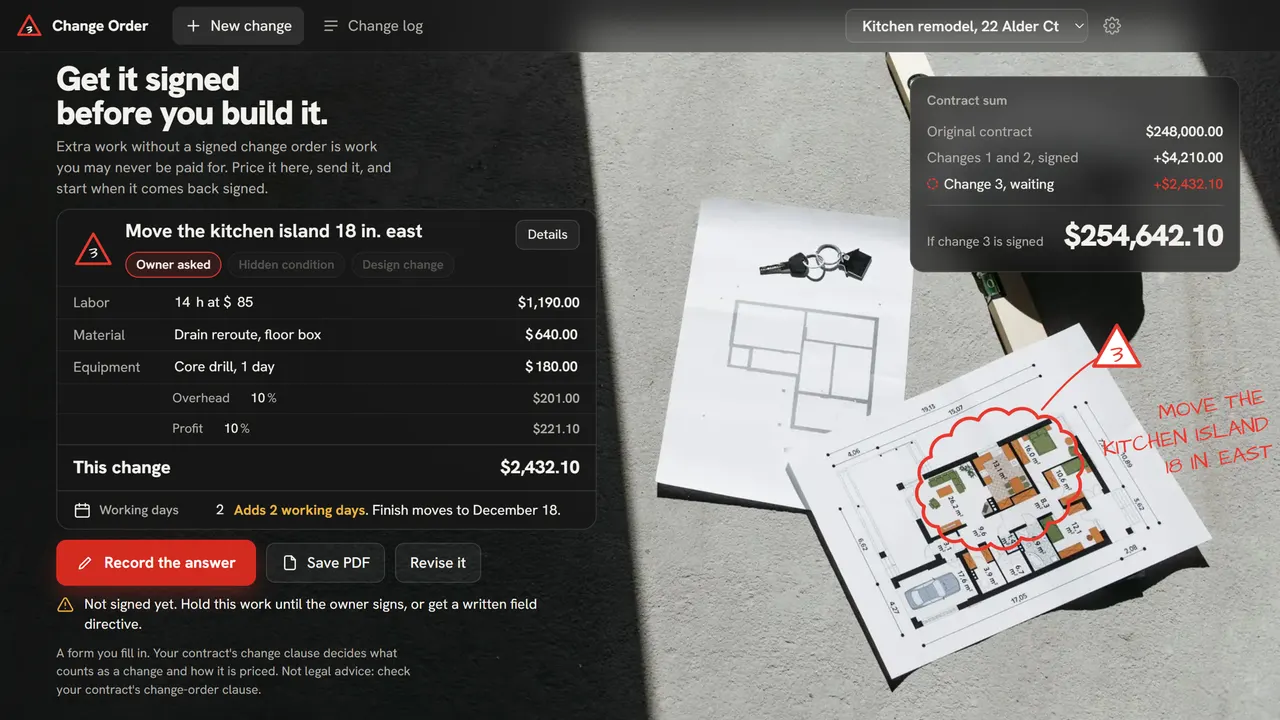
Change Order: change 3, moving a kitchen island 18 inches east, priced with labor, material, equipment, overhead and profit; the plan on the slab is circled with a red revision cloud and tagged with delta 3; the contract sum if change 3 is signed is $254,642.10.

Features

What it does

Change Order: change 3, moving a kitchen island 18 inches east, priced with labor, material, equipment, overhead and profit; the plan on the slab is circled with a red revision cloud and tagged with delta 3; the contract sum if change 3 is signed is $254,642.10.

Price it on the spot

Labor hours at your rate, material and equipment, then overhead on cost and profit on top. The total is right to the cent.

  • The contract sum, always

    The original contract, the signed changes, and what it will be if this one is signed. Changes still waiting are kept apart and never counted.

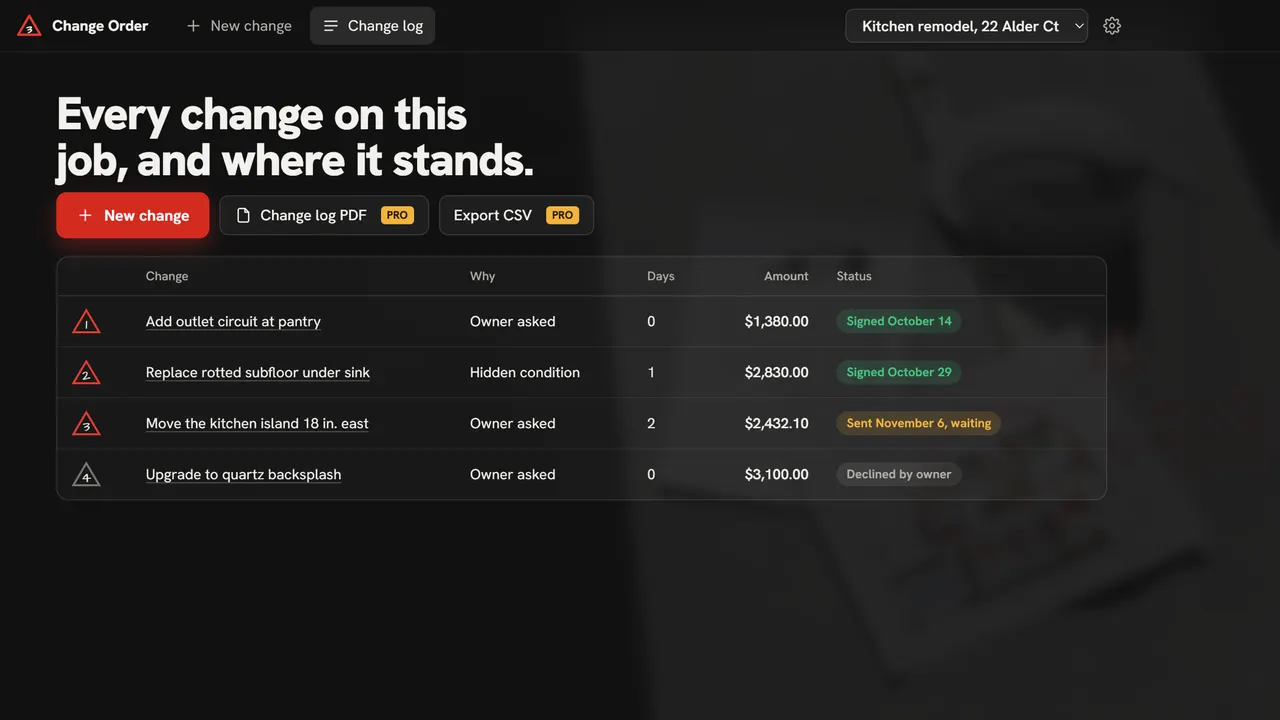
The change log: four changes with their reason, days, amount and status, two signed, one waiting and one declined.

The schedule too

"Adds 2 working days. Finish moves to December 18." Counted in working days from your scheduled finish and the changes already signed.

  • Get it signed before you build it

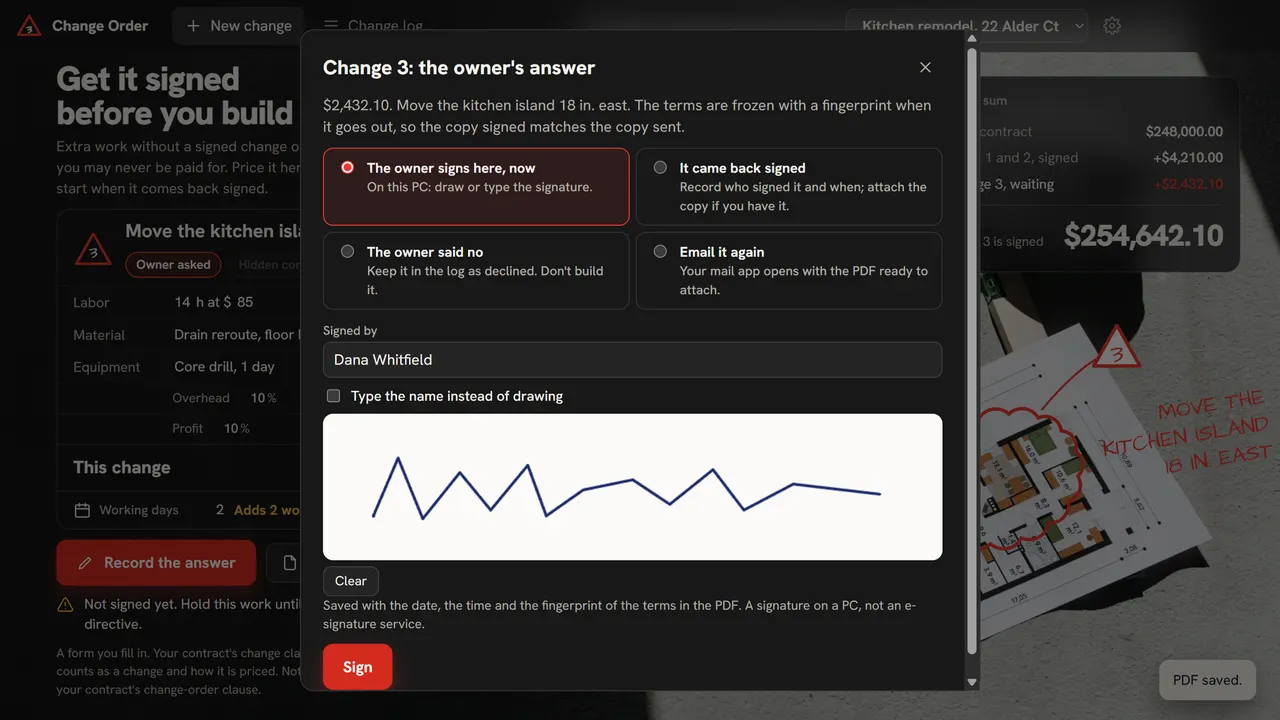
    The owner signs on your PC with a pen or a finger, or your mail app opens with the PDF ready, or print it to sign on paper. Until it is signed, the app tells you to hold the work.

Getting a change signed: the owner signs on the PC with a pen, or it is emailed, or it is recorded when it comes back signed.

The copy sent matches the copy signed

When a change goes out its terms are frozen and a fingerprint is printed on the PDF. Revise it and the fingerprint changes.

  • Redline the plan

    Add a photo or screenshot of the plan sheet and drag a box around the change: the revision cloud and the delta are drawn on it and printed.

How it works

Three steps, no setup

  1. Price the change

    Labor, material, equipment, overhead and profit, and the working days it adds.

  2. Get it signed

    On your PC, by email, or on paper.

  3. Build it, and keep the log

    Every change and the contract sum, on one page with Pro.

Pricing

Free to use, Pro when you need more

Get it free from the Microsoft Store. Pro is a one-time purchase on this website.

Free

$0

  • One job with any number of change orders
  • Pricing, time and materials, the schedule and the contract sum
  • Sign on your PC, email or print; the PDF with its fingerprint
  • The plan sheet with the revision cloud, and the change log
Get it from Microsoft

Pro: everything in Free, plus

$14.99 one-time

  • Any number of jobs
  • The change log as one PDF with the contract sum, for the pay application
  • Export the change log as a spreadsheet (CSV)
Buy Pro

Buy Pro here and paste the key into the app's Settings. It works on up to 3 PCs, with a 14-day refund, no questions asked.

What's new

Version 1.3.0

  • After you've used the app a few times, one quiet line under a result offers to open the Microsoft Store's rating box. It asks once, at most twice, never interrupts your work, and you can simply carry on.
  • Settings has a new "Report a problem" form: tell us what went wrong, and leave your email if you want an answer.
  • You can turn on crash reports in Settings to help us fix problems faster. They are off unless you turn them on, and file paths, email addresses and your user name are removed before anything is sent.

Version 1.2.0

  • "Get Pro" at the top of the window shows what Pro adds and its price, and takes your license key right there, without opening Settings. During a sale, it shows the sale price.

Version 1.0.0

  • First release: price a change with labor, material, equipment, overhead and profit, and see what it does to the contract sum and the finish date.
  • Get it signed on this PC, by email, or on paper; the copy sent and the copy signed carry the same fingerprint.
  • Cloud the change on your own plan sheet, and keep every change on the job in the change log.

FAQ

Questions

Something not answered here? Ask us and you'll get a reply.

Ask a question
Is a signature on my PC legally binding?

Change Order is a form you fill in, not an e-signature service, and this is not legal advice. Whether a change order signed this way counts is decided by your contract's change-order clause and your state's law; check them, or print it and sign on paper.

What is the fingerprint on the PDF?

A SHA-256 hash of the change order’s terms, taken when it goes out. The copy you sent and the copy that comes back signed carry the same fingerprint if nothing in the terms changed. Revising a change gives it a new one.

How are overhead and profit worked out?

Overhead is a percentage of the cost of labor, material and equipment; profit is a percentage of cost plus overhead. Both percentages are yours to set for each change, to match your contract.

Does a waiting change count in the contract sum?

No. The contract sum is the original contract plus the signed changes. A change still waiting is shown apart, as "if it is signed".

Can I use my own plan sheet?

Yes: a photo or a picture of the page (PNG or JPEG). For a PDF sheet, take a screenshot of the part you need (Windows key + Shift + S). Drag a box around what changes and the cloud is drawn.

Where is my data kept?

On your PC, in the app’s own data folder: your jobs, change orders, plan sheets, signatures and the PDFs. There is no account and no server.

What does Pro cost?

$14.99, once. Buy it on this website and paste the license key into Settings. It works on up to 3 PCs, and there is a 14-day refund, no questions asked.

Get Change Order

Price a change order, see what it does to the contract sum and the finish date, and get it signed before you build it: on your PC, by email or on paper.

A form you fill in. Your contract's change clause decides what counts as a change and how it is priced. Not legal advice: check your contract's change-order clause.

© 2026 CAO Labs