Get help

BusinessCAGE Code Lookup, free online

CAGE code lookup for government suppliers

Check a supplier by CAGE code, UEI or company name and read the SAM.gov record as an engraved data plate: whether they are registered and until when, whether they are excluded, and whether they are a small business. Check a whole supplier list with Pro.

  • Free, runs in your browser
  • No account needed
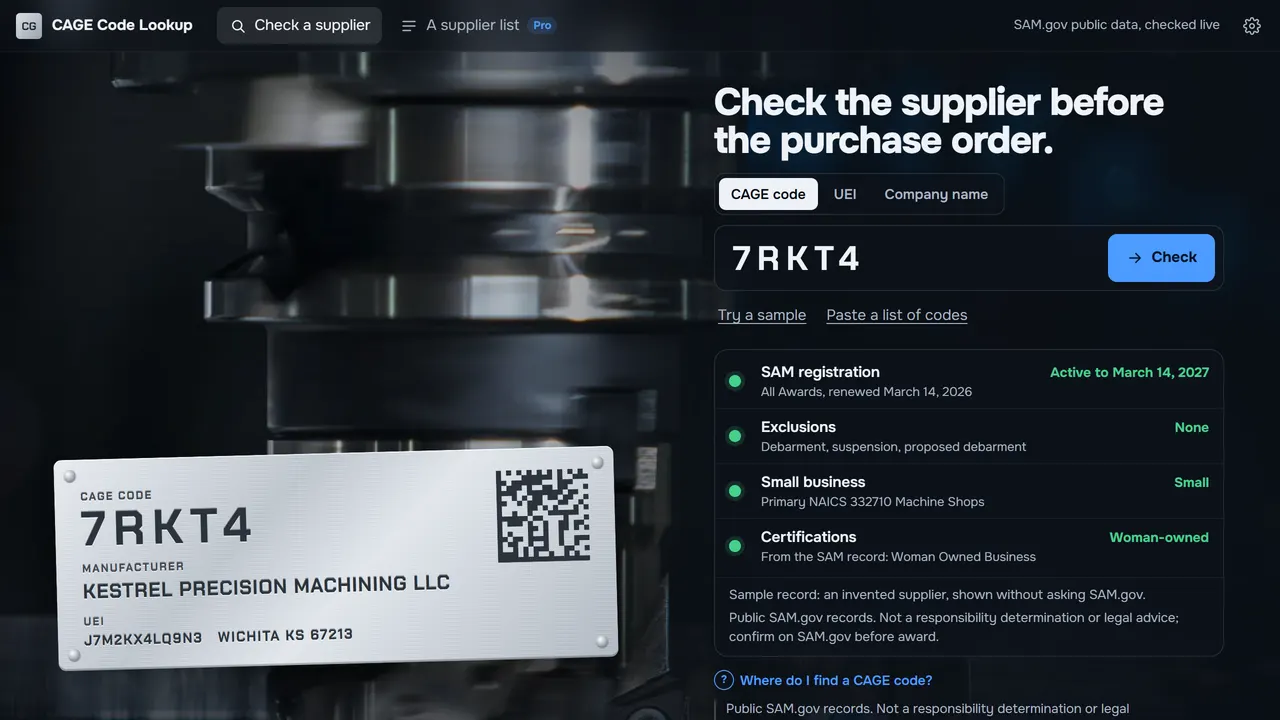
CAGE Code Lookup with the sample supplier: a riveted aluminium data plate engraved with CAGE code 7RKT4, Kestrel Precision Machining LLC and its UEI, over a photo of a milling cutter, and beside it four green checks: SAM registration active, no exclusions, small business, woman-owned.

Features

What it does

CAGE Code Lookup with the sample supplier: a riveted aluminium data plate engraved with CAGE code 7RKT4, Kestrel Precision Machining LLC and its UEI, over a photo of a milling cutter, and beside it four green checks: SAM registration active, no exclusions, small business, woman-owned.

The record, as a data plate

CAGE code, legal business name, UEI and city, engraved line by line like the plate on a part, from the supplier's SAM.gov registration.

  • The checks a buyer makes

    SAM registration and its expiry date, exclusions (debarment, suspension, proposed debarment), small business status for the primary NAICS code, and the certifications in the record.

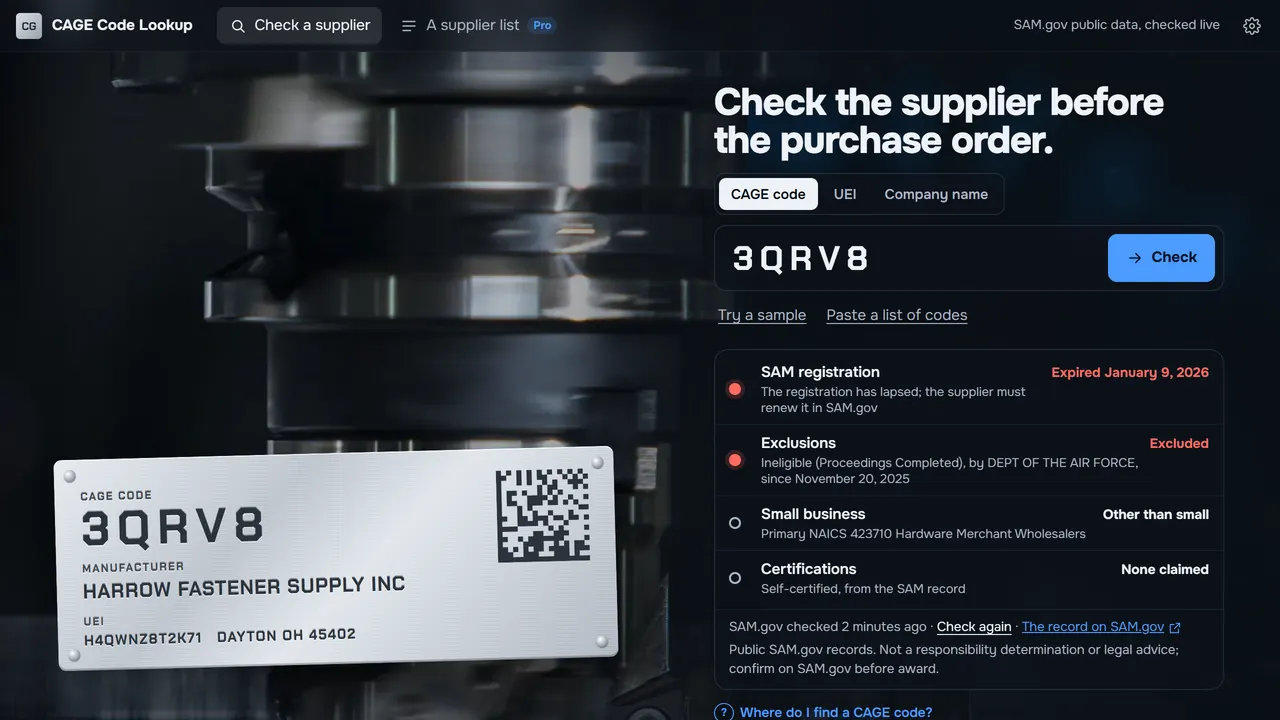
An invented supplier whose SAM registration has expired and who is excluded by the Air Force: the checks are red and name the exclusion type, the agency and the date.

Red where it matters

An expired registration or an exclusion turns red and says why, with the agency and the date. A registration expiring within 60 days is flagged so you can ask for the renewal.

  • By CAGE code, UEI or name

    Type whichever you have. A company name lists the matching registrations; pick one.

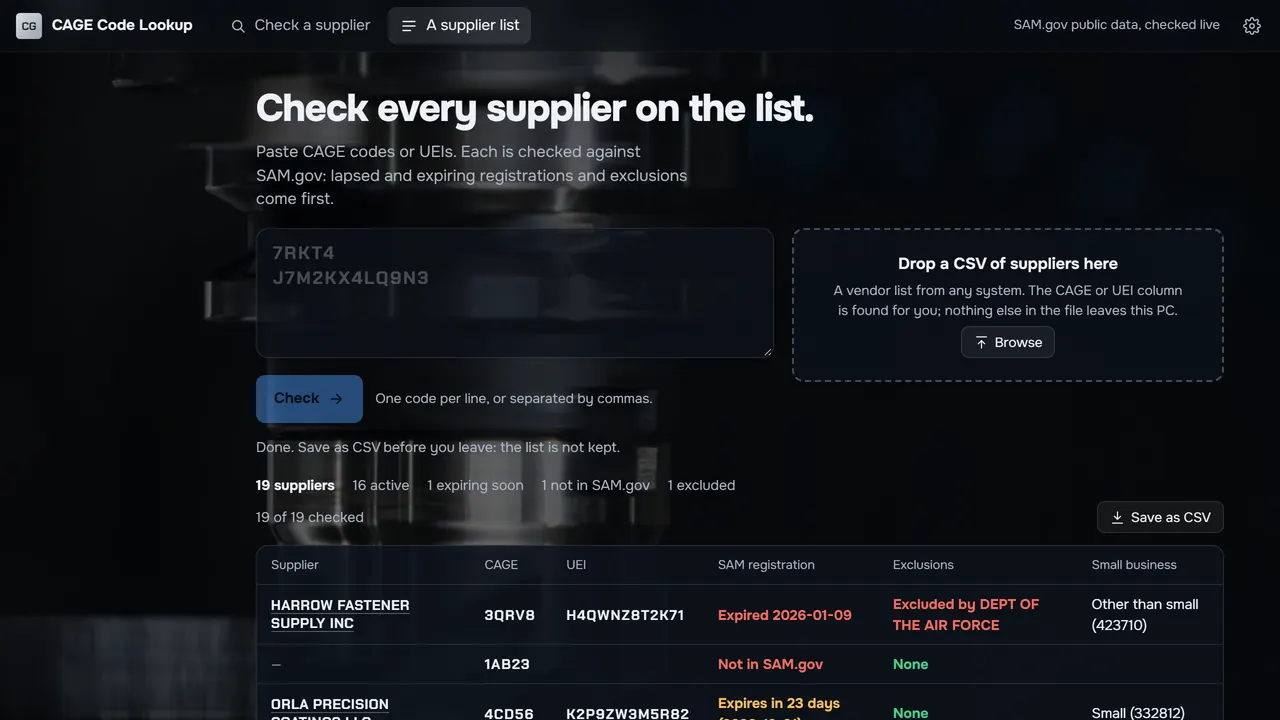
A supplier list of 19 codes checked at once: the excluded supplier, the code not in SAM.gov and the registration expiring in 23 days are listed first, then the active ones.

Pro: check the whole supplier list

Paste up to 500 CAGE codes or UEIs, or drop a vendor CSV. Expired, expiring and excluded suppliers come first; save the result as CSV.

  • Nothing about you kept

    A file you drop is read in your browser; only the codes go to our server, and nothing is stored about who asked.

How it works

Three steps, no setup

  1. Type the code

    A CAGE code, a UEI or a name.

  2. Read the plate

    The SAM.gov record, engraved.

  3. Check before award

    Registration, exclusions, size.

Pricing

Free to use, Pro when you need more

Get it free from the Microsoft Store. Pro is a one-time purchase on this website.

Free

$0

  • Unlimited checks by CAGE code, UEI or company name
  • The record as an engraved data plate
  • SAM registration, exclusions, small business and certifications
  • Check the first 5 codes of a pasted list or vendor CSV
Get it from Microsoft

Pro: everything in Free, plus

$9.99 one-time

  • Supplier lists up to 500 codes a run, pasted or from a CSV
  • Expired, expiring and excluded suppliers first
  • Save as CSV with expiry, days left, exclusions and NAICS
  • One payment, up to 3 PCs
Buy Pro

Buy Pro here and paste the key into the app's Settings. It works on up to 3 PCs, with a 14-day refund, no questions asked.

What's new

Version 1.0.0

  • First release: check a supplier by CAGE code, UEI or company name and read the SAM.gov record as an engraved part data plate: CAGE code, legal name, UEI and city.
  • Beside it, the buyer's checks: SAM registration and when it expires, exclusions (debarment and suspension), small business status for the primary NAICS code, and the certifications in the SAM record.
  • Answers come from SAM.gov's public registration and exclusion files, refreshed every month; each answer says the date of the data.
  • Check up to 10 codes at once. Pro checks a whole supplier list, expiring registrations and exclusions first, and saves the result as CSV.

FAQ

Questions

Something not answered here? Ask us and you'll get a reply.

Ask a question
Where do I find a CAGE code?

In the supplier's SAM.gov registration; ask for it with their UEI. On their quote, capability statement or W-9 packet. On contract documents: block 9 of a DD 1155, or the SF 1449 vendor block. Engraved on a part's data plate next to the part number. If you only have the UEI from an invoice, search by UEI instead.

What is a CAGE code?

A Commercial and Government Entity code: five letters and digits that identify a supplier to the US government and to NATO. It is assigned when a company registers in SAM.gov, and it never uses the letters I or O.

Where does the data come from?

From SAM.gov, the US government's System for Award Management: the public entity registration and exclusion files that GSA publishes. We refresh our copy every month, so a record can be up to a month old; each answer says the date of the data and links to the supplier's page on SAM.gov.

What does excluded mean?

A federal agency has debarred, suspended or proposed to debar the supplier, or listed it under another program, so it cannot receive most federal contracts. The check names the type, the agency and the date; read the full record on SAM.gov.

Is this a responsibility determination?

No. It shows public SAM.gov records as of the date it names. A contracting officer's responsibility determination looks at much more. Confirm on SAM.gov before award.

Is my supplier list uploaded?

No. A file you drop is read in your browser. Only the codes go to our server, which looks them up in its copy of the SAM.gov records and sends the answer back; the list is gone when you close the tab, so save it as CSV first.
Get CAGE Code Lookup

Check a supplier by CAGE code, UEI or company name and read the SAM.gov record as an engraved data plate: whether they are registered and until when, whether they are excluded, and whether they are a small business. Check a whole supplier list with Pro.

Public SAM.gov records. Not a responsibility determination or legal advice; confirm on SAM.gov before award. Supplier data from SAM.gov, published by GSA. Not affiliated with GSA, DLA or any government agency.

© 2026 CAO Labs