Get help

BusinessBulk VIN Decoder for Windows

Bulk VIN decoder for Windows

Decode one VIN or thousands on your PC from NHTSA's public VIN database, with no connection. Decodes factory specs. Not an accident, title or ownership history.

  • Free in the Microsoft Store
  • No account needed
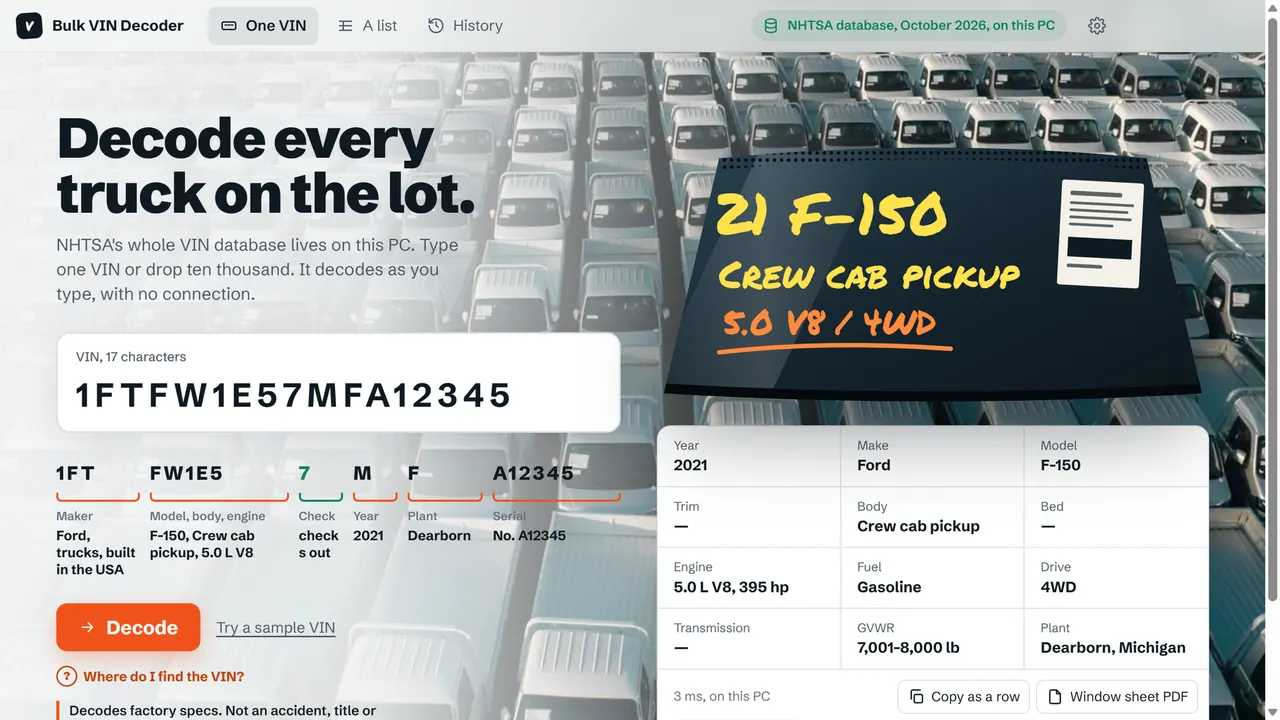
A 2021 Ford F-150 decoded: "21 F-150" written on a windshield in yellow grease pencil, with the spec card below.

Features

What it does

A 2021 Ford F-150 decoded: "21 F-150" written on a windshield in yellow grease pencil, with the spec card below.

The whole VIN database, on your PC

NHTSA's public vPIC database ships with the app and decodes with NHTSA's own rules: year, make, model, trim, body, engine, drive, transmission, GVWR and plant. No connection, no account, no per-VIN fee.

  • A VIN that explains itself as you type

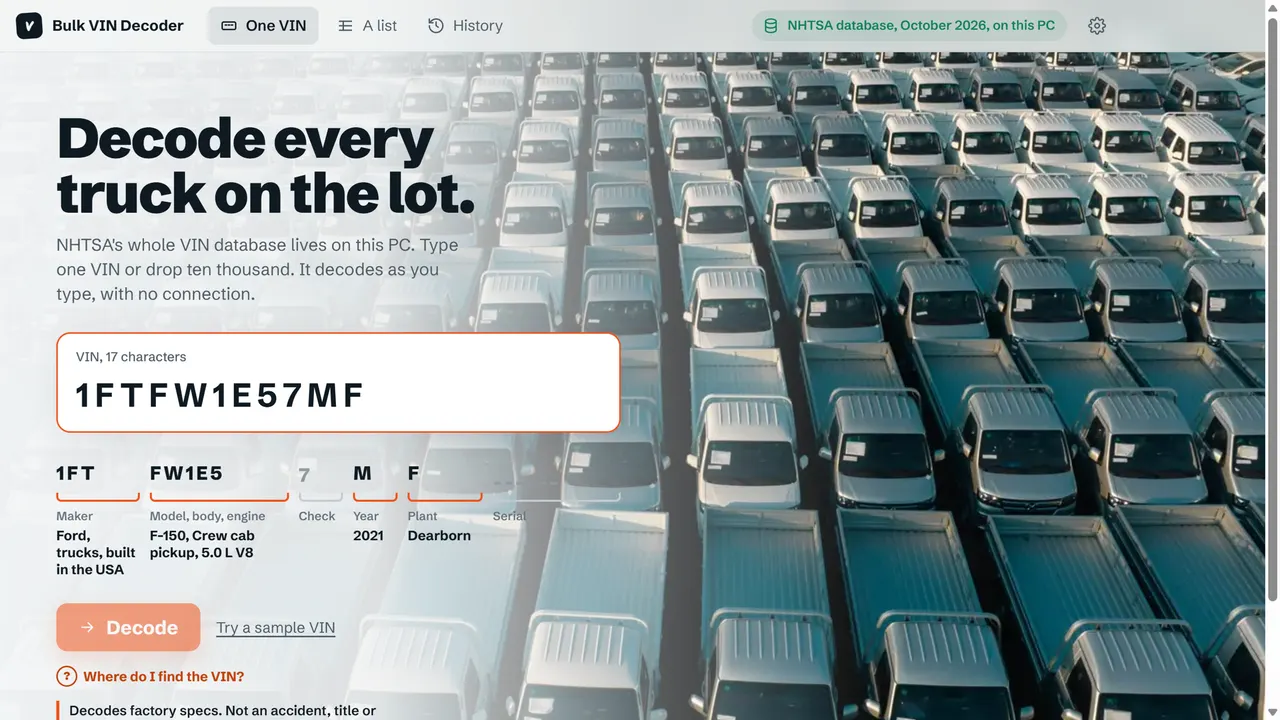
    Brackets under the characters fill in as you type: the maker, the model and engine codes, the check digit, the year, the plant and the serial. I, O and Q are refused, because no VIN uses them.

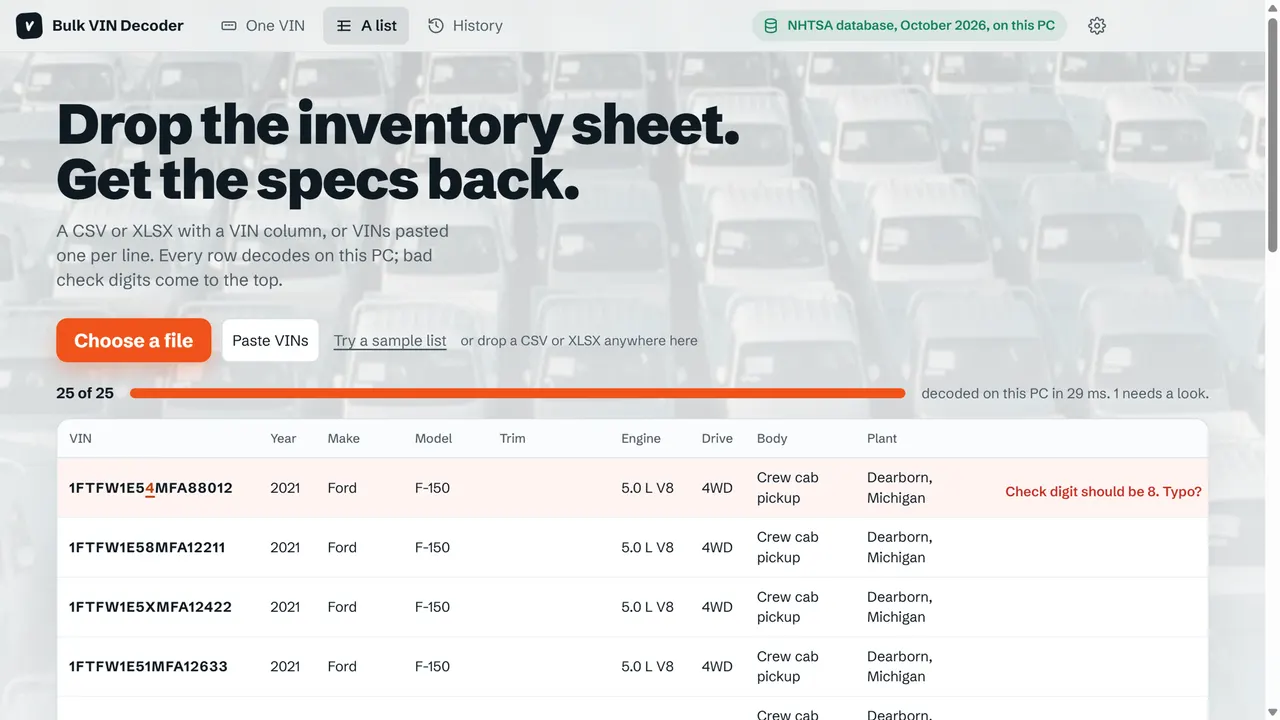
A list of 25 pickup VINs decoded, the one with a misread check digit first and its wrong character marked in orange.

Thousands of rows in seconds

Drop an inventory sheet, an auction run list or a fleet roster as CSV or Excel, or paste VINs. They are found in any column and decoded on your PC.

  • Typos come to the top

    A wrong check digit is how a misread VIN shows itself. Those rows come first, with the bad character marked: "Check digit should be 8. Typo?"

A VIN half typed: brackets under the characters say Ford trucks built in the USA, F-150, 2021, Dearborn.

Exports in your columns

Pro saves the list as CSV or XLSX with the columns you pick, and prints a window sheet PDF for any VIN.

  • Nothing leaves your PC

    VINs and lists are decoded locally and never sent anywhere. Check recalls hands a VIN to our Recall Lookup only when you click it.

How it works

Three steps, no setup

  1. Type a VIN or drop a list

    One VIN in the box, or a CSV or XLSX with VINs in any column.

  2. It decodes on your PC

    From NHTSA's database, bundled with the app and updated with it.

  3. Copy, export or print

    Copy a decode as a spreadsheet row; with Pro, export CSV or XLSX, or a window sheet PDF.

Pricing

Free to use, Pro when you need more

Get it free from the Microsoft Store. Pro is a one-time purchase on this website.

Free

$0

  • Unlimited single VINs, decoded as you type
  • The spec card and Copy as a row
  • History of every VIN you decoded
  • Lists: the first 5 rows decoded
  • Works offline
Get it from Microsoft

Pro: everything in Free, plus

$9.99 one-time

  • Lists of any length
  • Export CSV and XLSX
  • Choose the columns
  • Window sheet PDF
  • One payment, up to 3 PCs
Buy Pro

Buy Pro here and paste the key into the app's Settings. It works on up to 3 PCs, with a 14-day refund, no questions asked.

What's new

Version 1.2.1

  • Settings has a new "Report a problem" form: tell us what went wrong, and leave your email if you want an answer.
  • You can turn on crash reports in Settings to help us fix problems faster. They are off unless you turn them on, and file paths, email addresses and your user name are removed before anything is sent.

Version 1.2.0

  • Drop a CSV or Excel list in the free version too: the first 5 VINs are decoded in full and the rest are counted. Pro decodes the whole list.
  • "Get Pro" at the top of the window shows what Pro adds and its price, and takes your license key right there, without opening Settings. During a sale, it shows the sale price.

Version 1.0.0

  • First release: decode one VIN or thousands on your PC, from NHTSA's VIN database (October 2026).
  • The VIN explains itself as you type: maker, model, check digit, year, plant and serial.
  • Drop a CSV or XLSX, or paste VINs: bad check digits come to the top, with the misread character marked.

FAQ

Questions

Something not answered here? Ask us and you'll get a reply.

Ask a question
Where do I find the VIN?

On the plate at the base of the windshield on the driver's side, readable from outside; on the sticker in the driver's door jamb; and on the title, the registration, the insurance card, or the auction or inventory sheet. A VIN is 17 letters and digits and never uses I, O or Q.

Is this a vehicle history report?

No. Bulk VIN Decoder decodes factory specs: what the VIN says the vehicle was built as. It is not an accident, title, odometer or ownership history, and trim and options can differ from the vehicle in front of you.

Where does the data come from?

From NHTSA's vPIC database, the public U.S. government VIN database that NHTSA's own decoder uses. The app ships with the latest monthly release and decodes with the same rules. Bulk VIN Decoder is not affiliated with NHTSA or any government agency.

Can I decode a list of VINs?

Yes. Drop a CSV or Excel file, or paste VINs one per line. The VINs are found in any column. Free decodes the first 5 rows; Pro decodes any number and exports CSV or XLSX.

What does "check digit should be 8" mean?

The 9th character of a VIN is computed from the other 16. When it does not match, one character was probably misread or mistyped: an 8 for a B, a 5 for an S. The row comes first so you can fix it.

Does it work without the internet?

Yes. The VIN database is on your PC, so decoding never needs a connection.

What does Pro cost?

$9.99, once. Buy it on this website and paste the license key into Settings. It works on up to 3 PCs, and there is a 14-day refund, no questions asked.

Get Bulk VIN Decoder

Decode one VIN or thousands on your PC from NHTSA's public VIN database, with no connection. Decodes factory specs. Not an accident, title or ownership history.

Decodes factory specs from NHTSA's public VIN database. Not an accident, title or ownership history. Not affiliated with NHTSA or any government agency.

© 2026 CAO Labs