Get help

BusinessBid Proposal for Windows

Contractor bid proposal software for Windows

Price a bid as a stack of costs, set your margin, and send a proposal that says what is included and what is not. Every bid from drafting to won, on your PC.

  • Free in the Microsoft Store
  • No account needed
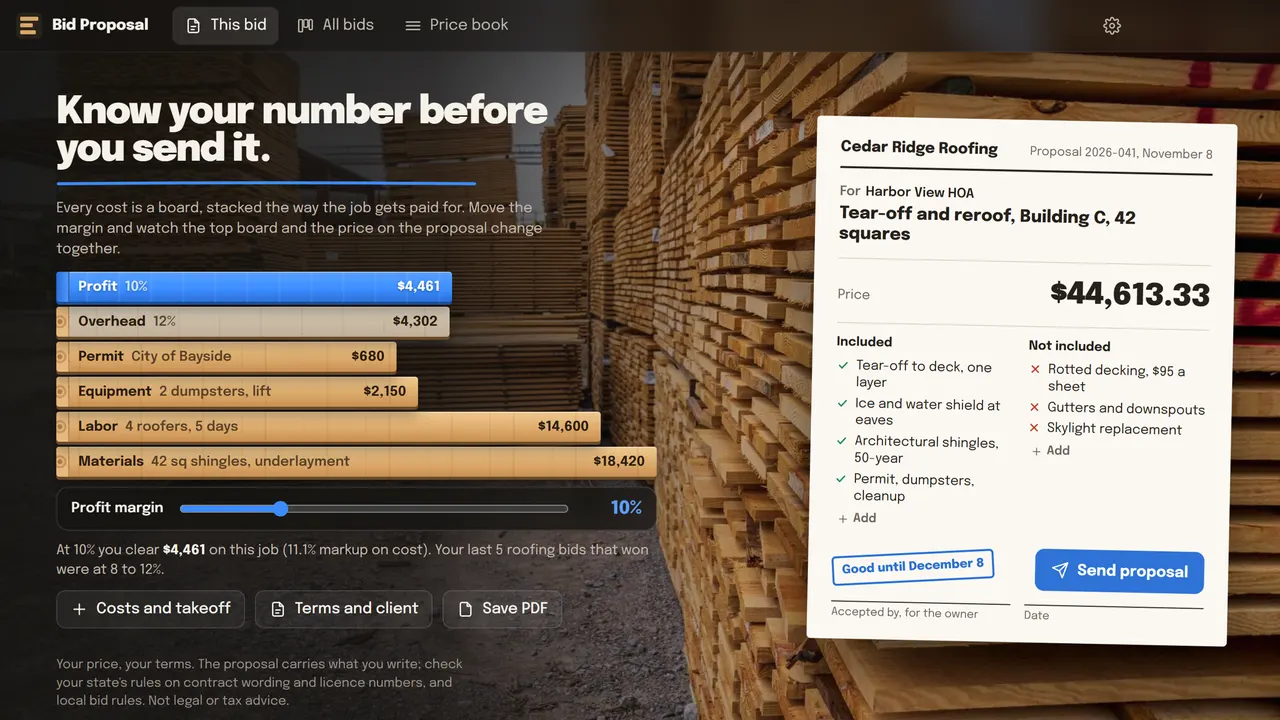
Bid Proposal: the price of a reroof built as a stack of boards (materials, labor, equipment, permit, overhead and the blue profit board on top), a margin slider, and the proposal with its price, what is included and what is not.

Features

What it does

Bid Proposal: the price of a reroof built as a stack of boards (materials, labor, equipment, permit, overhead and the blue profit board on top), a margin slider, and the proposal with its price, what is included and what is not.

The price, board by board

Materials, labor, equipment, permit, overhead and profit, each a board as long as its share of the bid. You see at a glance where the money goes.

  • A margin you can feel

    Drag the profit margin and the top board and the price on the proposal move together. The app says what you clear and the markup it equals, so margin and markup never get mixed up.

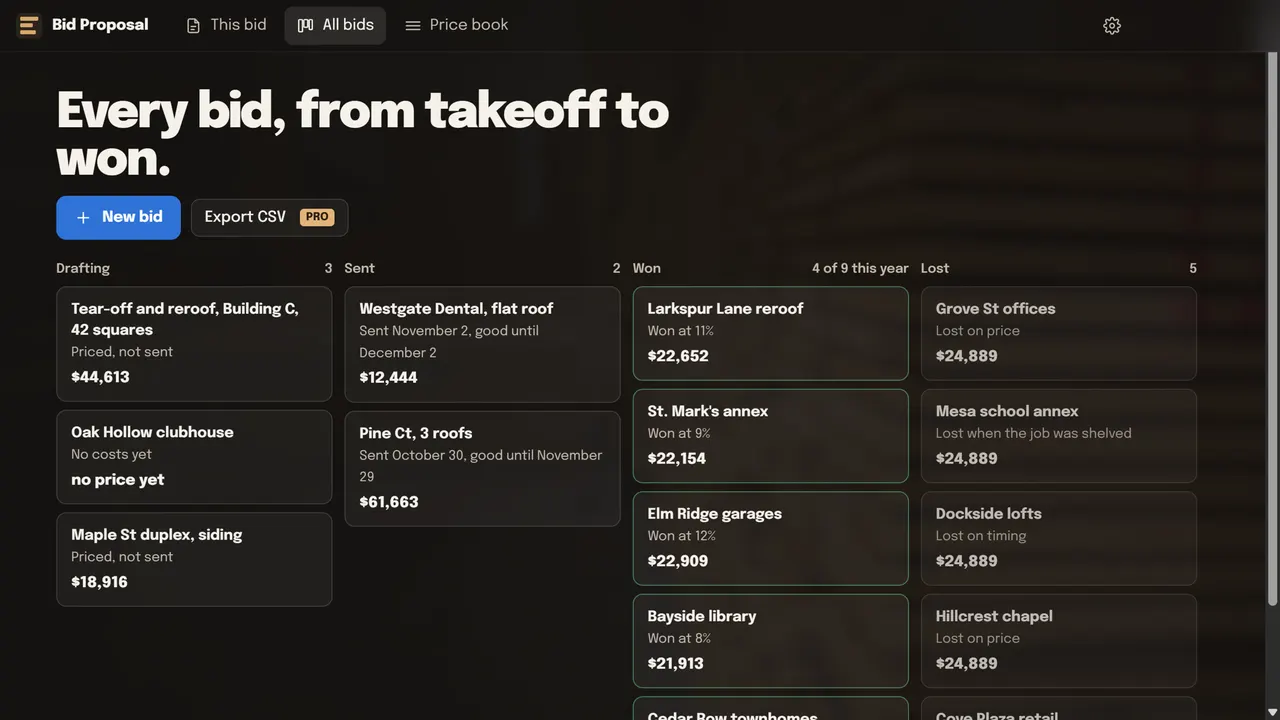
All bids: four columns, drafting, sent, won and lost, with the amount of each bid, the win rate this year and the margin each one was won at.

What you won at before

Mark bids won or lost, and the hint compares this margin with the margins your last winning bids in the same trade were at.

  • Exclusions that protect you

    The proposal has two columns, Included and Not included, typed right on the sheet. Rotted decking at $95 a sheet is not a surprise if it is on paper.

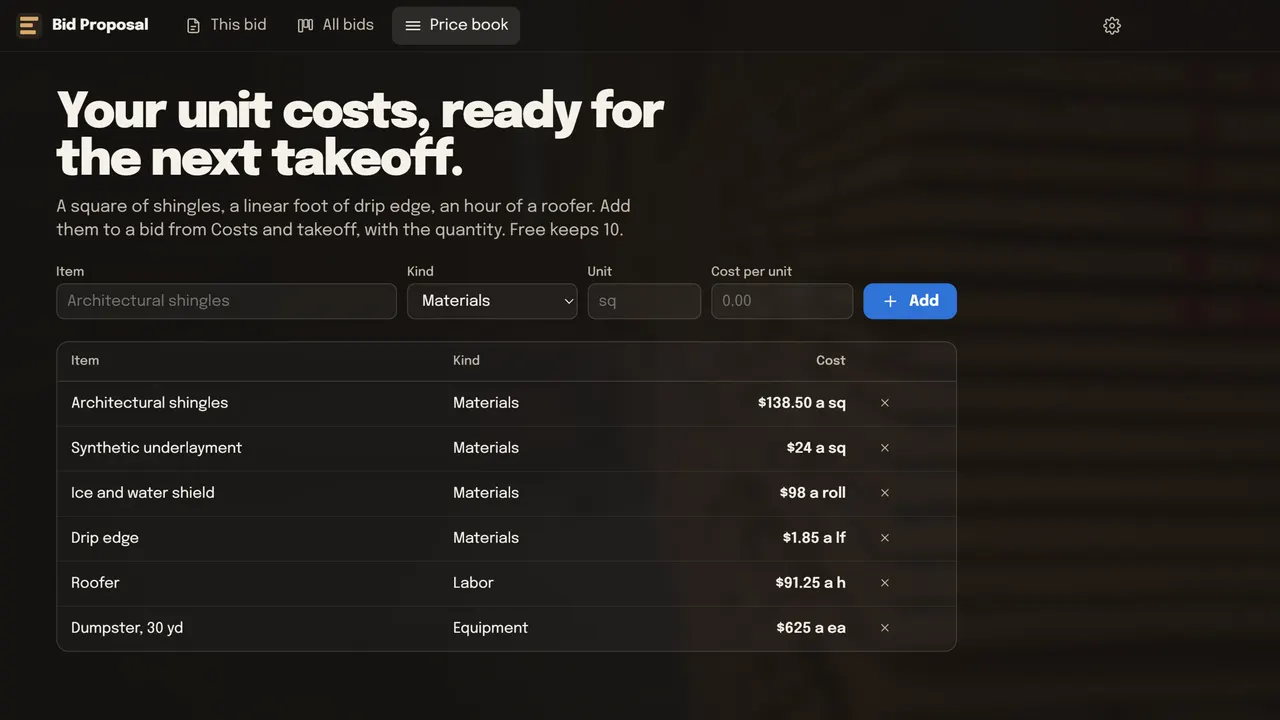
The price book: saved unit costs such as a square of shingles, a linear foot of drip edge and an hour of a roofer.

Takeoff and a price book

A cost can be a lump sum or a quantity times a unit cost: squares, linear feet, hours. Save the unit costs you use and add them to the next bid.

  • Sent, signed, kept

    Email the PDF from your own mail app, print it, or have the client sign on the PC. The proposal is frozen with a fingerprint when it goes out, and the signed copy is kept with the bid.

How it works

Three steps, no setup

  1. Stack the costs

    Lump sums or a takeoff from the price book.

  2. Set the margin

    Watch the price and what you clear.

  3. Send the proposal

    Email, print or sign here; mark it won or lost.

Pricing

Free to use, Pro when you need more

Get it free from the Microsoft Store. Pro is a one-time purchase on this website.

Free

$0

  • The price as a stack of boards, the margin slider and the past-wins hint
  • The proposal with Included and Not included, as a PDF, printed or emailed
  • The client signs on the PC or on paper
  • One open bid at a time, every won and lost bid kept, a price book of 10 unit costs
Get it from Microsoft

Pro: everything in Free, plus

$14.99 one-time

  • Any number of open bids at once
  • A price book of any size
  • Export every bid as a spreadsheet (CSV) with its margin and markup
Buy Pro

Buy Pro here and paste the key into the app's Settings. It works on up to 3 PCs, with a 14-day refund, no questions asked.

What's new

Version 1.3.0

  • Pro adds proposal templates. Start a bid from a trade starter (general contracting, electrical, plumbing, painting or roofing) with the included and not-included lines, terms, overhead and margin already written, or choose "Save as template" on any bid to reuse its scope, terms and costs on the next job.
  • Settings has a new "Report a problem" form: tell us what went wrong, and leave your email if you want an answer.
  • You can turn on crash reports in Settings to help us fix problems faster. They are off unless you turn them on, and file paths, email addresses and your user name are removed before anything is sent.

Version 1.2.0

  • "Get Pro" at the top of the window shows what Pro adds and its price, and takes your license key right there, without opening Settings. During a sale, it shows the sale price.

Version 1.0.0

  • First release: price a bid as a stack of costs, set the profit margin, and send a proposal with what is included and what is not.
  • Every bid from drafting to won or lost, with the win rate and the margin each one was won at; a price book of unit costs.

FAQ

Questions

Something not answered here? Ask us and you'll get a reply.

Ask a question
Is the slider a margin or a markup?

A margin: the share of the price that is profit. A 10% margin on $40,152 of cost is a $44,613.33 price, which is an 11.1% markup on cost. The app shows both, so a bid priced at "10%" means what you think it means.

Does the client see my costs?

No. The proposal shows the price, what is included, what is not, your terms and how long the price holds. Your costs, overhead and margin stay in the app.

Can the client sign it?

Yes, on your PC (drawn or typed), or on paper, which you then record. This is a signature on a PC, not an e-signature service. The PDF carries a fingerprint so the copy sent and the copy signed can be compared.

Does it track when the client opens the proposal?

No. That needs a link on a server, and your bids never leave your PC.

Is the proposal a legal contract?

It carries what you write. Your state may have rules on what a home improvement contract must say and where your licence number goes; check them. Not legal or tax advice.

Where is my data kept?

On your PC, in the app’s own data folder: your bids, costs, price book, PDFs and signatures. There is no account and no server.

What does Pro cost?

$14.99, once. Buy it on this website and paste the license key into Settings. It works on up to 3 PCs, and there is a 14-day refund, no questions asked.
Get Bid Proposal

Price a bid as a stack of costs, set your margin, and send a proposal that says what is included and what is not. Every bid from drafting to won, on your PC.

Your price, your terms. The proposal carries what you write; check your state's rules on contract wording and licence numbers, and local bid rules. Not legal or tax advice.

© 2026 CAO Labs