Get help

BusinessBank Statement Converter, free online

Bank statement converter: PDF to Excel, checked to the cent

Open a PDF bank statement and every transaction lands in an Excel sheet or a CSV file. Every running balance is added up from the one before it, and a row that does not add up is circled. Nothing is uploaded. Merge a whole folder with Pro.

  • Free, runs in your browser
  • No account needed
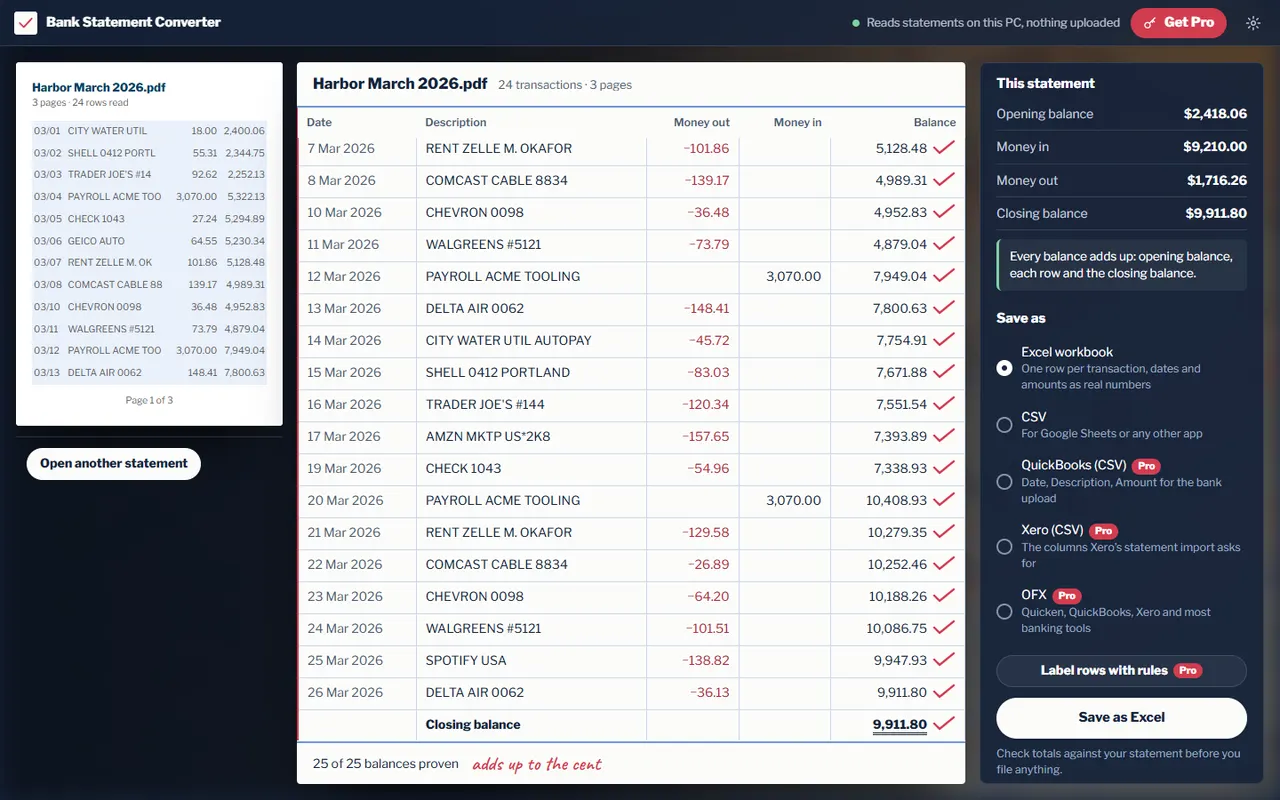
Bank Statement Converter showing a three-page checking statement as a ledger: every transaction in a row, a red pencil tick beside each balance that adds up, and the closing balance double-underlined.

Who it's for

For bookkeepers, small businesses, anyone doing their taxes, applying for a mortgage or building a budget, in the US, the UK, Germany and anywhere a bank sends a PDF statement. Scanned or photographed statements are not supported yet: it needs a PDF with text in it.

Features

What it does

Bank Statement Converter showing a three-page checking statement as a ledger: every transaction in a row, a red pencil tick beside each balance that adds up, and the closing balance double-underlined.

Every row, every page

Open the PDF you download from online banking and every transaction on every page lands in the ledger: the date, the description, money out, money in and the balance.

  • Balances proven, to the cent

    Each running balance is added up from the one before it: previous balance, minus what went out, plus what came in. A red tick marks each one that matches, and the closing balance is checked last.

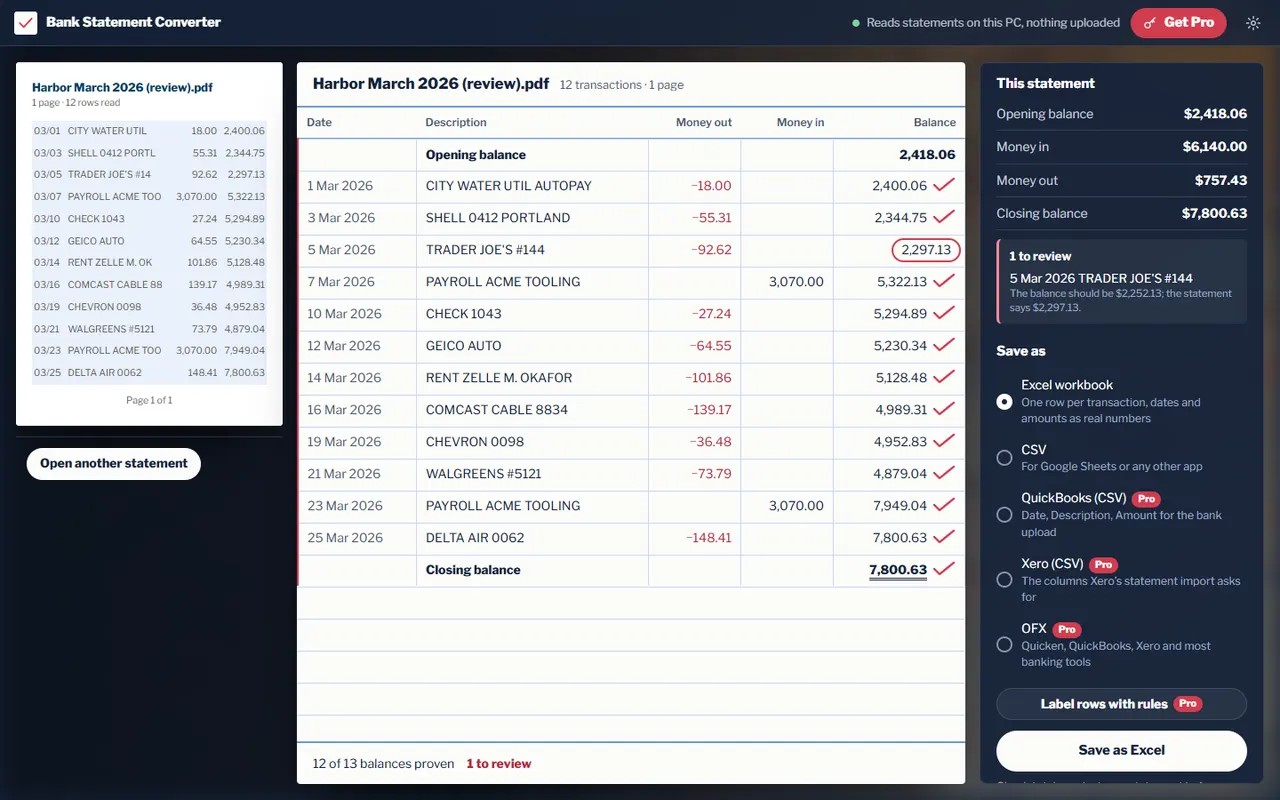
A statement where one balance is printed wrong: it is circled in red, and the panel lists the row with the balance it should have been.

The row that does not add up

A balance that does not match is circled and listed in plain words: "The balance should be $5,351.14; the statement says $5,351.41." One misprint is one mark, not a pile of them.

  • US, UK and German layouts

    One amount column or money out and money in, 1,234.56 and 1.234,56, day first or month first, Dr and Cr marks, descriptions that wrap onto a second line, and headers repeated on every page.

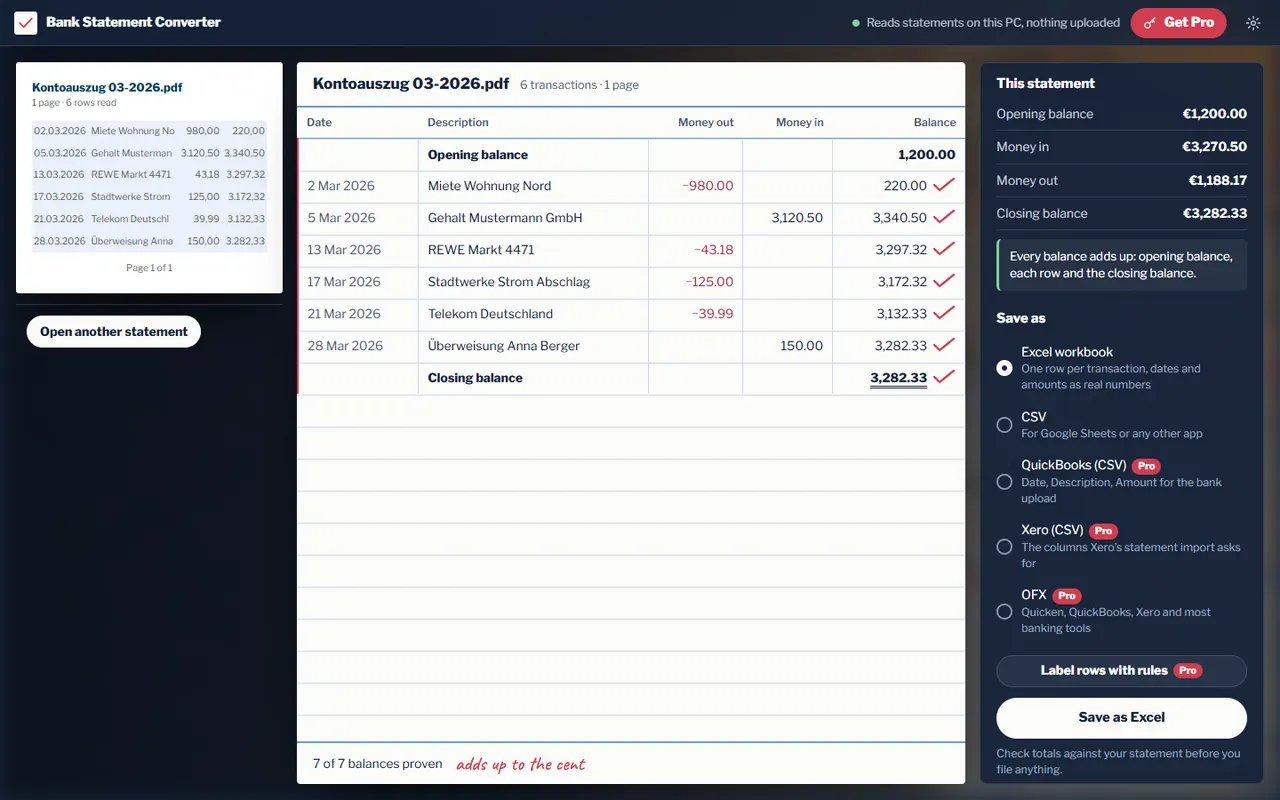
A German statement with 1.234,56 amounts and dd.mm.yyyy dates read into the ledger, every balance proven, next to the PDF as it was read.

Excel or CSV

Save an Excel workbook with dates and amounts as real numbers, so they sort and add up, or a CSV for Google Sheets or any other program.

  • Pro: a year in one sheet

    Merge a whole folder of statements, month after month, into one workbook. Export for QuickBooks, Xero and OFX, and label rows with your own rules: "contains SHELL → Fuel".

How it works

Three steps, no setup

  1. Open the statement

    The PDF from your bank’s online banking, or drop it on the window.

  2. Watch it add up

    The rows lift off the page into the ledger, and each balance gets its tick.

  3. Save the sheet

    Excel or CSV. Check totals against your statement before you file anything.

Pricing

Free to use, Pro when you need more

Get it free from the Microsoft Store. Pro is a one-time purchase on this website.

Free

$0

  • One PDF statement at a time: every page, every transaction
  • Save as an Excel workbook or a CSV file
  • Every running balance and the closing balance checked, shown on screen
  • The first 5 statements of a folder
Get it from Microsoft

Pro: everything in Free, plus

$19.99 one-time

  • Merge a whole folder of statements into one workbook
  • Export for QuickBooks, Xero and OFX
  • Your own rules that label rows, with a Category column
  • One payment, up to 3 PCs
Buy Pro

Buy Pro here and paste the key into the app's Settings. It works on up to 3 PCs, with a 14-day refund, no questions asked.

What's new

Version 1.0.0

  • First release: open a PDF bank statement and every transaction, on every page, lands in a sheet. Save it as an Excel workbook (dates and amounts are real numbers) or as CSV. Nothing is uploaded.
  • Every running balance is added up from the one before it, to the cent, and ticked when it matches. The closing balance is checked last. A balance that does not add up is circled and listed in plain words, with the figure it should have been.
  • Reads US, UK and German statements: one amount column or money out and money in, 1,234.56 and 1.234,56, day first or month first, Dr and Cr marks, descriptions that wrap onto a second line, and headers repeated on every page.
  • Scanned or photographed statements are not supported yet. The app says so instead of guessing.
  • Open a folder: the first 5 statements are converted, and the rest are counted so you know what is waiting.
  • Pro merges a whole folder of statements into one workbook, exports for QuickBooks, Xero and OFX, and labels rows with your own rules ("contains SHELL → Fuel").

FAQ

Questions

Something not answered here? Ask us and you'll get a reply.

Ask a question
Where do I find the PDF?

In your bank’s online banking, under Statements or Documents. Download the PDF itself: it has the text of the statement inside it. A photo or a scan of a paper statement is only a picture and has nothing to read.

Does it read scanned or photographed statements?

Not yet. It says so plainly instead of guessing at the figures. The PDF you download from your bank works.

Is my statement uploaded?

No. The PDF is read by your browser or the installed app, on your PC. Nothing about the statement is sent anywhere, and there is no account and no bank login.

How does it know the figures are right?

It adds them up. Each running balance is the one before it, minus the money out, plus the money in, to the cent, and the closing balance is checked against the last. If your statement prints no running balance and no opening and closing balance, it says there is nothing to check against.

Which banks and countries?

Any bank that sends a PDF with a table that has a header row naming the columns: a date, a description and amounts, for example Date, Description, Money out, Money in, Balance. Layouts from the US, UK and Germany are tested. If a statement will not read, write to us.

Which formats can I save?

An Excel workbook (.xlsx) with dates and amounts as real numbers, and CSV. With Pro: the QuickBooks bank-upload CSV, Xero’s statement CSV, and OFX.

Is it accounting or tax advice?

No. It shows what the PDF says. Check totals against your statement before you file anything, and ask your accountant when it matters.

Does it work offline?

Yes, after the first load. The app and its PDF reader are kept on your PC.
Get Bank Statement Converter

Open a PDF bank statement and every transaction lands in an Excel sheet or a CSV file. Every running balance is added up from the one before it, and a row that does not add up is circled. Nothing is uploaded. Merge a whole folder with Pro.

It shows what your PDF says. Check totals against your statement before you file anything. Not accounting or tax advice.

© 2026 CAO Labs